
Lesson 97 – Buyer Dashboard: Planning and Architecture

Introduction
With the Watchlist system now fully implemented, Flipnzee Auctions has taken an important step toward becoming a complete marketplace for buying and selling websites. Buyers can now save auctions they are interested in and revisit them later. However, as additional buyer-focused features are introduced, users need a central location where they can easily manage all of their auction activities.
In this lesson, we begin designing the Buyer Dashboard.
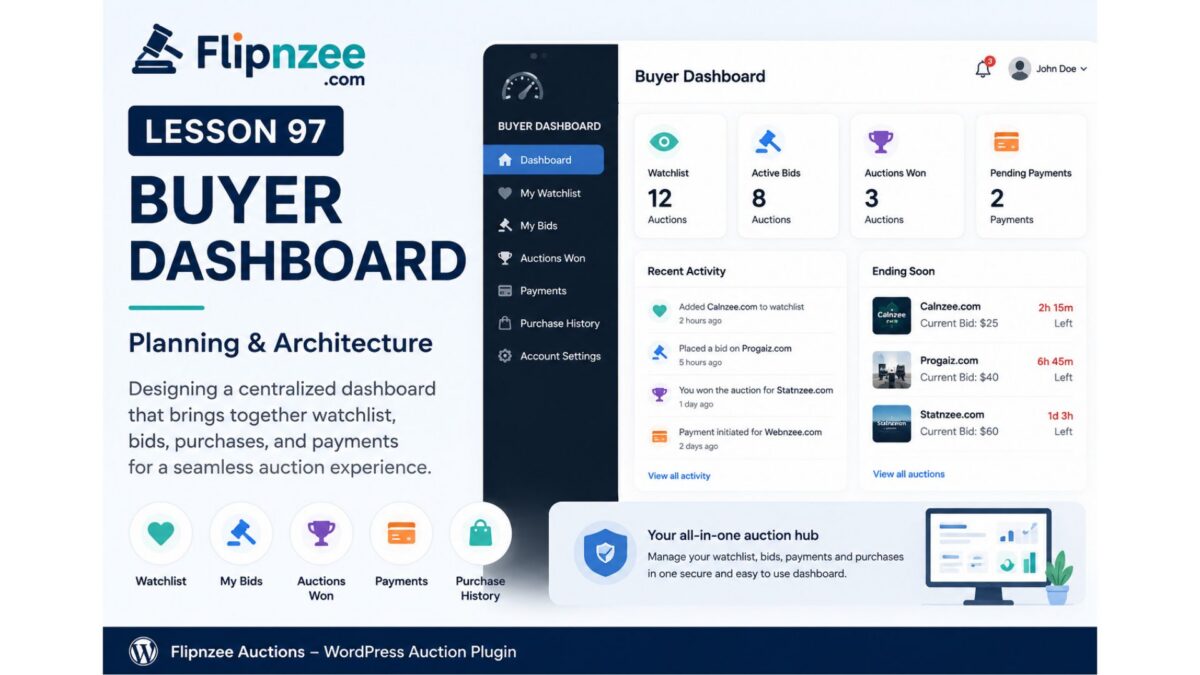
Rather than requiring users to navigate between multiple pages, the Buyer Dashboard will provide a single interface where buyers can monitor their watchlist, bids, purchases, payments, and auction activity.
Why a Buyer Dashboard?
Professional auction platforms such as eBay, Flippa, and GoDaddy Auctions provide dedicated dashboards that allow buyers to monitor their activity from one location.
The Buyer Dashboard serves several purposes:
- Improves user experience
- Reduces navigation complexity
- Encourages buyer engagement
- Makes future features easier to organize
- Provides a foundation for additional account functionality
Instead of creating separate pages for every feature, Flipnzee Auctions will gradually integrate them into one dashboard.
Dashboard Roadmap
The Buyer Dashboard will grow over multiple lessons.
Initial sections are planned as follows:
Dashboard Home
A summary page displaying:
- Total Active Bids
- Auctions Won
- Watchlist Count
- Pending Payments
- Recent Activity
My Watchlist
Displays auctions the buyer has saved.
Already completed in Lesson 96.
Future improvements may include:
- Search
- Sorting
- Pagination
- Remove directly from dashboard
My Bids
Displays every auction where the user has placed a bid.
Information may include:
- Listing Name
- Current Highest Bid
- User’s Bid
- Bid Status
- Auction Ending Time
Auctions Won
Displays auctions won by the buyer.
Possible information:
- Website Name
- Winning Bid
- Auction Date
- Payment Status
- Transfer Status
Payments
Displays payment history.
Examples:
- Pending Payments
- Completed Payments
- Escrow Transactions
- Refunds
This section will integrate naturally with the Transaction Manager developed in previous lessons.
Purchase History
Displays completed purchases.
Information may include:
- Website purchased
- Purchase date
- Purchase price
- Transfer completion
- Invoice download
Profile Summary
Provides buyer information such as:
- Username
- Registration Date
- Number of Auctions Won
- Reputation (future)
Navigation Structure
A left-side dashboard menu is planned.
Example:
Buyer Dashboard

├── Dashboard
├── My Watchlist
├── My Bids
├── Auctions Won
├── Payments
├── Purchase History
└── Account Settings
This modular structure allows new sections to be added without redesigning the interface.
Technical Architecture
The Buyer Dashboard will use a dedicated shortcode.
Example:
[flipnzee_buyer_dashboard]
The shortcode will determine whether a user is logged in before rendering dashboard content.
The implementation will follow the same object-oriented approach used throughout the plugin.
Possible class:
Flipnzee_Buyer_Dashboard
Responsibilities may include:
- Dashboard rendering
- Section routing
- Statistics generation
- Menu creation
- Dashboard widgets
Planned File Structure
A new class may be introduced:
includes/
    class-buyer-dashboard.php
Additional assets may include:
assets/css/dashboard.css
assets/js/dashboard.js
This keeps dashboard functionality isolated from other plugin components.
User Experience Considerations
The Buyer Dashboard should be:
- Responsive
- Mobile-friendly
- Lightweight
- Fast-loading
- Consistent with Flipnzee branding
Future enhancements may include:
- Dashboard cards
- Progress indicators
- Notification badges
- Auction countdown timers
- AJAX-powered widgets
Future Integrations
The Buyer Dashboard is expected to integrate with several existing plugin components:
- Auction Manager
- Bid Manager
- Watchlist Manager
- Transaction Manager
- Payment Manager
- Activity Log
By reusing existing classes, code duplication can be minimized while maintaining a clean architecture.
Development Strategy
The dashboard will be implemented incrementally.
The proposed order is:
- Create Buyer Dashboard shortcode
- Create dashboard page layout
- Build navigation menu
- Add Dashboard Home
- Integrate My Watchlist
- Integrate My Bids
- Integrate Auctions Won
- Integrate Payments
- Integrate Purchase History
- Polish styling and responsiveness
This phased approach ensures that each feature is independently testable while progressively building a comprehensive buyer experience.
Conclusion
Lesson 97 marks the beginning of the Buyer Dashboard, an important milestone in the Flipnzee Auctions plugin roadmap. Rather than treating watchlists, bids, purchases, and payments as isolated features, the dashboard will unify them into a single, user-friendly interface. As future lessons are completed, this dashboard will become the central hub for buyers to manage every stage of their auction journey, providing a professional experience comparable to established online auction marketplaces.