
Lesson 96 – Implementation: Complete My Watchlist Frontend Integration

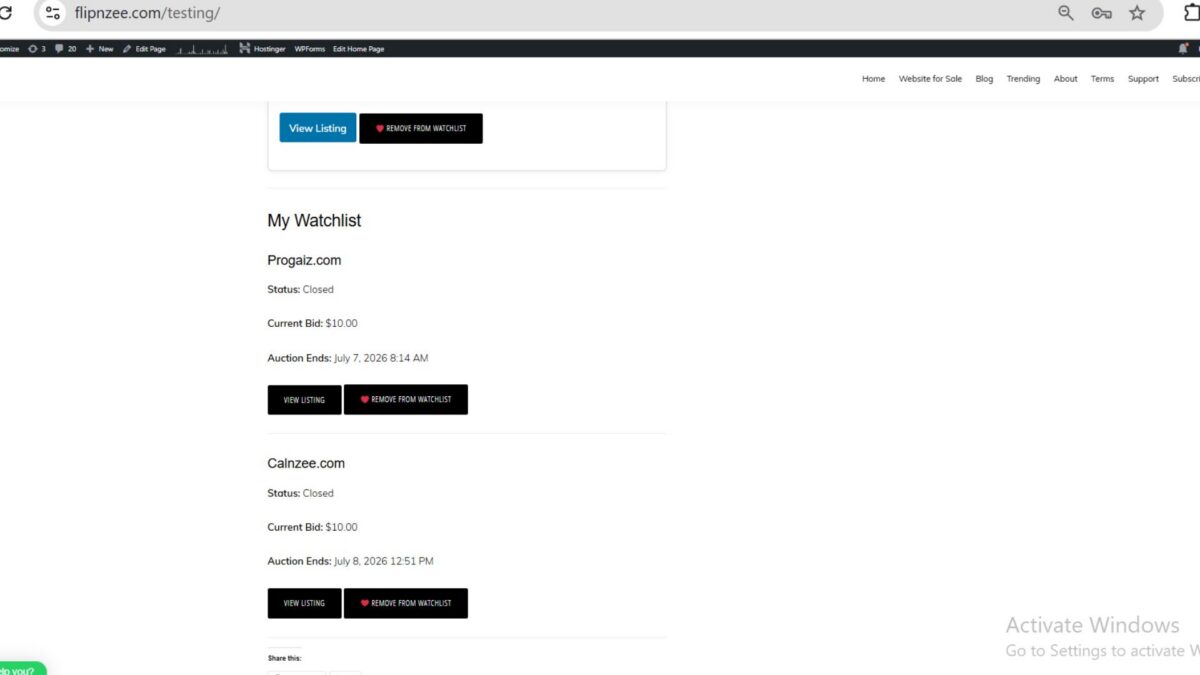
Overview
In this lesson, we completed the implementation of the My Watchlist feature for the Flipnzee Auctions plugin. The feature now provides logged-in users with a dedicated page to view and manage all auctions they have saved.
Unlike previous lessons that focused on the AJAX add/remove functionality, this implementation connects the entire workflow—from the watchlist database table to the auction and listing information displayed on the frontend.
Objectives
The objectives of this lesson were to:
- Retrieve the logged-in user’s watchlist.
- Load the corresponding auction records.
- Retrieve the associated WordPress listing posts.
- Display auction information in a user-friendly layout.
- Provide direct links back to each listing.
- Synchronize the Add/Remove Watchlist button state.
- Eliminate debugging code and prepare the feature for production.
Watchlist Retrieval
The shortcode begins by confirming that the visitor is logged in.
if ( ! is_user_logged_in() ) {
    return '<p>Please log in to view your Watchlist.</p>';
}
After authentication, the current user’s ID is obtained.
$user_id = get_current_user_id();
The watchlist entries are then retrieved using the Watchlist Manager.
$watchlist = Flipnzee_Watchlist_Manager::get_user_watchlist(
    $user_id
);
Auction Lookup
Each watchlist record stores an auction_id.
For every saved item, the shortcode retrieves the corresponding auction.
$auction = Flipnzee_Auction_Manager::get_auction(
    $item['auction_id']
);
Invalid auctions are skipped automatically.
if ( ! $auction ) {
    continue;
}
Listing Retrieval
Every auction references its associated WordPress listing.
$listing = get_post(
    $auction->listing_id
);
If a listing has been deleted or is unavailable, it is skipped gracefully.
if ( ! $listing ) {
    continue;
}
Displaying Auction Information
Each watchlist item now displays:
- Listing title
- Auction status
- Current bid
- Auction ending date
- View Listing button
- Watchlist button
Example:
<h3><?php echo esc_html( get_the_title( $listing ) ); ?></h3>
Current bid:
<?php echo esc_html(
    number_format_i18n(
        $auction->current_bid,
        2
    )
); ?>
Auction end date:
mysql2date(
    'F j, Y g:i A',
    $auction->auction_end
);
Watchlist Button Synchronization
One of the final bugs discovered during development involved the Watchlist button displaying “Add to Watchlist” even when an auction already existed inside the user’s watchlist.
This issue was traced to the button state logic and corrected so that the frontend accurately reflects whether an auction is already saved.
Users now immediately see the correct button state without inconsistent behaviour.
Frontend Result
Each watchlist item is rendered in a clean card layout containing:
- Website title
- Auction status
- Current bid
- Auction end time
- View Listing button
- Remove from Watchlist button
This provides buyers with a convenient dashboard for tracking auctions they intend to follow.
Debugging Process
This lesson involved extensive debugging and verification.
During development we verified:
- Watchlist database records
- Auction retrieval
- Listing retrieval
- WordPress post loading
- Auction-to-listing relationships
- Shortcode rendering
- Frontend output
Temporary debugging statements such as:
var_dump()print_r()<pre>- diagnostic
echostatements
were removed after successful verification.
WordPress Coding Standards
Throughout the implementation we continued following WordPress coding standards by:
- Escaping all frontend output.
- Sanitizing user input.
- Using prepared database queries.
- Separating business logic into manager classes.
- Keeping shortcode rendering focused on presentation.
Testing Completed
The completed feature has been tested for:
- Logged-in users
- Empty watchlists
- Multiple watchlist items
- Invalid auctions
- Missing listings
- Add to Watchlist
- Remove from Watchlist
- AJAX updates
- Frontend rendering
- Button state synchronization
Files Updated
Primary files updated during this lesson include:
includes/class-shortcodes.php
includes/class-watchlist-manager.php
includes/class-watchlist-ajax.php
assets/js/watchlist.js
Download Source Code
Download the starting version of the plugin before the lesson:
Download the completed version after this lesson:
Outcome
Lesson 96 completes the My Watchlist feature for Flipnzee Auctions.
Users can now save auctions, revisit them later, monitor their progress, and quickly navigate back to the corresponding listing page. This feature significantly improves buyer engagement and lays the foundation for future buyer dashboard functionality.
Git Commit
Lesson 96: Complete My Watchlist frontend integration and production-ready Watchlist system
This marks another major milestone in the Flipnzee Auctions plugin roadmap, with the buyer-facing Watchlist feature now fully functional and ready for production use.