
Lesson 100 Implementation — Building the Website Transfer Workflow Foundation

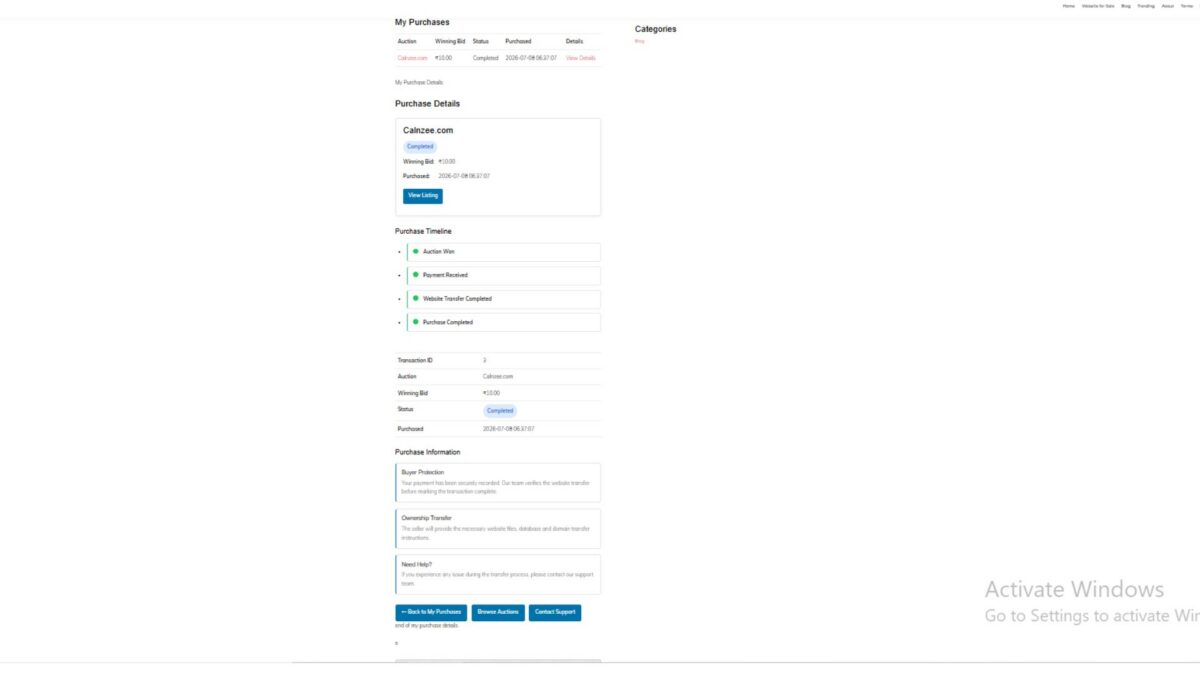
After completing the buyer purchase dashboard in the previous lessons, the Flipnzee Auctions plugin now enters an important new development phase. While the buyer can already view purchase details, timelines, reference numbers, payment information, and transfer guidance, the transfer process itself is still based on placeholder values.
Lesson 100 focuses on preparing the architecture that will eventually power real website transfers.
Rather than immediately introducing complex database logic, this lesson establishes a clean foundation that future lessons can build upon. The objective is to separate presentation from business logic while keeping the current implementation simple, stable, and easy to understand.
Objectives
During this lesson we improved the purchase details page and prepared it for future dynamic transfer management.
Major goals included:
- Display a professional purchase summary card
- Improve the transfer timeline
- Add transfer status information
- Display purchase reference number
- Show purchase date and purchase time separately
- Display payment method
- Introduce purchase notes
- Add buyer guidance cards
- Create next-step checklist
- Keep transfer data temporarily hardcoded while backend architecture is being designed
Purchase Summary
The purchase page now begins with a clean summary card displaying important information at a glance.
The buyer can immediately see:
- Purchased website
- Current purchase status
- Winning bid
- Purchase date
- Direct link to the listing
This significantly improves usability compared to viewing raw table data first.
Transfer Timeline
A visual timeline was introduced showing the expected stages of a website acquisition.
Current stages include:
- Payment Confirmed
- Website Files Delivered
- Database Delivered
- Domain Transfer Completed
- Buyer Verification
- Purchase Completed
Although currently driven by placeholder values, the interface is now ready for dynamic updates.
Purchase Information Cards
Additional informational panels were added beneath the transaction details.
These explain:
Buyer Protection
How Flipnzee verifies transfers before marking a purchase complete.
Ownership Transfer
Explains that website files, database and domain transfer instructions will be supplied.
Need Help?
Provides guidance if buyers experience issues during the transfer process.
These cards improve transparency while reducing repetitive support questions.
Transfer Status Section
A dedicated Transfer Status card has been introduced.
It currently displays:
- Payment
- Website Files
- Database
- Domain
- Buyer Verification
Each value is presently hardcoded using placeholder data such as:
- Completed
- Pending
This section will later become fully dynamic.
Purchase Notes
A Purchase Notes section was introduced to provide important reminders to buyers after completing an auction.
Examples include:
- Verify all transferred assets.
- Change passwords immediately after receiving the website.
- Review hosting and registrar access.
- Contact support if any issue occurs.
This creates a much more professional post-purchase experience.
Next Steps Checklist
The buyer dashboard now includes a clear checklist describing the expected transfer workflow.
Typical items include:
- ✓ Payment confirmed
- Receive website files
- Receive database
- Receive domain transfer
- Verify website
- Change passwords
- Confirm successful transfer
This checklist prepares buyers for the remaining transfer process instead of leaving them uncertain about what happens after payment.
Purchase Reference Number
A unique purchase reference was added to every transaction.
Example:
FLP-2026-00003
This makes customer support significantly easier since buyers can reference a human-friendly transaction ID instead of an internal database ID.
Purchase Date and Time
Instead of displaying a raw timestamp, the purchase details now separate:
- Purchase Date
- Purchase Time
This provides a cleaner and more readable interface while respecting the site’s configured WordPress date and time formats.
Payment Method
The purchase page now displays the payment method used for the transaction.
For current testing this defaults to:
Manual
As additional gateways such as Escrow.com, Stripe, PayPal, Wise and cryptocurrency are implemented, this field will automatically display the correct payment method.
Architecture Decision
One important architectural discussion took place during this lesson.
Initially, transfer progress was considered for storage using WordPress post meta attached to the listing.
However, after reviewing the long-term design, a better approach emerged.
Website transfer progress belongs to an individual transaction—not the listing itself.
A single website may eventually be sold multiple times over its lifetime, especially when the plugin is used as a marketplace by third-party developers.
For that reason, transfer management will be implemented using a dedicated Flipnzee_Transfer_Manager class and transaction-based data in upcoming lessons.
This decision avoids future refactoring while keeping the plugin scalable.
Why Placeholder Data Was Retained
Instead of prematurely introducing backend logic, Lesson 100 intentionally keeps transfer information hardcoded.
For example:
$transfer_status = array(
    'payment' => 'Completed',
    'files' => 'Pending',
    'database' => 'Pending',
    'domain' => 'Pending',
    'buyer' => 'Pending',
);
This allows the frontend interface to be fully designed and tested before connecting it to live transfer data.
Separating interface development from backend implementation results in cleaner, more maintainable code.
Current Status
By the end of Lesson 100, the Flipnzee Auctions buyer purchase page now provides:
- Professional purchase summary
- Purchase reference number
- Purchase date and time
- Payment method
- Purchase information cards
- Transfer timeline
- Transfer status panel
- Purchase notes
- Buyer next-step checklist
- Improved user experience
- Clean foundation for future transfer automation
Download Source Code
Download the starting version of the plugin before the lesson:
Download the completed version after this lesson:
What Comes Next?
Lesson 101 will begin implementing the backend transfer architecture by introducing a dedicated Flipnzee_Transfer_Manager class.
This class will eventually become responsible for:
- Managing website transfer progress
- Updating transfer stages
- Storing transaction-specific transfer data
- Powering dynamic buyer dashboards
- Supporting future marketplace implementations while remaining fully compatible with Flipnzee.com’s current in-house website sales model.
Lesson 100 therefore marks the transition from building the buyer interface to implementing the business logic that powers a complete website acquisition workflow.