
Lesson 103 Implementation: Automatic Transaction & Transfer Creation After Auction Closure

After several lessons of building the Flipnzee Auctions plugin, Lesson 103 represents one of the most significant milestones in the project. With this implementation, the auction lifecycle now extends beyond simply determining the winning bidder. Once an auction is closed, the plugin automatically creates the necessary transaction and transfer records that will be used throughout the payment and website transfer process.
This lesson transforms the plugin from an auction system into a complete marketplace workflow.
Objective
The primary goal of this lesson was to automate the actions that occur immediately after an auction closes.
The desired workflow was:
Auction Closed
        ↓
Determine Winner
        ↓
Create Transaction
        ↓
Create Transfer Status
        ↓
Ready for Payment & Website Transfer
Until now, the winning bidder was identified, but the remaining steps had to be handled manually or were not created at all.
Previous Behaviour
Before Lesson 103, when an administrator changed an auction status to Closed, only the auction status was updated.
Although a winning bidder could be determined, there was no automatic creation of:
- Transaction record
- Transfer record
- Payment workflow
As a result, the marketplace process stopped immediately after the auction ended.
New Workflow
The auction lifecycle now continues automatically.
Administrator closes auction
        ↓
Auction updated
        ↓
Winning bidder determined
        ↓
winner_user_id stored
        ↓
Transaction record created
        ↓
Transfer status record created
No manual database operations are required.
Winner Determination
The existing winner determination method was integrated directly into the auction closing workflow.
The method:
- Finds the highest bid
- Uses earliest bid as the tiebreaker
- Updates the auction record
- Stores:
- winner_user_id
- current_bid
Finally it fires the custom action:
do_action(
    'flipnzee_auction_winner_determined',
    $auction_id,
    $winner
);
This makes the winner determination process reusable throughout the plugin.
Automatic Transaction Creation
Once the winner is determined, the Transaction Manager now automatically creates a transaction.
Each transaction stores:
- Auction ID
- Listing ID
- Seller ID
- Buyer ID
- Winning bid
- Initial payment status
Duplicate transactions are prevented by checking whether a transaction already exists for the auction before inserting a new record.
Automatic Transfer Creation
Immediately after creating the transaction, the plugin now creates the corresponding transfer status record.
The transfer contains individual workflow stages including:
- Payment Status
- Website Files
- Database
- Domain
- Buyer Confirmation
- Administrator Notes
This lays the foundation for tracking the complete ownership transfer process.
Improved Logging
During implementation extensive debugging logs were added to trace the execution flow.
Examples included:
Auction was closed.
Looking for winner.

Winner determined.

Transaction created.

Transfer created.
These logs proved invaluable while diagnosing execution order, missing callbacks, and event flow during development.
Once the implementation is fully tested, most temporary debug logs can be removed to keep production logs clean.
Problems Encountered
Several issues were discovered during implementation.
Missing Transaction Creation
Initially, closing an auction only updated the auction record.
No transaction was created because the transaction workflow was never triggered.
Incorrect Method Call
An earlier implementation attempted to call:
Flipnzee_Bid_Manager::get_highest_bid()
The method no longer existed.
It was replaced with the existing:
Flipnzee_Bid_Manager::determine_winner()
which already contained the required business logic.
Undefined Variables
During testing, undefined variables prevented the transaction manager from receiving the correct auction information.
These variables were corrected before invoking the transaction creation process.
Duplicate Protection
The transaction manager now verifies whether a transaction already exists for the auction before creating another one.
This prevents accidental duplicate transactions if an auction is processed more than once.
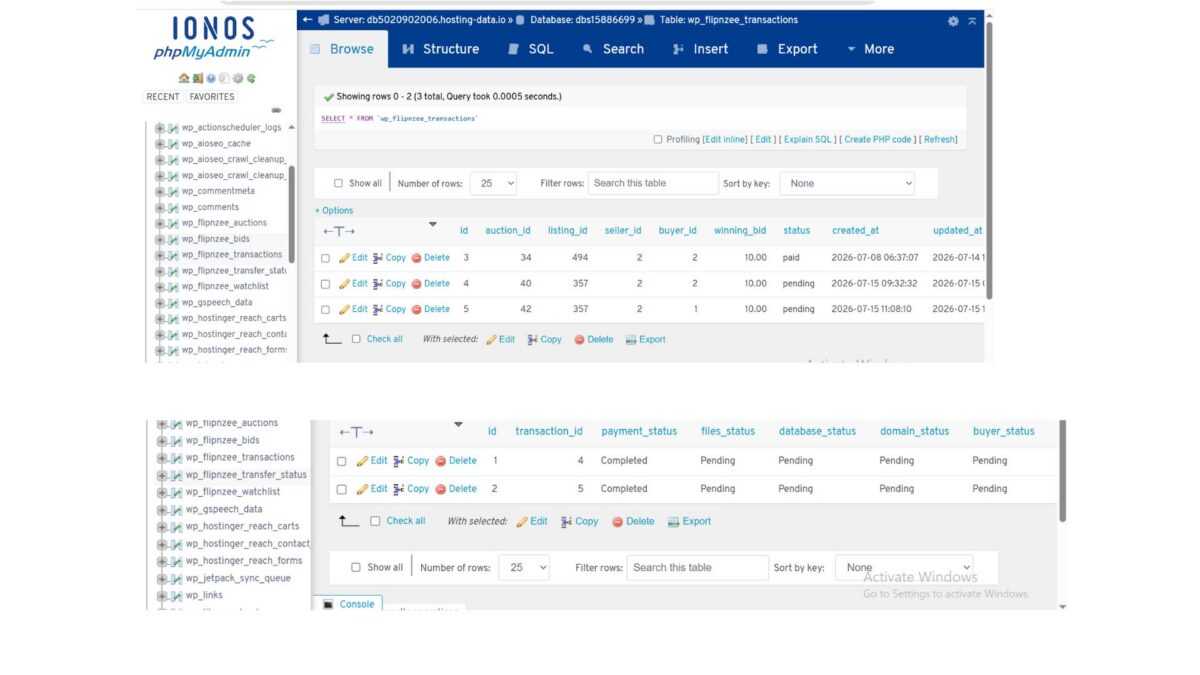
Database Verification
Testing confirmed that all related tables are updated correctly.
Auction Table
The auction now stores:
- Winner User ID
- Current Winning Bid
- Closed Status
Transactions Table
A new transaction record is created containing:
- Auction ID
- Listing ID
- Seller ID
- Buyer ID
- Winning Bid
- Pending Status
Transfer Status Table
A matching transfer record is automatically created with:
- Payment Completed
- Files Pending
- Database Pending
- Domain Pending
- Buyer Pending
This confirmed the entire workflow executed successfully from start to finish.
Current Auction Lifecycle
The Flipnzee Auctions plugin now performs the following complete backend workflow:
Create Auction
        ↓
Place Bids
        ↓
Determine Winner
        ↓
Store Winner
        ↓
Create Transaction
        ↓
Create Transfer Status
        ↓
Ready for Payment Workflow
This represents one of the largest functional improvements since development of the plugin began.
Download Source Code
Download the starting version of the plugin before the lesson:
Download the completed version after this lesson:
Lessons Learned
Lesson 103 reinforced several important development principles:
- Reuse existing business logic instead of creating duplicate methods.
- Trigger downstream processes through well-defined events.
- Validate database changes through direct inspection.
- Protect against duplicate record creation.
- Use detailed logging while developing complex workflows.
- Verify every stage of a multi-step process independently.
Conclusion
Lesson 103 completes one of the most important backend milestones of the Flipnzee Auctions plugin. The auction engine no longer stops after identifying a winner. Instead, it automatically generates the transaction and transfer records required for the remainder of the marketplace lifecycle.
With this implementation in place, the plugin now supports a seamless transition from bidding to payment preparation and website transfer management. Future lessons can build upon this solid foundation by adding payment gateway integration, automated notifications, transfer progress tracking, and enhanced post-auction administration.