
Lesson 117: Building the Admin Payment Verification Workflow

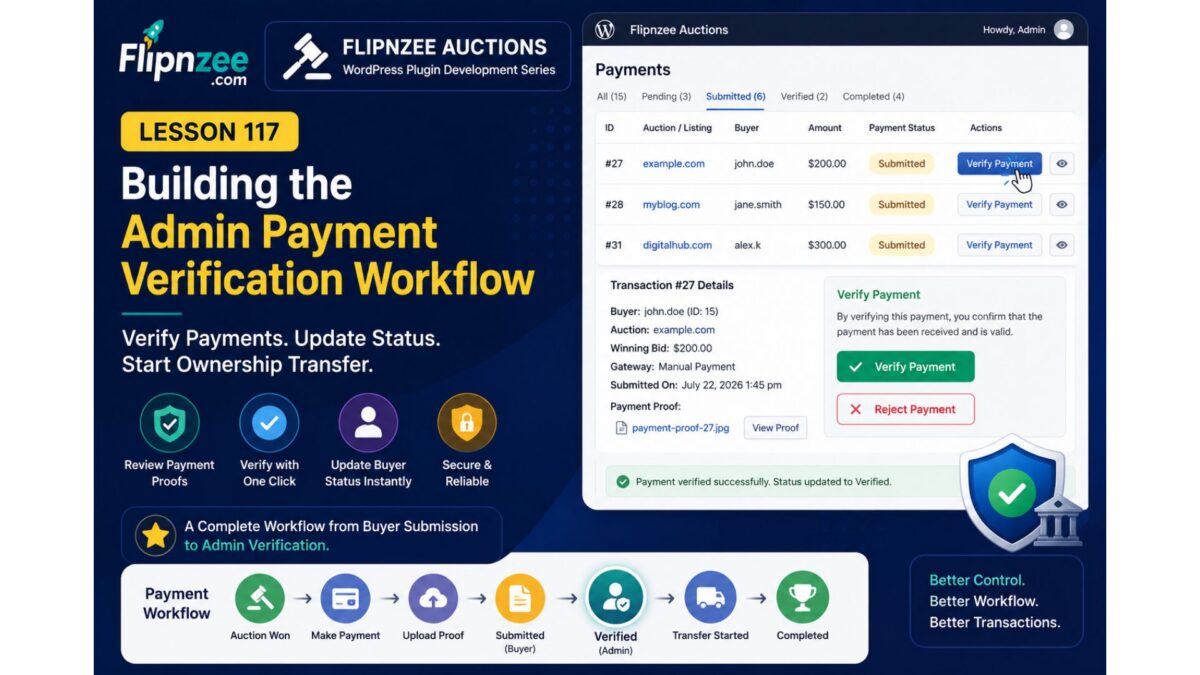
In the previous lesson, the buyer payment page was refactored into a clean, state-driven architecture. Buyers can now submit payment proof, and the interface automatically reflects the payment status.
However, one important piece of the workflow is still missing.
Once a buyer uploads proof of payment, an administrator needs a way to verify it before ownership transfer can begin.
In this lesson, we’ll implement the Payment Verification Workflow in the WordPress admin panel.
Where We Left Off
Our payment lifecycle currently looks like this:
Auction Won
        │
        ▼
Pending
        │
        ▼
Manual Payment
        │
        ▼
Upload Payment Proof
        │
        ▼
Submitted
At this point, the buyer has completed everything required.
The next step belongs to the administrator.
Current Problem
Although payment proofs are stored successfully, administrators cannot yet:
- verify the payment
- reject incorrect payment proofs
- begin ownership transfer
- update the buyer’s payment status
The transaction simply remains in the Submitted state.
Goal of This Lesson
We’ll extend the Admin Payments screen so administrators can manage submitted payments directly.
Each submitted transaction should display actions such as:
Verify Payment
Later lessons will add:
Reject Payment

Mark Transfer Started

Complete Transfer
New Payment Workflow
The buyer and administrator will now share responsibility for the payment lifecycle.
Buyer
──────────────

Win Auction
↓

Choose Payment Method
↓

Upload Payment Proof
↓

Submitted


Administrator
────────────────────────

Review Payment Proof
↓

Verify Payment
↓

Ownership Transfer
↓

Completed
Why Verify Instead of Mark Paid?
Payment verification represents a business decision rather than simply changing a status.
The administrator confirms that:
- payment amount is correct
- payment reference matches
- uploaded proof is valid
- payment has actually been received
Only after these checks should ownership transfer begin.
State Transition
We’ll introduce our first administrator-driven state transition.
Submitted
      │
      ▼
Verified
Later:
Verified
      │
      ▼
Completed
Because the buyer page is already state-driven, changing a single database value automatically changes the buyer experience.
Updating the Admin Payments Table
For submitted payments, we’ll add a new action button.
Example:
Transaction #27

Status:
Submitted

[ Verify Payment ]
Once clicked, the plugin will:
- validate the request
- verify the nonce
- update payment status
- refresh the admin screen
Database Changes
The database already stores the payment status.
No schema changes are required.
We’ll simply update:
payment_status
from
submitted
to
verified
This is one advantage of designing the payment system around discrete states.
Buyer Experience
The buyer does not need to perform any additional action.
Once the administrator verifies the payment, the payment page will automatically switch from:
Payment Submitted
to
Payment Verified

Ownership transfer has started.
No additional templates or pages are required.
Security Considerations
Administrative actions should always include:
- capability checks
- nonce verification
- transaction validation
- status validation
For example, only payments currently marked as Submitted should be eligible for verification.
Attempting to verify an already completed transaction should simply be ignored.
Benefits of This Design
Separating buyer actions from administrator actions keeps responsibilities clear.
Buyers can:
- choose payment methods
- upload payment proof
- monitor progress
Administrators can:
- verify payment
- initiate ownership transfer
- complete transactions
This separation also makes future integrations with automated gateways much easier.
What We’ll Build
By the end of this lesson, administrators will be able to:
- view submitted payments
- verify payments with one click
- update the payment status
- immediately update the buyer-facing payment page
Next Steps
Once payment verification is complete, the plugin will be ready for the next major milestone:
- Ownership Transfer Workflow
- Transaction Completion
- Email Notifications
- Additional Payment Gateways
- Escrow.com Integration
- Audit Logging
The payment system is gradually evolving from a simple upload form into a complete transaction management workflow that mirrors how real-world website sales are handled.