
Lesson 118: Connecting Payment Verification to the Ownership Transfer Workflow

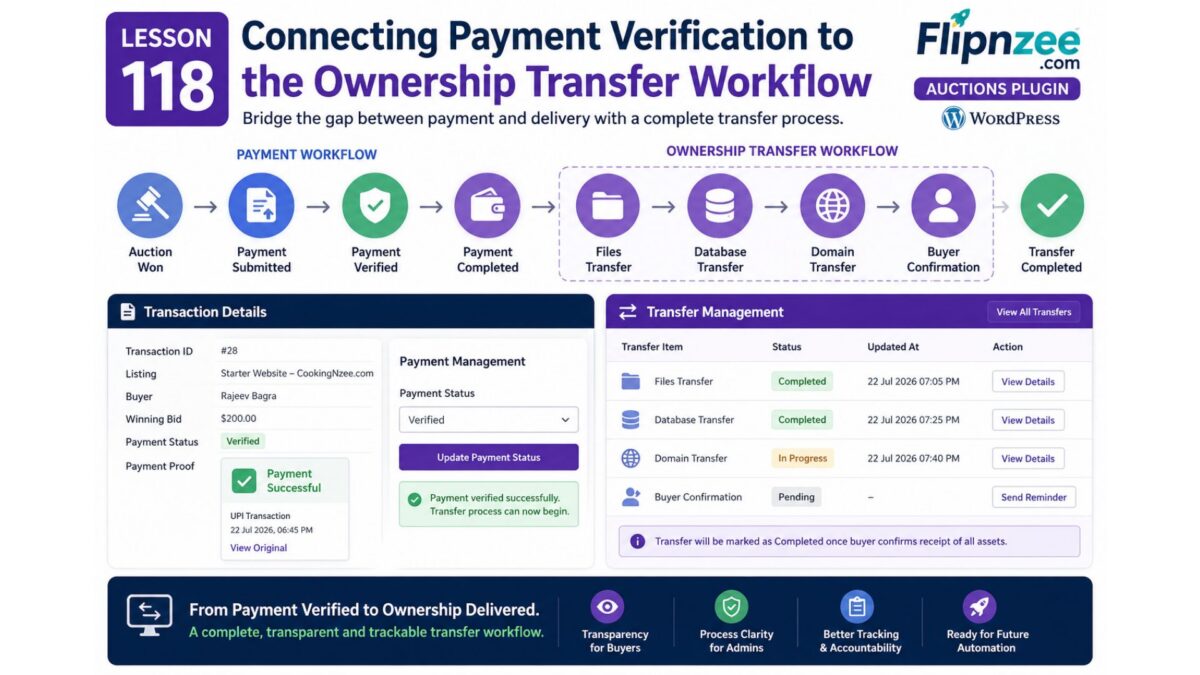
In the previous lesson, the Flipnzee Auctions plugin introduced a complete payment verification workflow. Buyers can upload payment proof, administrators can review the submission, and the payment progresses through a structured lifecycle from Pending to Submitted, Verified, and finally Completed.
Although this completes the payment process, a website sale does not end when payment is received. The actual ownership transfer still needs to take place.
This lesson focuses on bridging the gap between payment management and website transfer management.
Why a Transfer Workflow?
Unlike physical products, websites consist of multiple digital assets that must be transferred individually.
A successful website sale may include:
- Website files
- Database
- Domain name
- Hosting credentials
- Administrator accounts
- Email accounts
- Documentation
Completing payment simply authorizes the beginning of this process.
Current Workflow
After Lesson 117, the payment lifecycle looks like this:
Auction Won
      │
      ▼
Pending
      │
      ▼
Payment Submitted
      │
      ▼
Payment Verified
      │
      ▼
Payment Completed
While technically correct, this skips one of the most important business processes.
Introducing Ownership Transfer
Instead of ending the transaction after payment, we’ll introduce a dedicated transfer phase.
The revised workflow becomes:
Auction Won
      │
      ▼
Payment Submitted
      │
      ▼
Payment Verified
      │
      ▼
Ownership Transfer
      │
      ▼
Transaction Completed
This separates financial completion from operational completion.
The Transfer Dashboard
The Flipnzee Auctions plugin already includes a Transfer Management page.
Rather than creating another administration interface, this page will evolve into the central dashboard for tracking every ownership transfer.
Each transfer will contain multiple independent tasks.
Transfer Components
Instead of a single “Transferred” flag, the workflow will track individual stages.
For example:
Files
───────────────
Pending
In Progress
Completed
Database
────────────────
Pending
In Progress
Completed
Domain
───────────────
Pending
In Progress
Completed
Buyer Confirmation
──────────────────────
Pending
Completed
Tracking each component independently provides administrators with much greater visibility into the progress of a transaction.
Why Separate Payment and Transfer?
Although payment and ownership transfer are related, they represent different business processes.
Payment answers one question:
Has the buyer paid?
Transfer answers another:
Has the buyer actually received ownership of the website?
Separating these workflows reduces ambiguity and more accurately reflects how website acquisitions are managed.
Triggering a Transfer
Once an administrator verifies a payment, the plugin can automatically prepare the transfer process.
The simplified workflow becomes:
Payment Verified
        │
        ▼
Transfer Record Ready
        │
        ▼
Files
Database
Domain
Buyer Confirmation
Administrators no longer need to manually create transfer records.
Administrative Workflow
The administrator’s responsibilities now expand beyond payment approval.
A typical transaction becomes:
Review Payment Proof
        │
        ▼
Verify Payment
        │
        ▼
Transfer Website Files
        │
        ▼
Transfer Database
        │
        ▼
Transfer Domain
        │
        ▼
Buyer Confirms Receipt
        │
        ▼
Complete Transaction
This mirrors the practical workflow followed by agencies and marketplace operators when transferring ownership of digital assets.
Buyer Experience
The buyer also benefits from a more transparent process.
Instead of seeing only:
Payment Completed
they can eventually follow the transfer itself.
Example:
Payment Verified

Website Transfer

✓ Files

✓ Database

✓ Domain

Waiting for Buyer Confirmation
This reduces uncertainty and provides confidence that the transaction is progressing.
Foundation for Future Automation
Designing transfer management as its own workflow opens the door to future enhancements.
Potential additions include:
- Automatic transfer record creation
- Progress tracking
- Email notifications
- Buyer acknowledgements
- Transfer checklists
- Internal notes
- Document uploads
- Completion certificates
Because the transfer system is independent of payment processing, these features can be added without changing the payment workflow.
Lessons Learned
Real-world business processes often consist of multiple related workflows rather than a single sequence of events.
By separating payment verification from ownership transfer, the Flipnzee Auctions plugin becomes easier to maintain while better representing the lifecycle of a website sale.
This modular approach also keeps the codebase extensible as additional transfer features are introduced.
Conclusion
Lesson 118 marks the transition from payment management to operational ownership transfer. Instead of treating payment as the end of the transaction, the plugin now recognizes it as the beginning of the website handover process.
With a dedicated Transfer Management workflow already in place, the next lessons will focus on automating transfer creation, tracking progress across multiple transfer stages, and providing administrators and buyers with a clearer view of each transaction from payment verification through final ownership transfer.