
Lesson 99: Building the Purchase Details Page

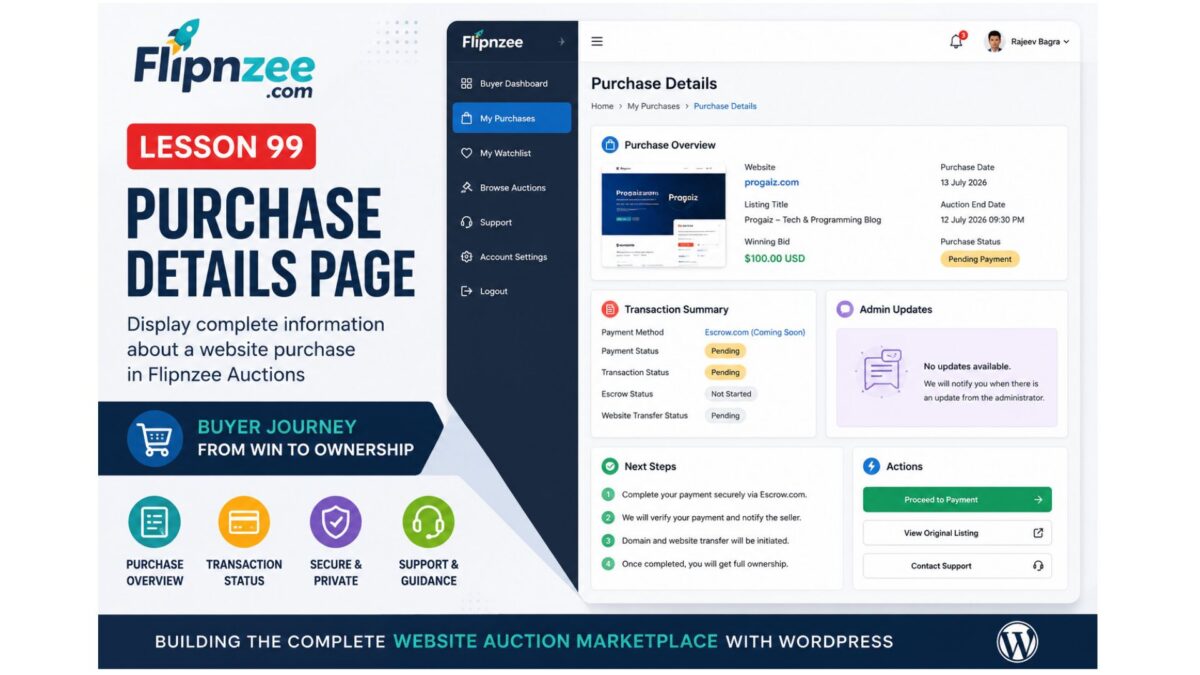
In the previous lesson, we introduced the My Purchases page, allowing buyers to view all the websites they have successfully won through Flipnzee Auctions. While that page provides a useful overview, buyers also need access to detailed information about each individual purchase.
In this lesson, we will build the Purchase Details Page, which will serve as the central location for managing a purchased website throughout its lifecycle—from winning the auction to completing payment and eventually transferring ownership.
Why a Purchase Details Page?
Purchasing a website involves multiple stages beyond simply winning an auction. Buyers often need to review:
- Winning bid amount
- Auction information
- Payment status
- Transaction details
- Domain transfer progress
- Administrative updates
Rather than displaying all this information on the Purchases page, it is better organized within a dedicated details page.
This modular approach keeps the user interface clean while allowing each purchase to have its own management page.
Objectives
At the end of this lesson, buyers should be able to:
- View detailed information about a purchased website
- Verify purchase ownership
- Review transaction information
- Monitor payment status
- Access support resources
- Prepare for future transfer management
Creating a Dedicated Purchase Details Class
A new class will be introduced:
includes/class-my-purchase-details.php
Separating purchase details into its own class keeps the plugin organized and follows the object-oriented architecture established throughout previous lessons.
Registering a New Shortcode
The page will be rendered using a dedicated shortcode.
[flipnzee_purchase_details]
This allows administrators to place the purchase details page anywhere within WordPress while maintaining complete separation between presentation and business logic.
Secure Purchase Validation
Security remains one of the most important aspects of the marketplace.
Before displaying any purchase information, the plugin should verify:
- The visitor is logged in.
- A valid purchase ID has been provided.
- The purchase actually exists.
- The logged-in user owns that purchase.
If any validation fails, an appropriate message should be displayed instead of exposing sensitive information.
Example:
Purchase not found.
or
You do not have permission to view this purchase.
Purchase Overview
The top section of the page will summarize the purchase.
Example fields include:
- Website Name
- Listing Title
- Winning Bid
- Purchase Date
- Auction End Date
- Purchase Status
This provides buyers with an immediate overview without requiring them to search through multiple pages.
Transaction Summary
The page will also display transaction-related information.
Initially, this section will include placeholders for:
- Payment Method
- Payment Status
- Transaction Status
- Escrow Status
- Website Transfer Status
As future lessons introduce payment gateways and Escrow.com integration, these fields will automatically become more informative.
Administrative Updates
Marketplace administrators may occasionally need to communicate with buyers regarding:
- Payment verification
- Required documents
- Domain transfer
- Hosting migration
- Additional instructions
A dedicated section will be reserved for these updates.
Initially it may simply display:
No updates available.
Later this area will become a communication hub between administrators and buyers.
Buyer Guidance
Many first-time buyers may be unfamiliar with the website acquisition process.
The Purchase Details page will therefore include a brief explanation of the next steps after winning an auction, including:
- Payment instructions
- Escrow workflow
- Domain transfer
- Website migration
- Completion of ownership transfer
This reduces buyer confusion while improving the overall marketplace experience.
Action Buttons
To simplify navigation, the page will provide several action buttons.
Examples include:
- View Original Listing
- Proceed to Payment
- Contact Support
These shortcuts eliminate unnecessary navigation and allow buyers to continue their purchase workflow with minimal effort.
Responsive User Interface
The Purchase Details page will continue using the design language introduced in previous lessons.
Features include:
- Responsive layout
- Clean information cards
- Consistent typography
- Professional spacing
- Mobile-friendly design
Maintaining a consistent interface improves usability throughout the marketplace.
Preparing for Future Lessons
Although this lesson primarily focuses on displaying purchase information, it also lays the foundation for several important upcoming features.
Future lessons will build upon this page by adding:
- Escrow.com transaction tracking
- Online payment processing
- Transfer progress indicators
- Buyer notifications
- Downloadable invoices
- Ownership confirmation
- Website migration status
- Administrative messaging
- Transaction history
Because all purchase-related functionality will originate from this page, designing it carefully now makes future development significantly easier.
Final Thoughts
Lesson 99 represents another important step toward transforming Flipnzee Auctions into a complete marketplace for buying and selling websites.
With the introduction of a dedicated Purchase Details page, buyers gain a centralized location for reviewing every aspect of a completed auction. Rather than treating a successful bid as the end of the buying journey, Flipnzee now begins supporting the entire post-auction process—from payment and verification to domain transfer and final ownership.
This lesson continues the philosophy of building the marketplace incrementally, ensuring that each new feature integrates naturally with the existing architecture while providing a scalable foundation for future enhancements.