
Lesson 98 Implementation: Building the Buyer Dashboard

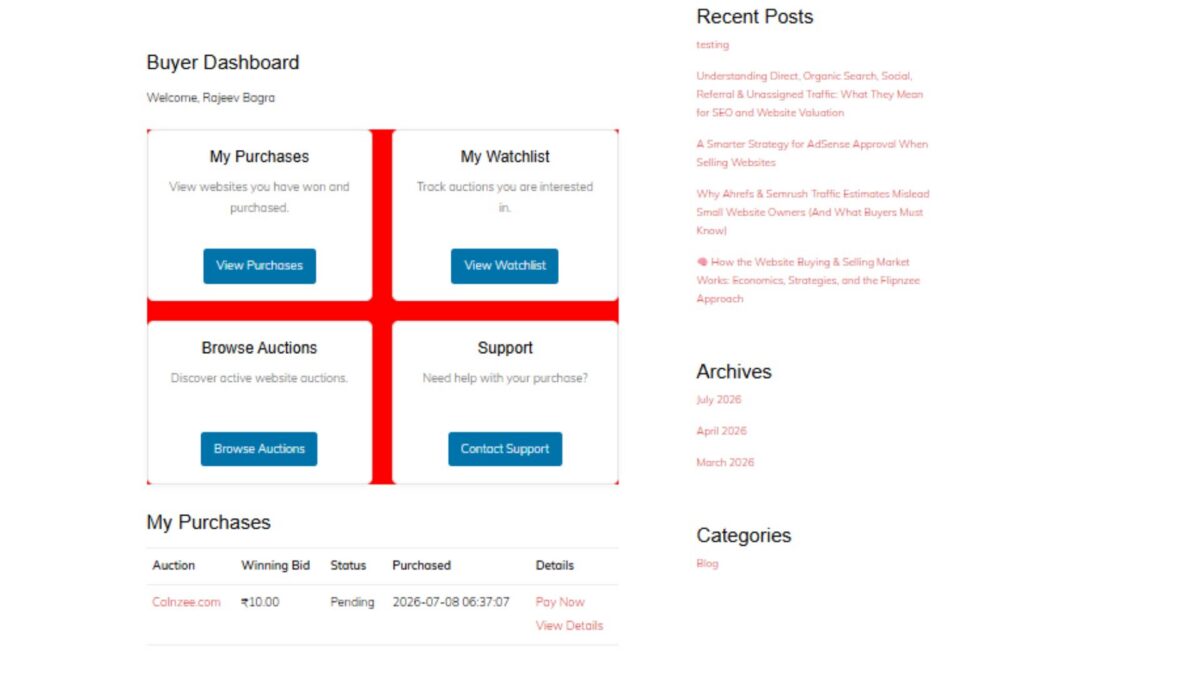
In this lesson, we introduced the Buyer Dashboard, an important milestone in the Flipnzee Auctions plugin. While the earlier lessons focused on auctions, bidding, payments, and watchlists, this lesson begins building the buyer’s personal workspace after logging into the marketplace.
The Buyer Dashboard serves as the central navigation hub for buyers, allowing them to quickly access their purchases, watchlist, active auctions, and support resources.
Why a Buyer Dashboard?
As Flipnzee grows into a specialized marketplace for buying and selling websites, buyers need a dedicated area where they can manage their activity without navigating through multiple pages.
The dashboard is designed to provide:
- Quick access to purchased websites
- Easy navigation to the watchlist
- Direct access to current auctions
- Support resources
- A foundation for future buyer features
This dashboard will continue to evolve in upcoming lessons as more buyer functionality is introduced.
Registering a Dedicated Shortcode
A new shortcode was created for the dashboard:
[flipnzee_buyer_dashboard]
This shortcode allows the dashboard to be embedded on any WordPress page while keeping the implementation modular and reusable.
The dashboard class registers the shortcode during construction using WordPress’ Shortcode API.
Login Protection
Since the dashboard contains user-specific information, it is only available to authenticated users.
If a visitor is not logged in, the shortcode displays a friendly message requesting authentication before accessing buyer features.
This keeps buyer information private while following WordPress best practices.
Personalized Welcome Section
The dashboard greets the logged-in buyer using their WordPress display name.
Example:
Buyer Dashboard

Welcome, Rajeev Bagra
Personalization creates a much more user-friendly experience and prepares the dashboard for future account-specific information.
Dashboard Cards
Instead of displaying long navigation menus, the dashboard uses clean responsive cards.
Four primary navigation cards were introduced:
My Purchases
Provides access to websites that the buyer has successfully won and purchased.
Future lessons will display:
- Purchase history
- Pending transfers
- Completed transfers
- Payment status
My Watchlist
Allows buyers to quickly revisit auctions they are monitoring.
This integrates directly with the Watchlist system developed in previous lessons.
Browse Auctions
Provides a shortcut back to the marketplace so buyers can continue exploring active website auctions.
Support
Offers direct access to marketplace support resources whenever assistance is required during the buying process.
Responsive CSS Grid
A responsive CSS Grid layout was implemented to display the dashboard cards.
Benefits include:
- Responsive across desktop, tablet, and mobile devices
- Equal spacing between cards
- Professional appearance
- Easy future expansion
Each card includes:
- Title
- Description
- Action button
- Hover animation
- Subtle shadows
- Rounded corners
Modern User Interface
Several interface improvements were added:
- Soft shadows
- Rounded card design
- Smooth hover animations
- Consistent Flipnzee button styling
- Responsive spacing
- Clean typography
The result is a dashboard that feels modern while remaining lightweight.
Reusing Existing Marketplace Pages
Each dashboard card links to an existing or upcoming marketplace page.
Current destinations include:
/my-purchases//watchlist//listings//support/
This keeps navigation centralized and reduces unnecessary menu complexity.
Debugging Journey
An interesting challenge during this lesson involved the dashboard layout initially rendering as a vertical list instead of the intended responsive grid.
The issue was systematically investigated by verifying:
- Shortcode registration
- HTML structure
- CSS loading
- Browser Developer Tools
- Network requests
- Stylesheet versions
- CSS Grid rules
A temporary diagnostic background color confirmed that the correct stylesheet was being loaded, allowing the issue to be isolated and resolved successfully.
This debugging process reinforced the importance of methodical troubleshooting rather than assuming the problem originates in PHP or HTML.
Foundation for Future Lessons
Although the dashboard currently serves as a navigation hub, it lays the groundwork for significantly richer buyer functionality.
Upcoming enhancements will include:
- Live purchase summaries
- Recent bidding activity
- Pending payments
- Escrow transaction status
- Website transfer progress
- Buyer notifications
- Personalized marketplace insights
The dashboard is intentionally designed to grow alongside the Flipnzee marketplace.
Download Source Code
Download the starting version of the plugin before the lesson:
Download the completed version after this lesson:
Final Thoughts
Lesson 97 marks the beginning of the buyer experience within Flipnzee Auctions. By introducing a dedicated Buyer Dashboard, the plugin now offers a centralized, user-friendly starting point for every buyer after login.
Rather than overwhelming users with scattered pages and menus, the dashboard provides a clean, responsive interface that will gradually evolve into a comprehensive buyer control panel as future lessons expand payment workflows, purchase management, and ownership transfers.
The Buyer Dashboard represents another important step toward transforming Flipnzee Auctions into a professional marketplace specifically built for buying and selling websites and digital assets.