
How Plugin Activation and Deactivation Hooks Work

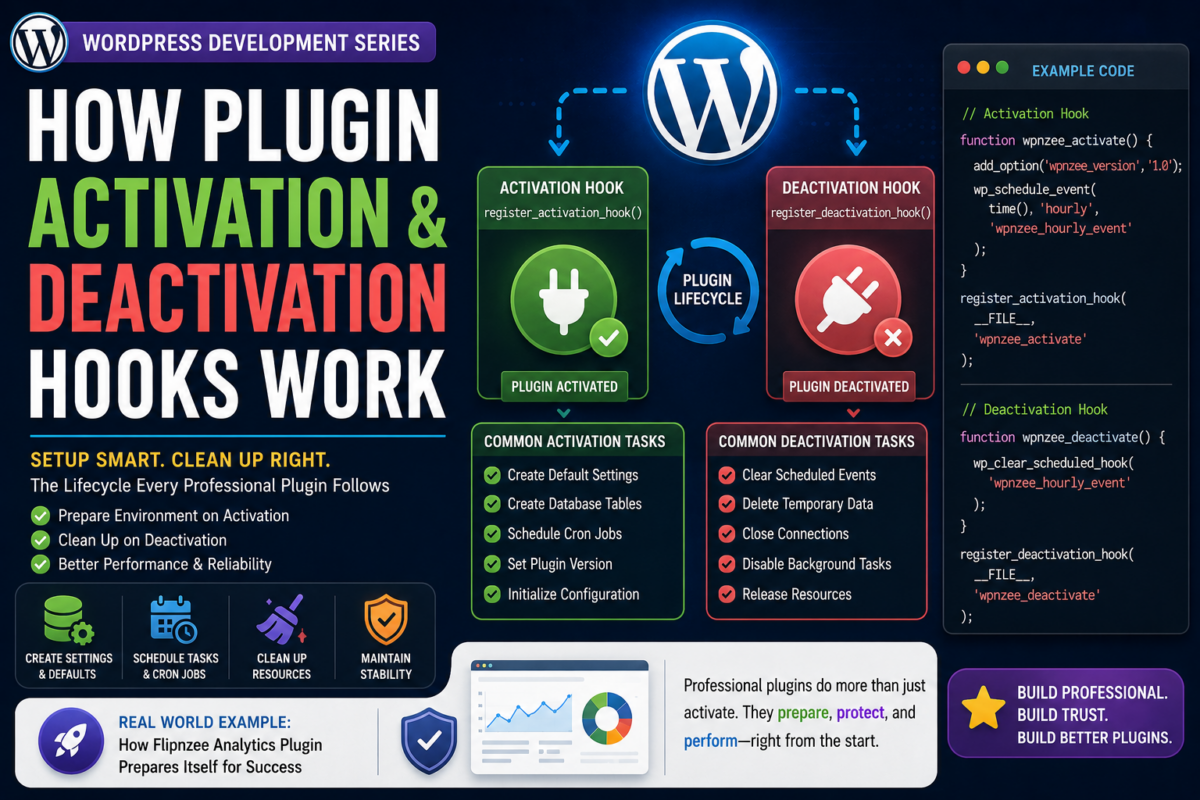
Series: WordPress Development From Scratch
Level: Beginner to Intermediate
Project Reference: Flipnzee Analytics
Introduction
When you activate a WordPress plugin, something special happens behind the scenes.
WordPress doesn’t simply mark the plugin as “active.” Instead, it gives the plugin an opportunity to perform setup tasks before it starts running.
Similarly, when a plugin is deactivated, WordPress allows the plugin to clean up after itself.
This process is handled using Activation Hooks and Deactivation Hooks.
In this tutorial you’ll learn:
- What activation hooks are
- What deactivation hooks are
- Why they are important
- How WordPress executes them
- Common setup tasks during activation
- Common cleanup tasks during deactivation
- How professional plugins use these hooks
- How Flipnzee Analytics uses plugin initialization
By the end, you’ll understand one of the most important parts of building production-ready WordPress plugins.
What Happens When You Activate a Plugin?
Imagine installing a plugin that creates:
- Custom database tables
- Default settings
- User roles
- Scheduled tasks
These things must be created before the plugin can work properly.
WordPress solves this problem using an activation hook.
When a user clicks:
Plugins → Activate
WordPress automatically executes any activation function registered by the plugin.
Activation Hook Syntax
WordPress provides:
register_activation_hook()
Example:
register_activation_hook(
    __FILE__,
    'wpnzee_activate'
);
This tells WordPress:
“Run the function wpnzee_activate() when this plugin is activated.”
Creating Your First Activation Hook
Example:
function wpnzee_activate() {

    update_option(
        'wpnzee_version',
        '1.0.0'
    );

}

register_activation_hook(
    __FILE__,
    'wpnzee_activate'
);
When the plugin activates:
wpnzee_version = 1.0.0
is automatically stored in the database.
Why Store Plugin Settings During Activation?
Many plugins need default configuration values.
Example:
function wpnzee_activate() {

    add_option(
        'wpnzee_show_widget',
        'yes'
    );

}
Now the plugin starts with sensible defaults.
The user doesn’t need to configure everything manually.
What Happens Behind the Scenes?
The activation process looks like:
User clicks Activate
          ↓
WordPress loads plugin
          ↓
Activation Hook Executes
          ↓
Setup Tasks Run
          ↓
Plugin Becomes Active
Common Activation Tasks
Professional plugins often:
Create Default Settings
add_option(
    'plugin_color',
    'blue'
);
Create Database Tables
global $wpdb;
Custom tables are often created here.
Schedule Cron Jobs
wp_schedule_event(
    time(),
    'hourly',
    'my_plugin_event'
);
Create User Roles
add_role(
    'analytics_manager',
    'Analytics Manager'
);
Store Plugin Version
update_option(
    'plugin_version',
    '1.0'
);
This helps future upgrades.
Understanding Deactivation Hooks
Deactivation hooks perform cleanup.
WordPress provides:
register_deactivation_hook()
Example:
register_deactivation_hook(
    __FILE__,
    'wpnzee_deactivate'
);
When a user clicks:
Deactivate
the specified function runs.
Creating Your First Deactivation Hook
Example:
function wpnzee_deactivate() {

    wp_clear_scheduled_hook(
        'wpnzee_hourly_event'
    );

}

register_deactivation_hook(
    __FILE__,
    'wpnzee_deactivate'
);
This removes scheduled events when the plugin is disabled.
Why Deactivation Matters
Imagine a plugin schedules:
Every Hour:
Fetch Analytics Data
If the plugin is deactivated but the scheduled event continues running:
- Resources are wasted
- Errors may occur
- Performance suffers
Deactivation hooks prevent this.
Activation vs Deactivation
| Activation | Deactivation |
|---|---|
| Setup environment | Clean up environment |
| Create settings | Remove temporary processes |
| Schedule tasks | Unschedule tasks |
| Initialize plugin | Disable plugin activity |
Think of it like:
Activation   = Setup
Deactivation = Shutdown
What About Uninstall?
Many beginners confuse:
Deactivate
with:
Delete
They are different.
Deactivate
Plugin remains installed.
Delete
Plugin is removed entirely.
For deletion, WordPress provides:
uninstall.php
or
register_uninstall_hook()
These are used to permanently remove data.
Real Example: Analytics Plugin
Imagine Flipnzee Analytics is activated.
Possible activation tasks:
Store Plugin Version
Create Default Settings
Initialize Analytics Configuration
Prepare Cache System
Schedule Data Refresh Jobs
These ensure the plugin is ready before the user starts using it.
Example Plugin with Both Hooks
<?php

function wpnzee_activate() {

    add_option(
        'wpnzee_version',
        '1.0'
    );

}

function wpnzee_deactivate() {

    wp_clear_scheduled_hook(
        'wpnzee_hourly_event'
    );

}

register_activation_hook(
    __FILE__,
    'wpnzee_activate'
);

register_deactivation_hook(
    __FILE__,
    'wpnzee_deactivate'
);
This is a common pattern you’ll see in professional plugins.
Common Beginner Mistakes
Running Setup Code on Every Page Load
Bad:
add_option(
    'plugin_version',
    '1.0'
);
This executes constantly.
Use activation hooks instead.
Forgetting Cleanup
Always remove:
- Scheduled events
- Temporary files
- Cached data
when appropriate.
Deleting User Data on Deactivation
Avoid:
delete_option(...)
during deactivation.
Users may reactivate later.
Save permanent cleanup for uninstall.
Not Checking Existing Settings
Before creating options:
if (!get_option('plugin_version')) {
    add_option(...);
}
Avoid overwriting user settings.
What You’ve Learned
In this tutorial you learned:
✓ What activation hooks are
✓ What deactivation hooks are
✓ How register_activation_hook() works
✓ How register_deactivation_hook() works
✓ Common setup tasks
✓ Common cleanup tasks
✓ The difference between deactivate and uninstall
✓ How professional plugins prepare their environment
Key Takeaway
Activation hooks allow a plugin to prepare itself before use.
Deactivation hooks allow a plugin to shut down gracefully.
Together they help create reliable, professional WordPress plugins that behave correctly throughout their lifecycle.
Every serious WordPress developer should understand these hooks before building larger projects.
Next Lesson
In the next tutorial we’ll explore:
Loading CSS and JavaScript Properly in WordPress
You’ll learn why professional plugins never use raw HTML <script> and <link> tags, how WordPress manages assets using enqueue functions, and how the Flipnzee Analytics plugin loads styles and scripts efficiently across the admin dashboard and frontend.