
Lesson 102 Implementation: Building the Transfer Management System and Completing the Auction Workflow

After completing the core auction engine in previous lessons, this lesson focused on one of the most important components of any digital asset marketplace—the post-auction transfer process. Winning an auction is only the beginning; the real business value comes from securely transferring the website, domain, database, and related assets to the buyer.
Lesson 102 introduces the foundation of the Flipnzee Transfer Management System, bringing the plugin much closer to supporting a complete end-to-end marketplace experience.
What We Built
This lesson concentrated on connecting the auction, transaction, and transfer systems into one seamless workflow.
The following major features were implemented.
1. Transfer Status Database
A dedicated database table was introduced to manage the progress of every completed transaction.
Each transfer record now stores:
- Transaction ID
- Payment status
- Website files status
- Database status
- Domain transfer status
- Buyer verification status
- Internal notes
- Created date
- Updated date
This provides a permanent audit trail for every completed auction.
2. Transfer Manager Class
A brand-new manager class was created to centralize all transfer operations.
Major helper methods include:
- Retrieve transfer table name
- Create transfer record
- Retrieve transfer information
- Update individual transfer status
- Update transfer notes
- Update an entire transfer in a single database query
- Determine completion status
- Default transfer steps
- Default transfer statuses
- Status badge helper methods
Using a dedicated manager class keeps transfer-related business logic completely separate from auction and transaction logic.
3. Automatic Transfer Creation
Previously, auctions ended with a winning bidder and transaction record.
Lesson 102 extends this workflow by automatically preparing a transfer record immediately after a successful transaction.
The auction lifecycle now becomes:
Auction
      ↓
Winner Selected
      ↓
Transaction Created
      ↓
Transfer Record Created
This removes manual database work and prepares every purchase for delivery.
4. Purchase Details Enhancements
The My Purchase Details page was expanded considerably.
Buyers can now view:
- Purchase information
- Auction details
- Payment information
- Transfer progress
- Status badges
- Delivery steps
- Helpful instructions
- Support links
The purchase page now serves as a central dashboard throughout the delivery process.
5. Default Transfer Workflow
A standard transfer checklist was introduced.
Current workflow:
- Payment Confirmed
- Website Files Delivered
- Database Delivered
- Domain Transfer Completed
- Buyer Verification
- Purchase Completed
This provides a structured process that can be reused for every website sold on Flipnzee.
6. Transfer Status System
Each transfer stage now supports standardized status values.
Examples include:
- Completed
- Pending
- In Progress
Centralizing status values makes future reporting, dashboards, and filtering much easier.
7. Status Badge Helpers
Status badge helper methods were added to simplify frontend rendering.
Instead of scattering CSS logic throughout templates, badge classes are now managed from a single location.
Benefits include:
- Cleaner templates
- Easier maintenance
- Consistent styling
- Simpler future theme customization
8. Countdown and Auction Improvements
During implementation several improvements were made to the auction experience.
These include:
- Fixed current bid updates
- Highest bidder updates correctly
- Improved bid validation
- Highest bidder cannot bid again until outbid
- Countdown improvements
- Anti-sniping logic remains intact
A small UI issue where “Auction Ends In” wrapped onto two lines was also resolved by shortening the label to:
Auction Ends
9. New Transfer Administration Module
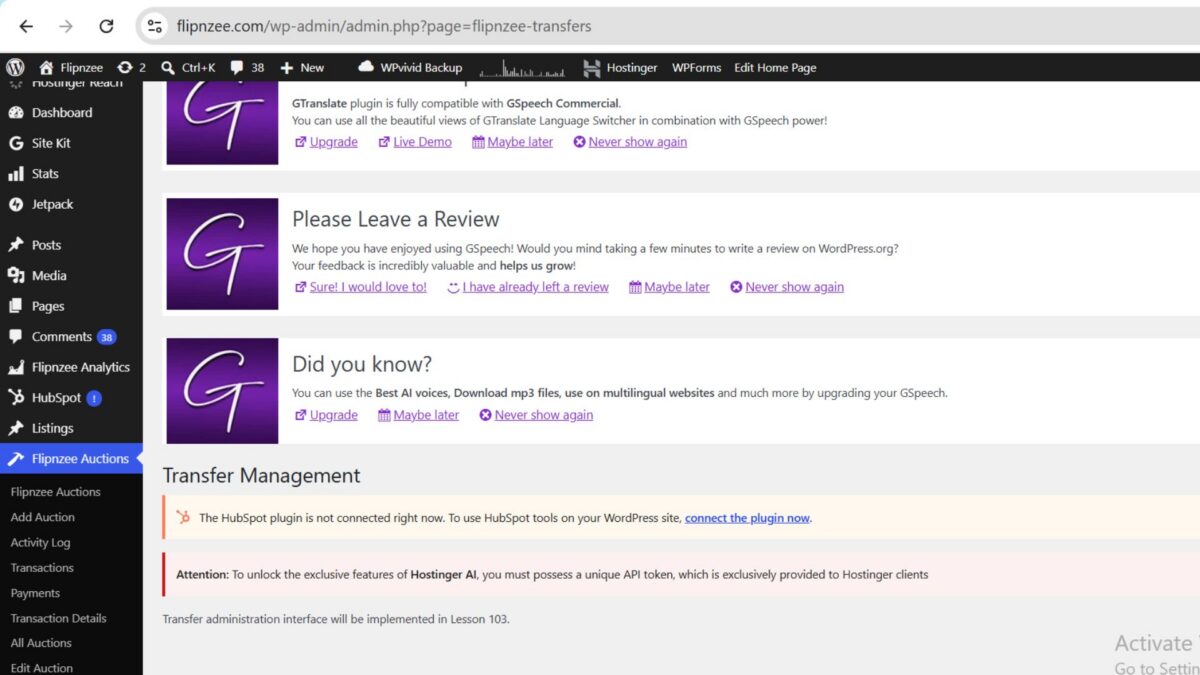
The first version of the Transfer Administration page was introduced.
A new admin menu now appears:
Flipnzee Auctions

├── Dashboard
├── All Auctions
├── Add Auction
├── Transactions
└── Transfers
Currently this page acts as the foundation for Lesson 103, where full transfer management functionality will be implemented.
10. Internal API Improvements
Several helper methods were added to simplify future development.
Examples include:
- update_notes()
- update_transfer()
- get_transfer()
- update_status()
These methods make future admin screens significantly easier to implement while reducing duplicate SQL queries.
Architecture Overview
The complete business workflow now looks like this:
Website Listed
        │
        ▼
Auction Starts
        │
        ▼
Users Place Bids
        │
        ▼
Auction Ends
        │
        ▼
Winner Determined
        │
        ▼
Transaction Created
        │
        ▼
Transfer Record Created
        │
        ▼
Buyer Views Purchase Details
        │
        ▼
Admin Manages Delivery
        │
        ▼
Purchase Completed
This represents one of the biggest architectural milestones of the Flipnzee Auctions plugin.
Challenges Faced
Like many real-world software projects, this lesson involved debugging and refinement alongside feature development.
Some of the issues addressed included:
- Missing helper methods
- PHP parse errors caused by misplaced braces
- Incorrect placement of class methods
- Database version synchronization
- Bid update validation
- Current bid synchronization
- Transfer table integration
- UI polishing for auction countdowns
- Plugin activation errors caused by incorrect include paths
Each issue was resolved incrementally, reinforcing the importance of careful debugging and incremental testing during plugin development.
Benefits of the New Transfer System
The new architecture offers several practical advantages:
- Dedicated transfer tracking
- Better separation of responsibilities
- Cleaner object-oriented design
- Easier future enhancements
- Improved buyer experience
- Reduced manual administration
- Complete audit trail for every purchase
Download Source Code
Download the starting version of the plugin before the lesson:
Download the completed version after this lesson:
What Comes Next
Lesson 103 will build upon the foundation created here.
Planned enhancements include:
- Complete Transfer Management dashboard
- Editable transfer statuses
- Internal delivery notes
- Admin update forms
- Automatic progress synchronization
- Activity log integration
- Completion automation
- Email notifications (future enhancement)
These additions will transform the placeholder Transfer page into a fully functional administrative workflow for managing completed website sales.
Conclusion
Lesson 102 marks another major milestone in the development of the Flipnzee Auctions plugin. By introducing a dedicated Transfer Management System and integrating it with auctions, transactions, and buyer purchase pages, the plugin now supports nearly the entire lifecycle of a digital asset sale.
While the administrative interface will be completed in Lesson 103, the underlying architecture established in this lesson provides a scalable and maintainable foundation for secure website transfers, improved buyer communication, and efficient post-auction management.
With auctions, transactions, and transfers now working together, Flipnzee Auctions moves significantly closer to becoming a complete marketplace solution for buying and selling websites, domains, and other digital assets.