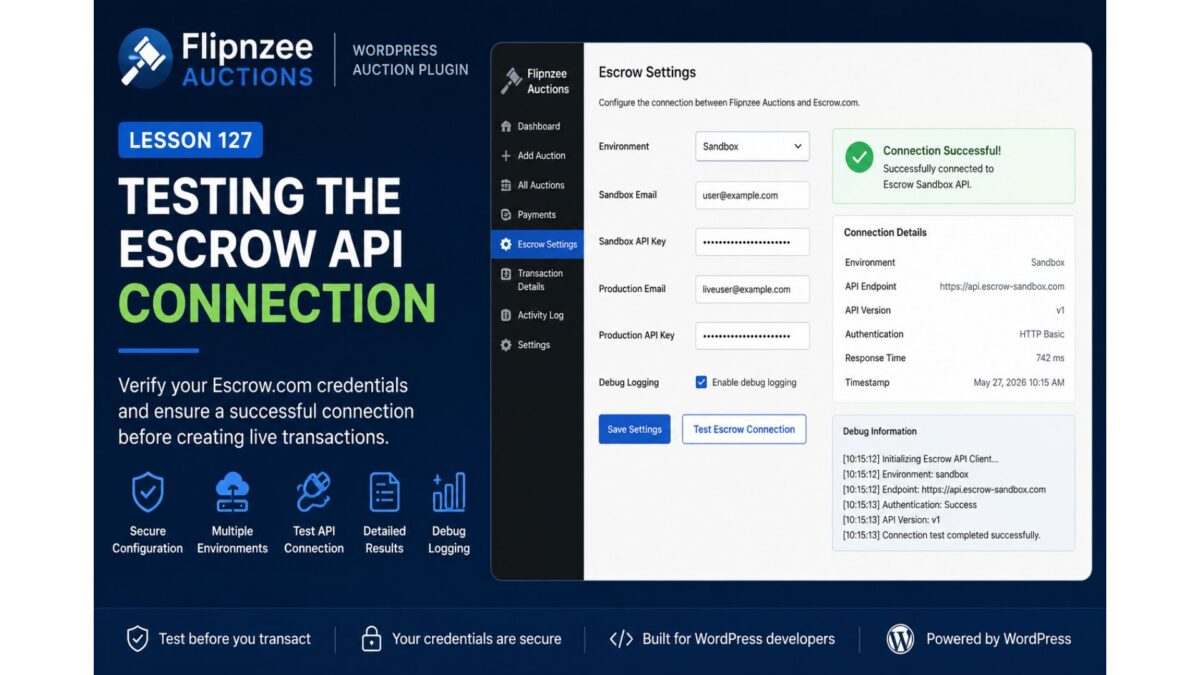
Lesson 130 – Building a Production-Ready Escrow Settings Interface

In the previous lessons, we focused on strengthening the internal architecture of the Escrow integration. The API client was refactored to use the WordPress HTTP API, response handling became standardized, and the plugin gained support for Simulation, Sandbox, and Production environments.

While these backend improvements significantly improved maintainability, the administrator experience still had room for improvement.

In this lesson, we’ll redesign the Escrow Settings page to provide a cleaner interface, better validation, and a clearer overview of the plugin’s configuration.


Where We Left Off

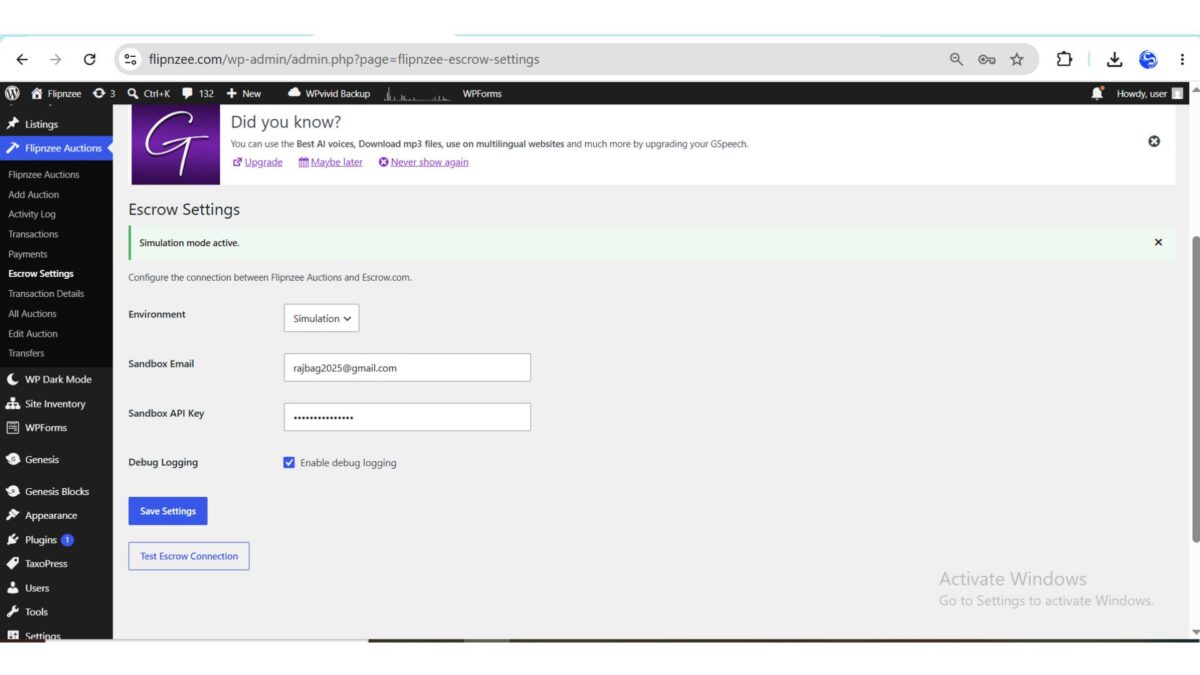
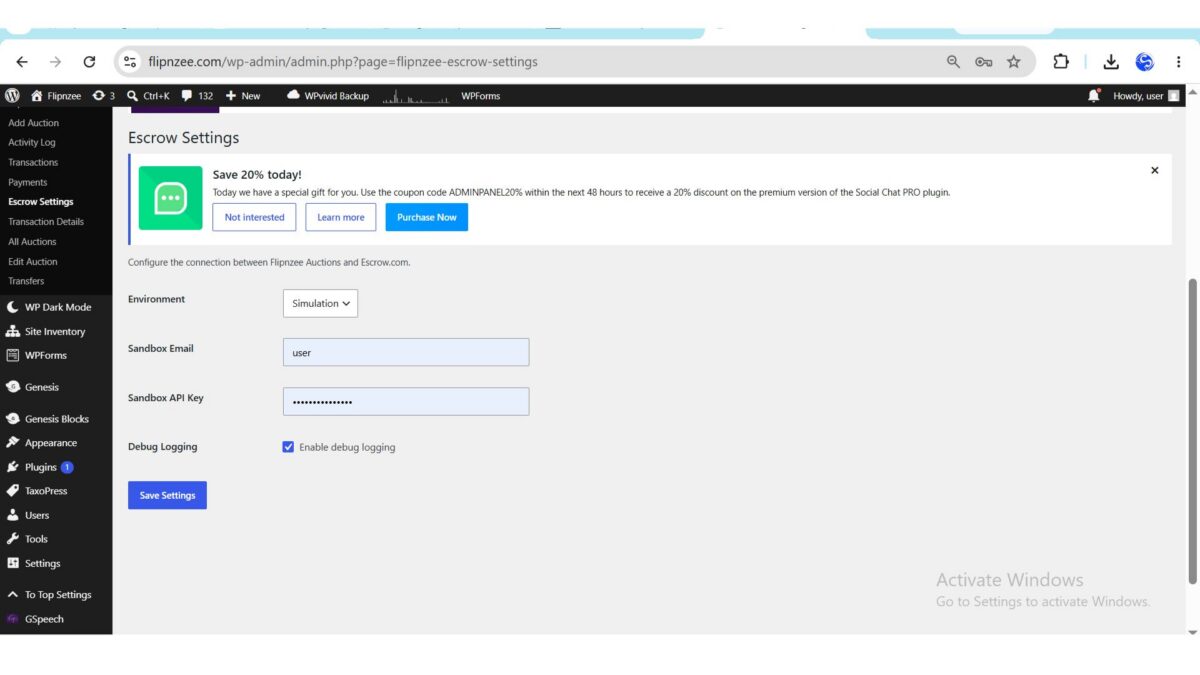
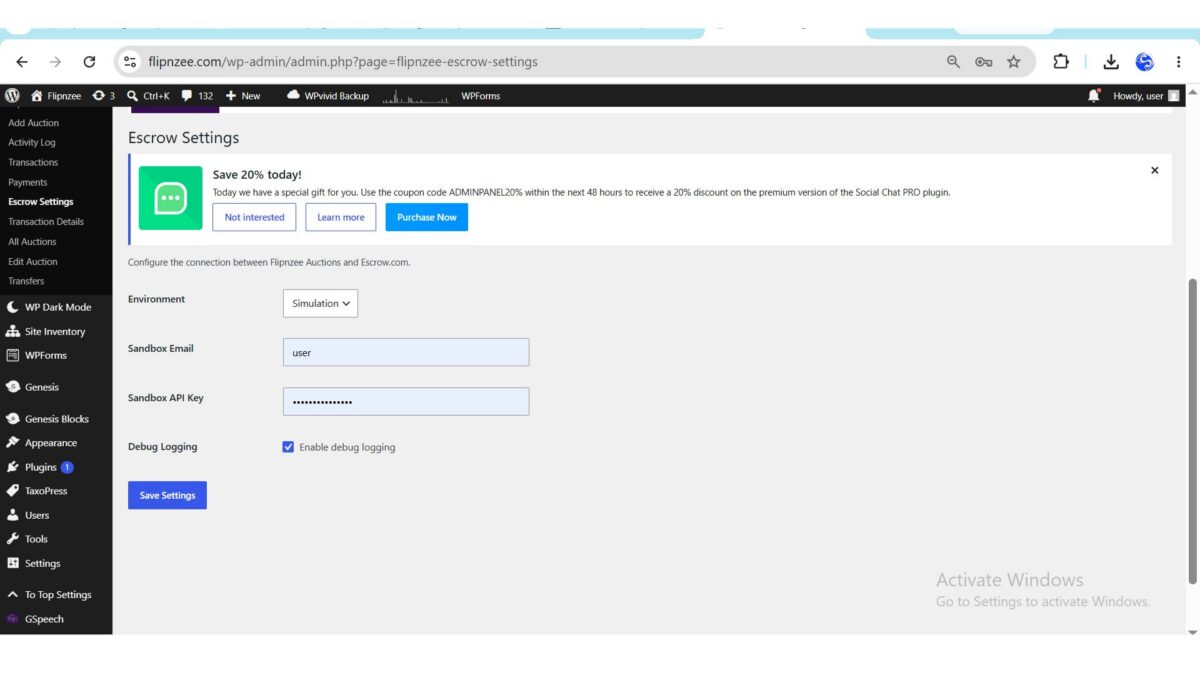
At the end of Lesson 129, administrators could configure the Escrow integration, but the page was fairly minimal.

It provided:

  • Environment selection
  • Sandbox credentials
  • Debug logging
  • Connection testing

Although functional, it didn’t fully expose the capabilities already built into the Escrow API client.


Objectives

The goal of this lesson is to transform the Escrow Settings page into a more polished administration interface while keeping the existing backend architecture intact.

The improvements focus on usability rather than introducing new API functionality.


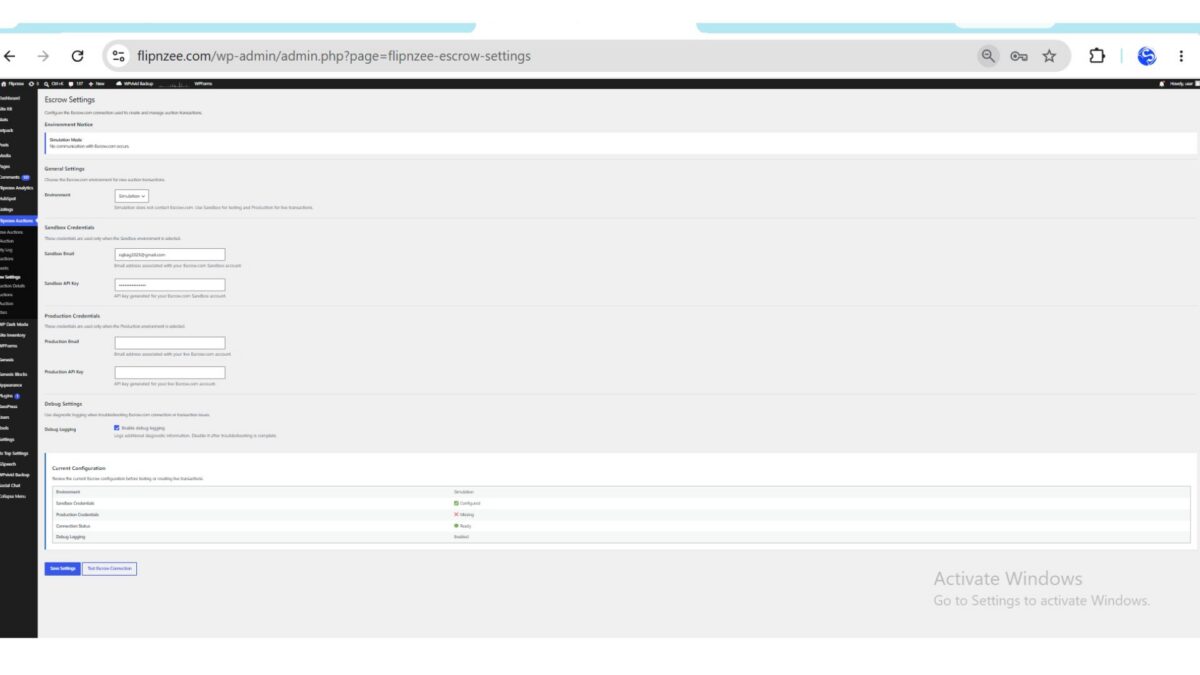
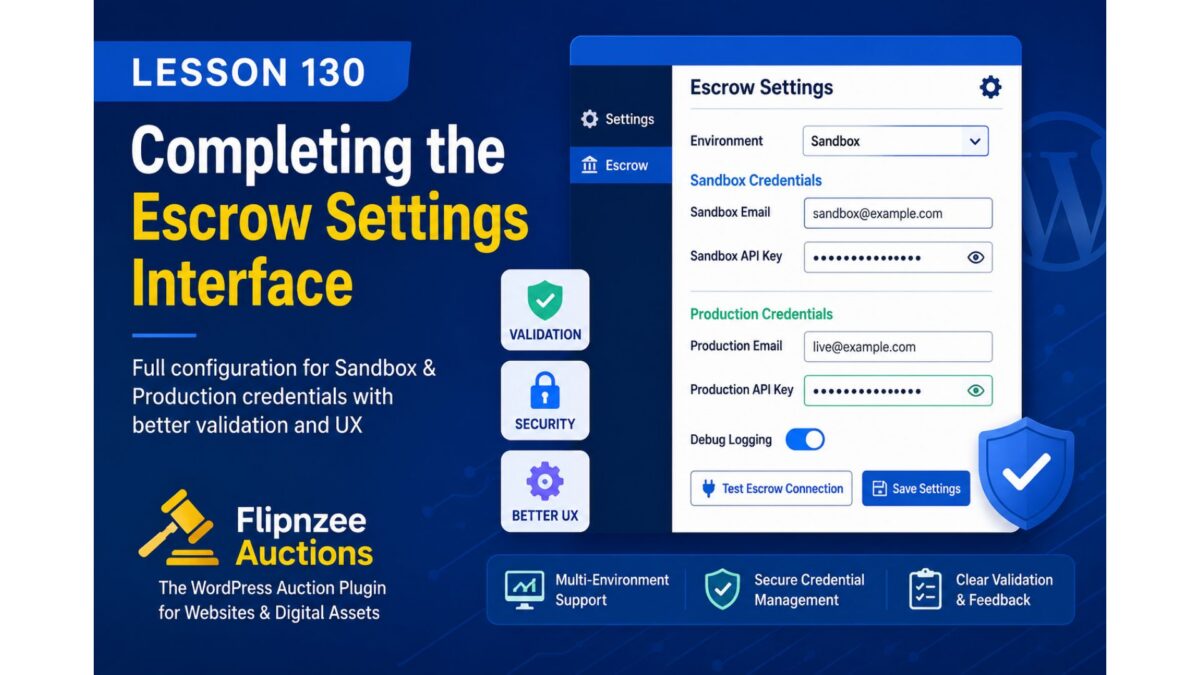
Introducing Multiple Configuration Sections

Instead of presenting every option inside a single table, the settings page is now divided into logical sections.

The new layout includes:

  • Environment Notice
  • General Settings
  • Sandbox Credentials
  • Production Credentials
  • Debug Settings
  • Current Configuration

Breaking the page into smaller sections makes navigation easier and improves readability as the plugin continues to grow.


Environment Awareness

One of the most noticeable improvements is the addition of an environment notice.

Whenever an administrator selects an environment, the page immediately explains what that environment represents.

For example:

  • Simulation performs no external requests.
  • Sandbox communicates with the Escrow testing environment.
  • Production is intended for real Escrow transactions.

Providing this information directly within the interface reduces configuration mistakes and makes the plugin easier to understand.


Production Credentials

Previous versions of the settings page focused primarily on Sandbox credentials.

Lesson 130 introduces dedicated fields for live Escrow.com credentials.

Administrators can now configure:

  • Production Email
  • Production API Key

This completes the configuration interface and aligns it with the capabilities already implemented within the Escrow API client.


Better Input Validation

The plugin now validates configuration before saving.

Depending on the selected environment, administrators must provide the required credentials.

For example:

Sandbox mode requires:

  • Sandbox Email
  • Sandbox API Key

Production mode requires:

  • Production Email
  • Production API Key

Instead of saving incomplete settings, the plugin now displays clear validation messages, helping administrators resolve configuration problems before attempting to connect to Escrow.com.


Credential Verification

A small helper method now determines whether the required credentials exist for the active environment.

Rather than repeating this logic throughout the codebase, it has been centralized into a reusable method.

This helper is now used to determine whether the current configuration is ready for testing.


Smarter Connection Testing

One subtle but useful improvement is the Test Escrow Connection button.

Rather than allowing administrators to submit a request that is guaranteed to fail, the button now becomes unavailable whenever the required credentials are missing.

This defensive approach improves the overall user experience while reducing unnecessary API requests.


Configuration Dashboard

The settings page now concludes with a configuration summary.

Rather than forcing administrators to review multiple input fields, the dashboard provides a quick overview of the current Escrow configuration.

Information displayed includes:

  • Current Environment
  • Sandbox Credential Status
  • Production Credential Status
  • Connection Readiness
  • Debug Logging Status

This makes it much easier to verify the plugin’s configuration at a glance.


Cleaner Code Structure

Although the visual changes are significant, the internal architecture has also improved.

Several responsibilities have been moved into dedicated helper methods, including:

  • Environment labeling
  • Credential validation
  • Credential availability checks
  • Environment notices

This keeps the render_page() method focused on presentation while allowing reusable logic to remain centralized elsewhere in the class.


User Experience Improvements

Several smaller refinements were also introduced:

  • Better section headings
  • Improved field descriptions
  • More consistent spacing
  • Clearer labels
  • Improved accessibility through proper form labels
  • Better alignment with the native WordPress administration interface

While individually small, these improvements combine to create a much more polished configuration experience.


Preparing for Live Escrow Transactions

Although this lesson doesn’t yet create real Escrow transactions, it lays an important foundation for the lessons that follow.

Before a plugin can communicate reliably with an external payment provider, administrators must have confidence that their configuration is correct.

Lesson 130 ensures that the plugin can now validate and present that configuration much more effectively.


Expected Outcome

After completing this lesson, Flipnzee Auctions provides a significantly improved Escrow administration experience.

Administrators can:

  • Configure Sandbox and Production credentials separately.
  • Clearly identify the active environment.
  • Validate settings before saving.
  • Test only valid configurations.
  • Review their current configuration from a dedicated status dashboard.

These improvements make the plugin easier to configure, easier to troubleshoot, and better prepared for future production features.


Conclusion

As software matures, development gradually shifts from building core functionality to refining the overall user experience.

Lesson 130 demonstrates that production-ready software isn’t defined solely by powerful backend code. A well-designed administration interface is equally important, helping users configure the system correctly while reducing errors and simplifying maintenance.

With the configuration interface now significantly improved, the groundwork is complete for the next major milestone: creating and managing real Escrow.com transactions directly from Flipnzee Auctions.

In the next lesson, we’ll begin implementing the transaction lifecycle by initiating real Escrow transactions through the refactored API client, bringing the plugin one step closer to a fully production-ready Escrow integration.

https://github.com/SplendidDigital/flipnzee-auctions/releases/tag/lesson-130-stable
Lesson 130 – Validating Escrow Credentials and Strengthening Environment Safety

Over the past several lessons, we’ve steadily improved the architecture of the Escrow integration within Flipnzee Auctions. The API client now relies on the WordPress HTTP API, networking has been centralized, and response handling has been standardized.

While these improvements make the client easier to maintain, production-ready software requires more than clean code. It must also protect administrators from configuration mistakes before they affect live transactions.

In this lesson, we’ll improve how the plugin validates Escrow credentials and handles environment-specific configuration.


Where We Stand

The Escrow Settings page currently supports:

  • Simulation mode
  • Sandbox mode
  • Production mode
  • Sandbox credentials
  • Production credentials
  • Connection testing
  • Debug logging

The API client can communicate with different environments while returning standardized responses throughout the plugin.

Although this provides a solid foundation, the plugin still assumes that administrators have entered valid credentials.


Why Validation Matters

Incorrect configuration is one of the most common causes of integration failures.

Examples include:

  • selecting Sandbox without entering Sandbox credentials,
  • selecting Production while leaving production credentials empty,
  • accidentally using Sandbox credentials in Production,
  • forgetting to save updated API keys.

Without validation, these mistakes are only discovered after a connection attempt has already failed.

A better administrator experience is to identify these problems before any HTTP request is sent.


Objectives of Lesson 130

The goal of this lesson is to introduce stronger validation and safer environment handling throughout the Escrow integration.

By the end of this lesson, the plugin will perform additional checks before attempting to communicate with Escrow.com.


Credential Validation

The settings page will verify that the required credentials exist for the currently selected environment.

For example:

Simulation

No credentials are required.

Simulation mode remains available for plugin development without requiring an Escrow account.


Sandbox

The plugin will verify that:

  • Sandbox Email has been provided.
  • Sandbox API Key has been provided.

If either value is missing, administrators will receive a clear validation message.


Production

Likewise, the plugin will verify that:

  • Production Email has been configured.
  • Production API Key has been configured.

This prevents unnecessary API requests that are guaranteed to fail.


Safer Environment Handling

We’ll also improve how environments are interpreted throughout the plugin.

Instead of relying solely on user input, the Escrow client will explicitly determine which credentials belong to the currently selected environment.

This makes the code easier to understand while reducing the possibility of accidentally using the wrong credentials.


Improved Administrator Feedback

Validation messages should explain exactly what needs attention.

Rather than displaying generic failures, administrators should immediately understand:

  • which environment is active,
  • which credentials are missing,
  • why a connection test could not proceed.

Clear feedback reduces troubleshooting time and improves the overall configuration experience.


Defensive Programming

This lesson also introduces another important software engineering principle: defensive programming.

Instead of assuming that configuration is always correct, the plugin will verify its assumptions before performing external operations.

This approach makes integrations more reliable while reducing unexpected runtime failures.


Preparing for Live Transactions

As Flipnzee Auctions moves closer to supporting real Escrow.com transactions, preventing configuration mistakes becomes increasingly important.

By validating credentials before communicating with the API, we’re building a safer foundation for future lessons involving live transaction creation, synchronization, and payment processing.


Expected Outcome

After completing this lesson, the Escrow integration will perform environment-aware credential validation before initiating external communication.

Administrators will receive clearer feedback when configuration is incomplete, while the API client will become more resilient against invalid settings.

These improvements enhance both usability and reliability without changing the public interface of the Escrow API client.


Conclusion

A robust integration is not defined solely by its ability to communicate with external services—it must also guide administrators toward correct configuration and prevent avoidable mistakes.

By introducing stronger credential validation and safer environment handling, we’re taking another step toward making Flipnzee Auctions a production-quality WordPress plugin capable of supporting real-world website transactions with confidence.

In the next lesson, we’ll implement these improvements by adding environment-aware validation, clearer administrator notices, and additional safety checks before any Escrow API request is made.

Lesson 129 – Simplifying Response Handling in the Escrow API Client

As Flipnzee Auctions continues to mature, one of the recurring goals is to reduce duplication while improving consistency across the codebase. After refactoring the Escrow API client in the previous lesson, we now have a centralized HTTP request layer built around the WordPress HTTP API.

Although that refactoring significantly improved the networking architecture, one area still contains unnecessary duplication: response construction.

In this lesson, we’ll simplify how the Escrow API client generates success and error responses.


Where We Left Off

Following the previous refactoring, every public method delegates its networking responsibilities to a reusable send_request() method.

The overall flow now looks like this:

Public Methods
        │
        ▼
send_request()
        │
        ▼
WordPress HTTP API
        │
        ▼
Escrow.com REST API

This removed duplicated networking logic and established a single entry point for all HTTP communication.

However, the responses returned by the client are still assembled in multiple places.


The Remaining Problem

Every interaction with the Escrow API ultimately returns a response array containing information such as:

  • success status
  • message
  • transaction reference
  • transaction status
  • endpoint
  • response code
  • response data

While these arrays follow the same general structure, they are still created repeatedly throughout the client.

This duplication increases maintenance effort because every future change requires modifying several return statements instead of one centralized implementation.


Objectives of Lesson 129

The goal of this lesson is to centralize response creation while keeping the public interface of the Escrow API client completely unchanged.

By the end of this lesson:

  • success responses will be generated consistently,
  • error responses will follow the same structure,
  • duplicated array construction will be removed,
  • networking code will become easier to read,
  • future enhancements will require fewer changes.

Separating Success and Error Responses

One useful design improvement is to clearly distinguish between successful operations and failed operations.

Rather than manually constructing response arrays throughout the client, we’ll introduce dedicated helper methods responsible for building standardized responses.

These helpers become the single source of truth for the response format used throughout the Escrow API client.


Benefits of Centralized Responses

Moving response construction into reusable helper methods provides several advantages.

Consistency

Every response—regardless of where it originates—shares the same structure.

This makes the client easier to consume throughout the plugin.


Maintainability

If new fields are added in the future, they only need to be implemented once.

For example, future enhancements might include:

  • request identifiers,
  • execution time,
  • timestamps,
  • provider metadata,
  • debugging information.

Instead of modifying numerous return statements, these additions can be made within a single helper.


Readability

The networking logic becomes easier to understand because it focuses solely on:

  • sending requests,
  • processing responses,
  • handling errors.

Constructing arrays is delegated to dedicated helper methods.

This separation makes the code significantly easier to follow.


Simulation Mode

Simulation mode remains an important part of the development workflow.

Rather than returning custom arrays directly, simulated responses will also use the new helper methods.

This ensures that simulation, sandbox, and production environments all produce responses with the same structure.

Maintaining identical response formats across environments simplifies testing and reduces the chance of environment-specific bugs.


Preparing for Future Features

A standardized response layer also provides a solid foundation for future Escrow integration features.

Upcoming lessons may introduce:

  • live transaction creation,
  • transaction updates,
  • webhook processing,
  • provider synchronization,
  • enhanced diagnostics,
  • detailed error reporting.

Having one centralized response format makes these enhancements considerably easier to implement.


Expected Outcome

After completing this lesson, the Escrow API client will return every success and failure through a consistent response mechanism.

The external behavior of the client will remain unchanged, but the internal implementation will be significantly cleaner, reducing duplicated code while improving maintainability and readability.


Conclusion

Good software architecture is often about removing repetition rather than adding new functionality.

By centralizing response handling, we’re making the Escrow API client simpler, more consistent, and easier to extend. This refactoring builds upon the improvements introduced in the previous lesson and prepares the client for the increasingly sophisticated payment features that will follow.

In the next lesson, we’ll implement this refactoring by introducing standardized success and error response helpers and updating the Escrow API client to use them throughout.

https://github.com/SplendidDigital/flipnzee-auctions/releases/tag/lesson-129-stable

Lesson 129 – Standardizing Escrow API Responses with Response Builders


Objective

Refactor the Escrow API client to eliminate duplicated response arrays by introducing reusable response builder methods.

Instead of manually constructing arrays in every public method, the client will centralize response creation through dedicated helper methods.


Why this refactoring?

After Lesson 128, every public method returns a structure similar to:

array(
    'success'      => true,
    'message'      => '',
    'data'         => array(),
    'reference'    => '',
    'status'       => '',
    'endpoint'     => '',
    'response_code'=> 200,
);

This structure is repeated throughout the class.

Although functional, it introduces unnecessary duplication and increases maintenance effort.


Goals

By the end of this lesson we will:

  • Remove duplicated response arrays.
  • Introduce reusable helper methods.
  • Standardize success responses.
  • Standardize error responses.
  • Improve readability.
  • Reduce future maintenance.

New helper methods

Introduce two new private methods.

success_response()

Responsible for constructing successful API responses.

Example responsibilities:

  • success flag
  • message
  • data
  • reference
  • status
  • endpoint
  • response code

error_response()

Responsible for constructing error responses.

Example responsibilities:

  • success = false
  • error message
  • endpoint
  • response code
  • optional error payload

Refactoring send_request()

Instead of manually returning arrays such as:

return array(
    'success' => false,
    ...
);

the method becomes

return $this->error_response(
    ...
);

Likewise,

return $this->success_response(
    ...
);

Benefits

This provides several advantages.

Single source of truth

Every response follows exactly the same structure.


Easier maintenance

If we later decide to add:

provider
timestamp
request_id
duration

only two helper methods require updating.


Cleaner code

Large repetitive array blocks disappear.

The public methods become easier to understand because they focus on business logic instead of formatting arrays.


Preparing for future lessons

Lesson 129 also prepares the client for future functionality.

Upcoming lessons will introduce:

  • Provider synchronization
  • Escrow transaction lifecycle
  • Webhook handling
  • Audit logging
  • Retry mechanisms

Having standardized response builders greatly simplifies those additions.


Expected outcome

After completing Lesson 129:

  • Every public API method returns standardized responses.
  • Response formatting exists in one place.
  • The Escrow client becomes smaller, cleaner, and easier to extend.

Implementation roadmap

We will:

  1. Create success_response().
  2. Create error_response().
  3. Refactor send_request().
  4. Refactor simulation responses.
  5. Refactor all public API methods.
  6. Verify backward compatibility.

I think this is a natural continuation of Lesson 128. Lesson 128 established how the client communicates with external services; Lesson 129 refines how those communications are represented internally, making the codebase more maintainable before moving on to real Escrow transaction payloads and synchronization.

Lesson 128 – Refactoring the Escrow API Client with the WordPress HTTP API

As Flipnzee Auctions continues to evolve from a learning project into a production-ready WordPress plugin, it’s important to periodically pause feature development and improve the underlying architecture.

Our current Escrow API client has served its purpose well by simulating API interactions, allowing us to build and test the payment workflow without relying on external services. However, before integrating with the real Escrow.com API, the client needs to be redesigned into a reusable, maintainable networking component.

In this lesson, we’ll plan that refactoring.


Where We Stand

The current Escrow API client already provides:

  • Simulation mode for development
  • Basic transaction creation methods
  • Transaction status retrieval
  • Connection testing
  • Integration with the Escrow settings page

While functional, much of the networking logic is still tightly coupled to individual methods.

This makes future enhancements more difficult.


Current Limitations

Some of the issues with the existing implementation include:

  • API logic duplicated across multiple methods.
  • No centralized HTTP request handler.
  • Environment handling mixed with business logic.
  • Authentication generated in several places.
  • Difficult to extend for future API endpoints.
  • Response handling not fully standardized.

None of these issues prevent the plugin from working today, but addressing them now will make future development significantly easier.


Objectives of Lesson 128

The primary goal is to transform the Escrow API client into a reusable HTTP client while keeping its public interface compatible with the rest of the plugin.

By the end of this refactoring we want:

  • A cleaner architecture.
  • Better separation of responsibilities.
  • Improved maintainability.
  • Easier testing.
  • Simpler future integration with Escrow.com.

Architectural Changes

Instead of allowing every public method to perform its own networking, we’ll introduce a dedicated request layer.

The new architecture will look like this:

Public API Methods
        │
        ▼
send_request()
        │
        ▼
WordPress HTTP API
        │
        ▼
Escrow REST API

Every network request will pass through a single reusable method.


Environment Support

The refactored client will continue supporting three operating modes:

  • Simulation
  • Sandbox
  • Production

Simulation mode will remain an important development tool, allowing contributors to work on the plugin without requiring live Escrow credentials.


Authentication

Authentication will also be centralized.

Rather than constructing credentials inside individual methods, the client will generate HTTP Basic Authentication headers automatically using the settings saved within the plugin.

This keeps credential handling consistent throughout the class.


WordPress HTTP API

Instead of custom request logic, all communication will use the WordPress HTTP API.

This provides several advantages:

  • Better compatibility with WordPress hosting environments.
  • SSL handling managed by WordPress.
  • Consistent error handling.
  • Proxy support.
  • Easier debugging.

Using native WordPress APIs also keeps the plugin aligned with WordPress development best practices.


Standardized Responses

Another important objective is to ensure every public method returns a predictable structure.

Whether the request succeeds or fails, callers should receive a consistent response containing information such as:

  • Success status
  • Message
  • Provider reference
  • Transaction status
  • Response data
  • Endpoint
  • HTTP response code

This simplifies error handling throughout the rest of the plugin.


Preparing for Future Lessons

This refactoring is not about adding new user-facing features.

Instead, it creates the technical foundation for upcoming work, including:

  • Real Escrow transaction creation
  • Transaction updates
  • Provider synchronization
  • Improved error reporting
  • Webhook support
  • Production deployment

Completing this work now will make those lessons significantly cleaner.


Expected Outcome

After Lesson 128, the Escrow API client will become a reusable networking component rather than a simple simulation helper.

The rest of the plugin will continue using the same public methods, but internally those methods will rely on a much cleaner architecture built around the WordPress HTTP API.


Conclusion

Before integrating with a live payment provider, it’s worth investing time in improving the underlying design.

Refactoring the Escrow API client now will reduce technical debt, improve code quality, and establish a solid networking layer that can support future payment functionality without requiring major architectural changes.

In the next lesson, we’ll implement this new design by introducing a centralized HTTP request handler and refactoring the Escrow API client to use the WordPress HTTP API throughout.

Lesson 128: Refactoring the Escrow API Client with the WordPress HTTP API

In the previous lessons, the Escrow provider relied on a simulated API client. Although this allowed us to build and test the payment workflow without contacting external services, the implementation was tightly coupled to simulation logic and wasn’t ready for real API communication.

In this lesson, we’ll redesign the Escrow API client into a reusable networking component built on top of the WordPress HTTP API. Rather than focusing on Escrow.com specifically, the goal is to establish a clean architecture that can communicate with any REST API while keeping the rest of the plugin independent of transport details.


Why Refactor?

As the plugin grows, responsibilities should become more clearly separated.

Previously, the API client:

  • Simulated responses directly inside public methods.
  • Mixed environment detection with business logic.
  • Had no reusable HTTP layer.
  • Was difficult to extend for production integration.

Instead, we want a client that:

  • Supports multiple environments.
  • Centralizes HTTP communication.
  • Produces consistent response structures.
  • Is easy to test and maintain.

Design Goals

By the end of this lesson, the client should:

  • Support Simulation, Sandbox, and Production modes.
  • Use the WordPress HTTP API (wp_remote_request()).
  • Centralize networking in a reusable request method.
  • Generate HTTP Basic Authentication headers.
  • Return standardized responses.
  • Preserve backwards compatibility with existing provider classes.

Environment-Based Configuration

Instead of relying on a simple boolean flag, the client now loads its configuration directly from the plugin settings.

This allows the same class to operate in different environments without requiring code changes.

Supported environments include:

  • Simulation
  • Sandbox
  • Production

Simulation mode continues to return fake responses so development can proceed safely without contacting Escrow.com.


Centralizing HTTP Requests

One of the biggest improvements is introducing a dedicated request handler.

Rather than each public method performing its own networking, all requests now flow through a single internal method responsible for:

  • Building request URLs
  • Creating headers
  • Encoding JSON payloads
  • Calling the WordPress HTTP API
  • Handling transport errors
  • Decoding JSON responses
  • Returning normalized data

This dramatically reduces duplicated code throughout the client.


Authentication

Authentication is now generated automatically from the saved Escrow settings.

Depending on the selected environment, the client retrieves the appropriate credentials and builds a standard HTTP Basic Authentication header before every request.

This keeps authentication logic in one place while allowing the rest of the plugin to remain unaware of implementation details.


Consistent Responses

Another important improvement is response normalization.

Regardless of whether the client is operating in Simulation, Sandbox, or Production, every public method returns a consistent structure containing information such as:

  • Success status
  • Message
  • Provider reference
  • Transaction status
  • Response data
  • Endpoint information
  • HTTP response code

Having a predictable response format greatly simplifies error handling elsewhere in the plugin.


Simulation Mode

Simulation mode remains an important part of the architecture.

Instead of bypassing the client entirely, simulation requests travel through the same workflow before returning realistic mock responses.

This allows the rest of the plugin to be developed and tested without requiring valid Escrow credentials or network connectivity.


WordPress HTTP API

The client now communicates through the WordPress HTTP API instead of custom networking code.

Using the WordPress HTTP API provides several benefits:

  • WordPress-managed SSL verification
  • Proxy support
  • Better compatibility across hosting environments
  • Consistent error handling
  • Easier future maintenance

It also aligns the plugin with WordPress development best practices.


Logging

Debug logging has been improved to assist development.

When enabled, the client records useful information during requests without exposing sensitive authentication details.

This makes troubleshooting significantly easier while keeping production environments clean when debugging is disabled.


Benefits of the Refactoring

Although the plugin’s visible behavior changes very little, the internal architecture improves substantially.

The Escrow client is now:

  • More modular
  • Easier to understand
  • Easier to extend
  • More reusable
  • Better aligned with WordPress Coding Standards

Most importantly, future lessons can focus entirely on Escrow transaction payloads and provider synchronization without needing to revisit the networking layer.


What We Learned

In this lesson we learned how to:

  • Refactor an API client without changing its public interface.
  • Separate networking concerns from business logic.
  • Use the WordPress HTTP API for REST communication.
  • Support multiple runtime environments.
  • Normalize API responses.
  • Build a maintainable foundation for future payment provider integrations.

Conclusion

Lesson 128 marks an important architectural milestone for Flipnzee Auctions. The Escrow API client has evolved from a simple simulation helper into a reusable networking component capable of supporting real-world API integrations.

While transaction creation and synchronization will continue to evolve in upcoming lessons, the underlying transport layer is now in place. This separation of concerns makes the plugin easier to maintain, easier to test, and better prepared for production use.

In the next lesson, we’ll build on this foundation by improving how Escrow responses are processed and preparing the plugin for real transaction lifecycle management.

https://github.com/SplendidDigital/flipnzee-auctions/releases/tag/lesson-128-stable

Lesson 127: Implementing Escrow Connection Testing & API Client Integration

As the Flipnzee Auctions plugin evolves, the Escrow integration is beginning to take shape beyond simple configuration screens. In the previous lesson, an Escrow Settings page was introduced to allow administrators to configure the environment and credentials. While those settings could be saved successfully, there was still no practical way to verify that the configuration was actually usable.

In this lesson, the plugin gains its first end-to-end Escrow connection testing workflow. Although the implementation still operates in simulation mode, the architecture now closely resembles what will eventually be used for communicating with the live Escrow.com API.


Lesson Objectives

By the end of this lesson, the plugin can:

  • Save Escrow configuration securely.
  • Load Escrow settings from WordPress options.
  • Initialize the Escrow API Client using saved configuration.
  • Test the configured connection directly from the admin interface.
  • Display administrator-friendly success messages.
  • Prepare the plugin architecture for future live API requests.

Reviewing the Existing Architecture

Before adding new functionality, the existing components were reviewed.

The project already contained:

  • Escrow Settings administration page
  • Escrow API Client
  • External Provider Manager
  • Escrow Provider abstraction

Rather than creating another isolated implementation, the new functionality was integrated into these existing components.

This keeps responsibilities well separated.

Admin Page
        │
        ▼
Escrow API Client
        │
        ▼
Simulation / Sandbox / Production

Extending the Escrow API Client

The Escrow API Client was refactored to load configuration directly from the plugin settings.

During construction it now retrieves:

$this->settings = get_option(
    'flipnzee_escrow_settings',
    array()
);

Instead of relying on hardcoded values, the client now determines its behaviour from administrator-configured settings.


Environment Detection

A dedicated helper method was introduced:

public function get_environment()

This method returns one of:

simulation
sandbox
production

Centralising this logic makes the remainder of the API client significantly cleaner.

Instead of repeatedly checking options throughout the codebase, every component can simply ask:

$environment = $this->get_environment();

Refactoring Connection Testing

The previous implementation contained duplicate connection testing methods.

These were consolidated into a single implementation capable of handling every supported environment.

The method now returns responses similar to:

return array(
    'success' => true,
    'message' => 'Simulation mode active.',
);

Future lessons will replace these simulated responses with real HTTP requests while preserving the same interface.


Connecting the Admin Page

The Escrow Settings page was updated with a dedicated button:

Test Escrow Connection

Instead of simply saving settings, administrators can now immediately verify the configured environment.

Internally the workflow is:

Administrator

↓

Escrow Settings Page

↓

test_connection()

↓

Flipnzee_Escrow_API_Client

↓

Connection Result

↓

WordPress Admin Notice

This provides immediate feedback without requiring administrators to inspect debug logs.


WordPress Admin Notices

Rather than printing raw output, the implementation uses the native WordPress Settings API.

Successful tests generate notices using:

add_settings_error()

which are displayed through:

settings_errors()

This approach provides a familiar user experience consistent with WordPress core.


Security Improvements

The lesson also improves request handling.

Both actions now verify WordPress nonces before processing:

  • Save Settings
  • Test Connection

This prevents unauthorised requests while maintaining a clean administration workflow.


Eliminating Duplicate Logic

During development several issues surfaced, including:

  • duplicate connection testing methods
  • misplaced class methods
  • syntax errors
  • missing settings
  • undefined array warnings

Rather than working around these problems, the implementation was simplified by removing duplicate logic and ensuring every responsibility existed in only one location.

This makes the code easier to understand and maintain.


Testing the Workflow

After implementation, the complete workflow was verified.

Saving configuration now stores:

  • Environment
  • Sandbox Email
  • Sandbox API Key
  • Debug Logging preference

Selecting Simulation and pressing Test Escrow Connection now produces a successful administrator notice:

Simulation mode active.

This confirms that the complete execution path is functioning correctly.


Current Architecture

Escrow Settings

        │

        ▼

Save Configuration

        │

        ▼

WordPress Options

        │

        ▼

Escrow API Client

        │

        ▼

Simulation Environment

        │

        ▼

WordPress Success Notice

Although the implementation currently simulates API responses, every major architectural component required for live communication is now in place.


Lessons Learned

Several valuable engineering principles emerged during this lesson.

  • Build reusable components before integrating external services.
  • Keep configuration separate from business logic.
  • Prefer one well-designed implementation over multiple similar methods.
  • Leverage WordPress APIs instead of building custom administration workflows.
  • Test complete workflows, not just individual functions.

Looking Ahead

With a functioning Escrow configuration system and connection testing workflow now complete, the project is ready to move beyond simulation.

The next lesson will begin replacing simulated responses with actual requests to the Escrow.com REST API using WordPress HTTP functions, allowing the plugin to communicate with external services while preserving the architecture established in this lesson.


https://github.com/SplendidDigital/flipnzee-auctions/releases/tag/lesson-127-stable

Lesson 127 — Testing the Escrow API Connection

Introduction

In the previous lesson, we implemented a dedicated Escrow Settings administration page, allowing administrators to securely configure the plugin without modifying source code. Those settings now provide the foundation for interacting with the Escrow.com API.

However, before the plugin can create transactions or manage escrow payments, it is important to verify that the supplied credentials are valid and that communication with the selected environment is functioning correctly.

In this lesson, we will implement a Test Escrow Connection feature that allows administrators to verify connectivity directly from the WordPress dashboard.


Why Test the Connection?

Many integration problems occur long before the first API request is made.

Examples include:

  • Incorrect API credentials
  • Wrong environment selected
  • Network connectivity issues
  • Invalid API endpoints
  • Authentication failures

Rather than discovering these problems during a live auction, administrators should be able to verify their configuration beforehand.


Lesson Objectives

By the end of this lesson, the plugin will:

  • Add a Test Escrow Connection button.
  • Read configuration from the Escrow Settings page.
  • Initialize the Escrow API Client.
  • Determine the selected environment.
  • Attempt a connection.
  • Display the connection result to the administrator.
  • Record diagnostic information when debug logging is enabled.

Current Architecture

The plugin currently looks like this:

Administrator
        │
        ▼
Escrow Settings Page
        │
        ▼
WordPress Options API
        │
        ▼
Escrow API Client

This lesson extends the final stage by allowing the administrator to verify that communication with Escrow.com is working.


Reading Stored Configuration

The API client should no longer rely on hard-coded values.

Instead, it should retrieve configuration from the settings saved in Lesson 126.

Typical values include:

  • Environment
  • Sandbox Email
  • Sandbox API Key
  • Production Email
  • Production API Key
  • Debug Logging

This keeps the plugin flexible and makes switching environments as simple as changing a dropdown selection.


Initializing the API Client

The Test Connection action will instantiate the existing Flipnzee_Escrow_API_Client and configure it using the stored settings.

The client should automatically determine which endpoint to use based on the selected environment.

For example:

  • Simulation
  • Sandbox
  • Production

Keeping this logic inside the API client avoids duplicating environment selection throughout the plugin.


Simulation Mode

During development, many developers may not yet have Sandbox credentials.

To support plugin development, the existing Simulation mode remains useful.

Instead of making an external HTTP request, the plugin simply returns a simulated successful response.

Example:

✓ Simulation Mode Active

No external API request was performed.

This allows developers to continue building other parts of the plugin without depending on a live service.


Sandbox Connection

When Sandbox mode is selected, the plugin should:

  1. Validate the stored credentials.
  2. Build the appropriate request.
  3. Contact the Escrow Sandbox endpoint.
  4. Capture the response.
  5. Report the outcome.

A successful response confirms that the configuration is ready for development and testing.


Production Connection

Production mode follows the same workflow but communicates with the live Escrow.com environment.

Because Production interacts with live services, administrators should verify that:

  • Correct credentials are being used.
  • The intended environment is selected.
  • Debug logging is configured appropriately.

No financial transaction should be created during the connection test.

The purpose is only to confirm connectivity and authentication.


Displaying Results

After testing the connection, the administration page should present a clear status message.

Examples include:

Successful:

✓ Connected successfully.

Environment:
Sandbox

API Version:
Available

Authentication:
Successful

Simulation:

✓ Simulation Mode Active

No remote connection required.

Failure:

Connection Failed

Reason:
Authentication failed.

Please verify your API credentials.

Providing meaningful feedback helps administrators diagnose configuration issues without consulting server logs.


Debug Logging

If Debug Logging is enabled, the plugin should record useful diagnostic information.

Examples include:

  • Environment selected
  • Endpoint used
  • Request start time
  • Response received
  • HTTP status code
  • Error messages

Sensitive information such as API keys or passwords should never be written to logs.


Error Handling

External services are not always available.

The implementation should gracefully handle situations such as:

  • Invalid credentials
  • HTTP errors
  • Timeout exceptions
  • SSL problems
  • Unexpected API responses

Administrators should receive clear messages while detailed diagnostics remain available through debug logging.


Security Considerations

The Test Connection action should follow the same security practices established in previous lessons.

This includes:

  • WordPress nonce verification
  • Administrator capability checks
  • Sanitized user input
  • Escaped output
  • No exposure of API secrets

Maintaining consistent security practices is essential when interacting with third-party services.


Expected Workflow

Administrator
      │
      ▼
Clicks Test Connection
      │
      ▼
Load Saved Settings
      │
      ▼
Initialize API Client
      │
      ▼
Select Environment
      │
      ▼
Attempt Connection
      │
      ▼
Receive Response
      │
      ▼
Display Status Message
      │
      ▼
Optional Debug Log

Files Likely to be Updated

admin/class-admin-escrow-settings.php

includes/class-escrow-api-client.php

includes/class-logger.php (if required)

The exact implementation may vary, but the objective is to keep responsibilities clearly separated while reusing the API client introduced in earlier lessons.


What You’ll Learn

This lesson introduces several practical concepts commonly found in production WordPress plugins:

  • Testing third-party API connectivity.
  • Reading configuration from the WordPress Options API.
  • Environment-aware application design.
  • Graceful error handling.
  • Diagnostic logging.
  • Secure administrator actions.
  • Integrating existing classes rather than duplicating functionality.

These patterns are applicable to many WordPress integrations beyond Escrow.com.


Conclusion

With a dedicated settings page now in place, the next logical step is to verify that the plugin can successfully communicate with the configured Escrow environment. Implementing a Test Connection feature provides administrators with immediate feedback, reduces configuration errors, and lays the groundwork for future features such as transaction creation, status synchronization, and payment management.

In the next implementation lesson, we will build the Test Escrow Connection feature and connect it to the Flipnzee_Escrow_API_Client, completing the first end-to-end interaction between the plugin and the configured Escrow environment.

Lesson 126 Implementation — Building the Escrow Settings Administration Page

In the previous lesson, we created the foundation for communicating with Escrow.com by introducing a dedicated API client. Before that client can establish a connection, however, the plugin needs a secure and flexible way to store configuration details.

In this lesson, we implement a dedicated Escrow Settings administration page. This page allows administrators to configure the plugin without editing source code and prepares the foundation for Sandbox and Production integrations in future lessons.


Why This Lesson Is Important

One of the hallmarks of a well-designed WordPress plugin is that it separates configuration from application logic. Rather than embedding credentials directly in PHP files, configuration should be managed through the WordPress administration interface.

This approach offers several benefits:

  • Better security
  • Easier maintenance
  • Environment flexibility
  • Cleaner codebase
  • Improved user experience

It also makes the plugin suitable for deployment across multiple websites without requiring code modifications.


Objectives

By the end of this lesson, the plugin will:

  • Add an Escrow Settings page to the WordPress admin area.
  • Store configuration using the WordPress Options API.
  • Support multiple operating environments.
  • Allow Sandbox credentials to be managed from the dashboard.
  • Enable or disable debug logging.
  • Protect settings using WordPress nonce verification.

Creating the Administration Class

A new class was introduced to encapsulate all Escrow configuration functionality.

admin/
└── class-admin-escrow-settings.php

Instead of placing settings inside the main administration class, a dedicated class was created to keep responsibilities focused and improve maintainability.

The class is responsible for:

  • Rendering the settings page
  • Loading stored configuration
  • Saving administrator changes
  • Displaying the configuration interface

Loading the Class

The new class was registered during plugin initialization.

The plugin bootstrap now loads the class before it is referenced by the administration menu.

This small but essential step ensures that WordPress can instantiate the settings page without encountering class loading errors.


Registering the Menu

A new submenu was added beneath the existing Flipnzee Auctions menu.

Flipnzee Auctions
    ├── Dashboard
    ├── Auctions
    ├── Payments
    └── Escrow Settings

Keeping the page within the existing administration structure provides a familiar experience for administrators.


Building the User Interface

The page follows standard WordPress administration conventions using a familiar settings table layout.

The current interface includes:

  • Environment selector
  • Sandbox Email
  • Sandbox API Key
  • Debug Logging option
  • Save Settings button

Following WordPress UI conventions ensures the page feels consistent with the rest of the dashboard.


Supporting Multiple Environments

Different deployment stages require different Escrow environments.

The plugin now supports:

EnvironmentPurpose
SimulationInternal testing without contacting Escrow.com
SandboxEscrow.com’s testing environment
ProductionLive transactions

During development, Simulation mode allows the rest of the plugin to be implemented without relying on external API availability.


Saving Configuration

Instead of creating a custom database table, this lesson uses the WordPress Options API.

Configuration is stored under a single option, allowing WordPress to handle serialization and retrieval automatically.

The implementation uses:

  • get_option()
  • update_option()
  • wp_parse_args()

This keeps the code concise while remaining fully compatible with WordPress standards.


Security

Administrative settings should never trust submitted data.

The implementation therefore includes several important security measures.

Nonce Verification

Every settings submission includes a WordPress nonce to protect against Cross-Site Request Forgery (CSRF).

Sanitization

Submitted values are sanitized before storage.

Examples include:

  • sanitize_email()
  • sanitize_text_field()

Escaping Output

Values displayed back to administrators are escaped before rendering to prevent unintended HTML output.

These practices are fundamental to secure WordPress plugin development.


Object-Oriented Structure

The settings page follows the same object-oriented design used throughout the Flipnzee Auctions plugin.

Flipnzee_Admin_Escrow_Settings
│
├── render_page()
├── save_settings()
└── get_settings()

Each method performs a single responsibility, making the class easier to understand, test, and extend.


Debugging During Development

While implementing the feature, a few issues were encountered and resolved.

These included:

  • Missing class loading during plugin initialization.
  • Callback registration errors.
  • Admin page rendering failures.
  • Validation of plugin bootstrap order.
  • Incremental rebuilding of the settings page after isolating the source of a critical error.

Although these issues were temporary, resolving them improved the plugin’s architecture and highlighted the importance of testing each component as it is introduced.


Testing

The completed implementation was tested to verify that:

  • The Escrow Settings page loads successfully.
  • The submenu appears correctly.
  • Settings can be saved.
  • Stored values persist after page refresh.
  • The selected environment is retained.
  • Sandbox credentials are stored correctly.
  • Debug logging preferences are preserved.
  • WordPress nonce protection functions as expected.

Integration with Previous Lessons

The plugin architecture now looks like this:

Flipnzee_Admin_Escrow_Settings
            │
            ▼
 WordPress Options API
            │
            ▼
 Escrow Configuration
            │
            ▼
Flipnzee_Escrow_API_Client

Future API requests will retrieve configuration directly from these stored settings instead of relying on hard-coded values.


Files Added and Updated

admin/
└── class-admin-escrow-settings.php

admin/
└── class-admin.php

flipnzee-auctions.php

These changes establish the administrative infrastructure required for future Escrow integration.


What We Learned

This lesson demonstrated several important WordPress development concepts:

  • Creating dedicated administration classes.
  • Registering custom admin menus.
  • Using the WordPress Options API.
  • Designing secure administration forms.
  • Implementing nonce verification.
  • Sanitizing and escaping user input.
  • Structuring plugin code using object-oriented principles.

These techniques are applicable to many types of WordPress plugins beyond auction systems.


Conclusion

The Flipnzee Auctions plugin now includes a dedicated administration page for configuring its Escrow integration. By separating configuration from application logic and leveraging the WordPress Options API, the plugin becomes easier to deploy, maintain, and extend.

This implementation provides a solid foundation for the next phase of development, where the stored configuration will be used to establish communication with the Escrow.com API.

https://github.com/SplendidDigital/flipnzee-auctions/releases/tag/lesson-126-stable


Next Lesson

In Lesson 127, we will integrate the Escrow API Client with the stored settings and implement a Test Escrow Connection feature. This will allow administrators to verify connectivity to the selected Simulation, Sandbox, or Production environment before initiating real escrow transactions.

Lesson 126 Implementation — Building the Escrow Settings Administration Page

In the previous lesson, we introduced the Flipnzee_Escrow_API_Client to separate Escrow.com communication from the rest of the plugin. Before making live API requests, however, the plugin needs a secure and configurable way to store connection settings.

In this lesson, we implement a dedicated Escrow Settings administration page. This page becomes the central location for configuring the Escrow integration and provides the foundation for future Sandbox and Production connectivity.


Why This Lesson Matters

Rather than hard-coding credentials inside PHP files, professional WordPress plugins allow administrators to manage configuration through the WordPress dashboard.

This approach offers several advantages:

  • Secure credential storage
  • Easy environment switching
  • No source code modifications
  • Future extensibility
  • Better user experience

This lesson transforms our Escrow integration from a developer-only feature into one that can be configured by site administrators.


Objectives

By the end of this lesson the plugin can:

  • Display a dedicated Escrow Settings page
  • Store settings using the WordPress Options API
  • Support multiple environments
  • Store Sandbox credentials
  • Enable or disable debug logging
  • Protect submissions using WordPress nonces

Creating a Dedicated Admin Page

A new administration class was introduced:

admin/
└── class-admin-escrow-settings.php

Keeping Escrow settings isolated from the rest of the administration area improves maintainability and keeps responsibilities clearly separated.


Registering the Menu

A new submenu was added beneath the Flipnzee Auctions menu.

The page now appears as:

Flipnzee Auctions
    Escrow Settings

This provides administrators with a single location for all Escrow configuration.


Building the User Interface

The settings page currently includes:

  • Environment selector
  • Sandbox Email
  • Sandbox API Key
  • Debug Logging option
  • Save Settings button

The interface follows the standard WordPress administration style using native form controls and the familiar form-table layout.


Supported Environments

The plugin now supports multiple operating modes.

EnvironmentPurpose
SimulationInternal testing without API requests
SandboxEscrow.com’s testing environment
ProductionLive Escrow transactions

Development will continue using Simulation Mode until live API communication is introduced in later lessons.


Saving Configuration

Instead of storing credentials in PHP constants or configuration files, settings are saved using the WordPress Options API.

This provides several benefits:

  • Persistent storage
  • Automatic serialization
  • Easy retrieval
  • WordPress compatibility

The page automatically loads the stored configuration whenever it is opened.


Security

Administrative forms should never trust submitted data.

This lesson includes several security measures:

  • WordPress nonce verification
  • Capability checks through the admin menu
  • Data sanitization
  • Escaping output before rendering

These practices help protect against common attack vectors while following WordPress coding standards.


Object-Oriented Design

The implementation continues the plugin’s object-oriented architecture.

Responsibilities remain clearly separated.

Flipnzee_Admin_Escrow_Settings
        │
        ├── render_page()
        ├── save_settings()
        └── get_settings()

Each method performs a single responsibility, making future maintenance significantly easier.


Integration with Previous Lessons

This lesson connects naturally with the previous architecture.

Lesson 125
Escrow API Client
        │
        ▼
Lesson 126
Escrow Settings
        │
        ▼
Future Lessons
Sandbox API Requests
Production API Requests
Transaction Synchronization

The API Client introduced previously will soon begin reading these settings instead of relying on hard-coded values.


Testing

The following functionality was successfully verified:

  • Escrow Settings page loads correctly
  • Environment selection works
  • Sandbox credentials display properly
  • Debug Logging option is available
  • Settings persist using the WordPress Options API
  • WordPress nonce protection is functioning
  • Object-oriented structure loads correctly

Challenges Encountered

While implementing the page, several issues were identified and resolved:

  • Missing class loading in the plugin bootstrap
  • Callback registration issues
  • Runtime debugging for admin page rendering
  • Validation of class loading order
  • Refactoring the settings page into a dedicated administration class

Resolving these issues strengthened the plugin’s initialization process and improved its overall architecture.


What’s Next?

With configuration now handled through the WordPress dashboard, the next step is to make practical use of these settings.

In Lesson 127, we will connect the Escrow API Client to the stored configuration and implement the first Test Escrow Connection feature, allowing administrators to verify communication with the selected Simulation, Sandbox, or Production environment before creating live transactions.


Files Introduced / Updated

admin/class-admin-escrow-settings.php
admin/class-admin.php
flipnzee-auctions.php

These changes establish the administrative foundation required for the upcoming Escrow integration while keeping the plugin modular, secure, and aligned with WordPress development best practices.

https://github.com/SplendidDigital/flipnzee-auctions/releases/tag/lesson-126-stable