Lesson 103: Building the Transfer Management Administration Dashboard

In the previous lesson, we introduced the Transfer Management system by creating the transfer database, transfer manager class, and automatically generating transfer records after successful transactions. However, administrators still cannot manage transfers through the WordPress dashboard.

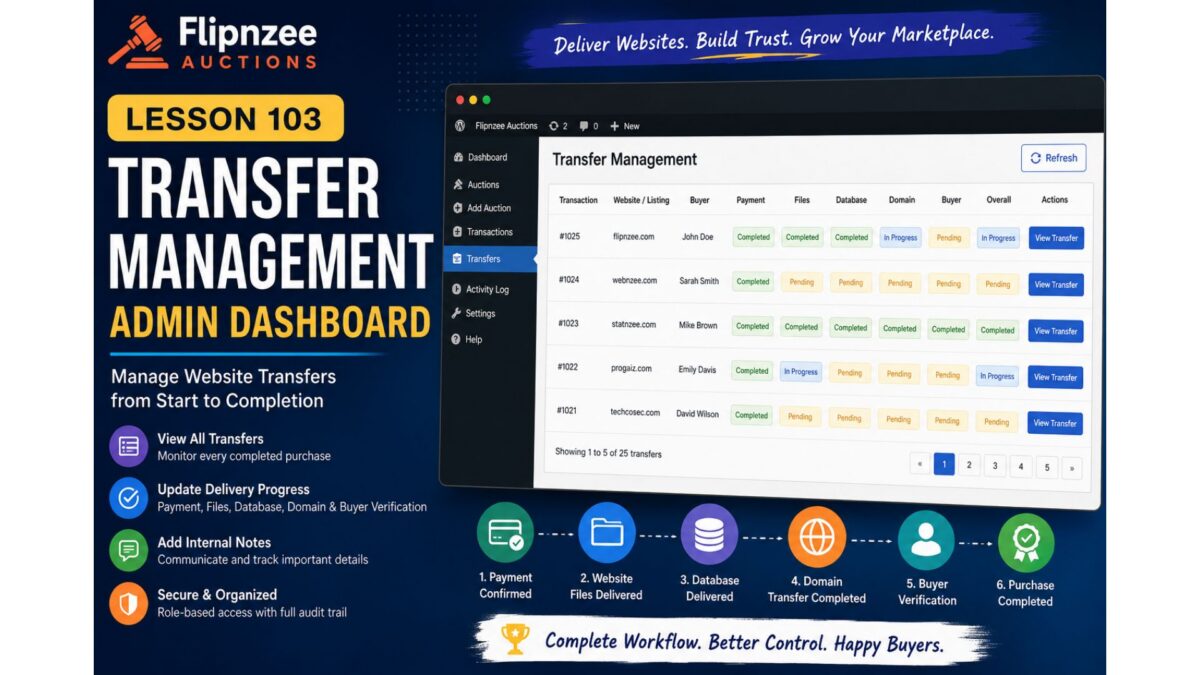
In this lesson, we will transform the placeholder Transfer Management page into a fully functional administration panel where administrators can monitor every website transfer, update delivery progress, communicate internally, and track completed purchases.

This lesson marks the beginning of the operational side of Flipnzee Auctions, moving beyond auctions and payments into the real business process of delivering digital assets to buyers.


Objectives

By the end of this lesson we will:

  • Build a Transfer Management dashboard
  • Display all active transfers
  • Show buyer and auction information
  • Display current transfer progress
  • Add transfer status badges
  • View transfer details
  • Add administrator notes
  • Update transfer progress
  • Automatically refresh transfer completion
  • Improve overall admin workflow

Why This Feature Matters

Unlike physical products, selling a website requires several manual steps:

  • Payment confirmation
  • Website files delivery
  • Database delivery
  • Domain transfer
  • DNS verification
  • Buyer confirmation

Without proper tracking, administrators can easily lose track of which purchases are waiting for which stage.

The Transfer Dashboard becomes the operational center for managing these deliveries.


New Admin Menu

The existing menu

Flipnzee Auctions

Dashboard
Auctions
Transactions
Transfers

will now have a fully functional Transfers page.


Transfer List Table

Instead of displaying a placeholder message, the page will show a table similar to:

TransactionWebsiteBuyerPaymentFilesDatabaseDomainBuyerOverall

Each row represents one completed purchase.


Status Badges

Every stage will display colored badges.

Examples:

Green

Completed

Yellow

Pending

Blue

In Progress

Red (future)

Problem

This allows administrators to understand the transfer state at a glance.


View Transfer Button

Each row will contain:

View Transfer

which opens a detailed transfer screen.


Transfer Details Page

The detail page will display:

Purchase Information

  • Transaction ID
  • Auction
  • Listing
  • Purchase price
  • Buyer

Delivery Progress

  • Payment
  • Website files
  • Database
  • Domain
  • Buyer verification

Internal Notes

Administrators can leave notes such as:

Domain unlock completed.

Waiting for buyer authorization code.

These notes remain private.


Update Transfer Status

Administrators will be able to update each stage using dropdowns.

Example:

Payment

Completed

Files

Completed

Database

Pending

Domain

In Progress

Buyer

Pending

Save Changes

A Save button will update the database using the Transfer Manager methods created in Lesson 102.


Automatic Completion Detection

Whenever every stage becomes Completed, the plugin will automatically recognize that the transfer is finished.

Future lessons will use this event to:

  • send emails
  • archive transfers
  • update statistics
  • generate reports

Security

All updates will include:

  • nonce verification
  • capability checks
  • input sanitization
  • prepared SQL statements

This keeps transfer data secure.


User Experience Improvements

The dashboard will provide administrators with:

  • faster delivery tracking
  • cleaner workflow
  • centralized management
  • fewer manual database edits
  • better visibility into active purchases

Files Expected to Change

Primary files:

admin/class-admin-transfer.php
includes/class-transfer-manager.php
flipnzee-auctions.php

Possibly:

assets/css/admin.css

for status badge styling.


Development Roadmap

At the end of Lesson 103, Flipnzee Auctions will include:

  • ✅ Auctions
  • ✅ Bidding
  • ✅ Winner determination
  • ✅ Transactions
  • ✅ Buyer dashboard
  • ✅ Purchase details
  • ✅ Transfer records
  • ✅ Transfer management dashboard

This completes another major operational module of the plugin and lays the groundwork for future enhancements such as email notifications, automated reminders, document uploads, and buyer-admin communication during the website transfer process.

In the next implementation lesson, we will replace the current placeholder Transfers page with a complete management interface, connect it to the Transfer Manager, and enable administrators to manage every stage of a website transfer directly from the WordPress dashboard.
Lesson 102 Implementation: Building the Transfer Management System and Completing the Auction Workflow

After completing the core auction engine in previous lessons, this lesson focused on one of the most important components of any digital asset marketplace—the post-auction transfer process. Winning an auction is only the beginning; the real business value comes from securely transferring the website, domain, database, and related assets to the buyer.

Lesson 102 introduces the foundation of the Flipnzee Transfer Management System, bringing the plugin much closer to supporting a complete end-to-end marketplace experience.


What We Built

This lesson concentrated on connecting the auction, transaction, and transfer systems into one seamless workflow.

The following major features were implemented.


1. Transfer Status Database

A dedicated database table was introduced to manage the progress of every completed transaction.

Each transfer record now stores:

  • Transaction ID
  • Payment status
  • Website files status
  • Database status
  • Domain transfer status
  • Buyer verification status
  • Internal notes
  • Created date
  • Updated date

This provides a permanent audit trail for every completed auction.


2. Transfer Manager Class

A brand-new manager class was created to centralize all transfer operations.

Major helper methods include:

  • Retrieve transfer table name
  • Create transfer record
  • Retrieve transfer information
  • Update individual transfer status
  • Update transfer notes
  • Update an entire transfer in a single database query
  • Determine completion status
  • Default transfer steps
  • Default transfer statuses
  • Status badge helper methods

Using a dedicated manager class keeps transfer-related business logic completely separate from auction and transaction logic.


3. Automatic Transfer Creation

Previously, auctions ended with a winning bidder and transaction record.

Lesson 102 extends this workflow by automatically preparing a transfer record immediately after a successful transaction.

The auction lifecycle now becomes:

Auction
      ↓
Winner Selected
      ↓
Transaction Created
      ↓
Transfer Record Created

This removes manual database work and prepares every purchase for delivery.


4. Purchase Details Enhancements

The My Purchase Details page was expanded considerably.

Buyers can now view:

  • Purchase information
  • Auction details
  • Payment information
  • Transfer progress
  • Status badges
  • Delivery steps
  • Helpful instructions
  • Support links

The purchase page now serves as a central dashboard throughout the delivery process.


5. Default Transfer Workflow

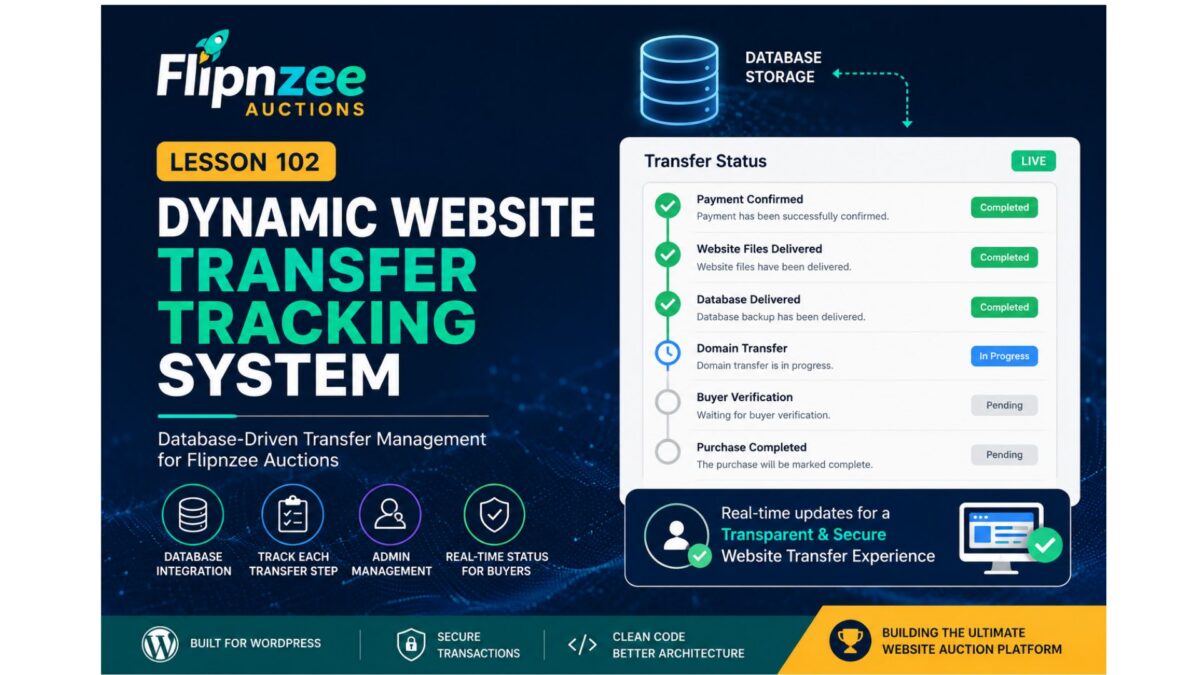
A standard transfer checklist was introduced.

Current workflow:

  • Payment Confirmed
  • Website Files Delivered
  • Database Delivered
  • Domain Transfer Completed
  • Buyer Verification
  • Purchase Completed

This provides a structured process that can be reused for every website sold on Flipnzee.


6. Transfer Status System

Each transfer stage now supports standardized status values.

Examples include:

  • Completed
  • Pending
  • In Progress

Centralizing status values makes future reporting, dashboards, and filtering much easier.


7. Status Badge Helpers

Status badge helper methods were added to simplify frontend rendering.

Instead of scattering CSS logic throughout templates, badge classes are now managed from a single location.

Benefits include:

  • Cleaner templates
  • Easier maintenance
  • Consistent styling
  • Simpler future theme customization

8. Countdown and Auction Improvements

During implementation several improvements were made to the auction experience.

These include:

  • Fixed current bid updates
  • Highest bidder updates correctly
  • Improved bid validation
  • Highest bidder cannot bid again until outbid
  • Countdown improvements
  • Anti-sniping logic remains intact

A small UI issue where “Auction Ends In” wrapped onto two lines was also resolved by shortening the label to:

Auction Ends

9. New Transfer Administration Module

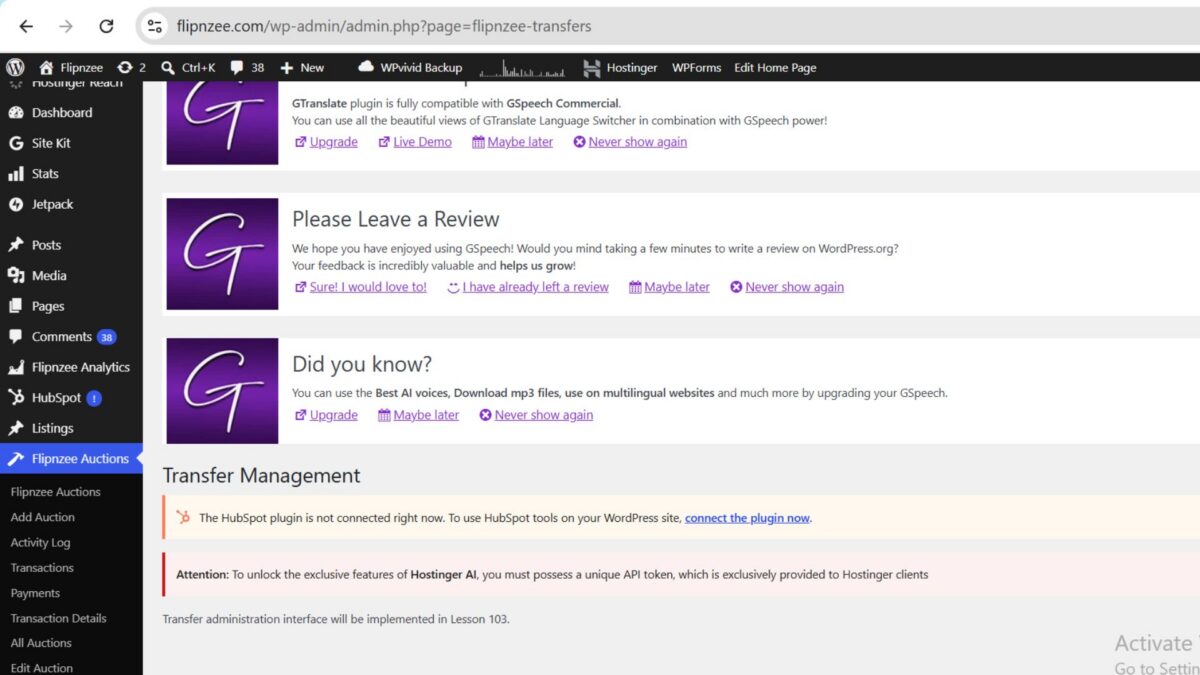
The first version of the Transfer Administration page was introduced.

A new admin menu now appears:

Flipnzee Auctions

├── Dashboard
├── All Auctions
├── Add Auction
├── Transactions
└── Transfers

Currently this page acts as the foundation for Lesson 103, where full transfer management functionality will be implemented.


10. Internal API Improvements

Several helper methods were added to simplify future development.

Examples include:

  • update_notes()
  • update_transfer()
  • get_transfer()
  • update_status()

These methods make future admin screens significantly easier to implement while reducing duplicate SQL queries.


Architecture Overview

The complete business workflow now looks like this:

Website Listed
        │
        ▼
Auction Starts
        │
        ▼
Users Place Bids
        │
        ▼
Auction Ends
        │
        ▼
Winner Determined
        │
        ▼
Transaction Created
        │
        ▼
Transfer Record Created
        │
        ▼
Buyer Views Purchase Details
        │
        ▼
Admin Manages Delivery
        │
        ▼
Purchase Completed

This represents one of the biggest architectural milestones of the Flipnzee Auctions plugin.


Challenges Faced

Like many real-world software projects, this lesson involved debugging and refinement alongside feature development.

Some of the issues addressed included:

  • Missing helper methods
  • PHP parse errors caused by misplaced braces
  • Incorrect placement of class methods
  • Database version synchronization
  • Bid update validation
  • Current bid synchronization
  • Transfer table integration
  • UI polishing for auction countdowns
  • Plugin activation errors caused by incorrect include paths

Each issue was resolved incrementally, reinforcing the importance of careful debugging and incremental testing during plugin development.


Benefits of the New Transfer System

The new architecture offers several practical advantages:

  • Dedicated transfer tracking
  • Better separation of responsibilities
  • Cleaner object-oriented design
  • Easier future enhancements
  • Improved buyer experience
  • Reduced manual administration
  • Complete audit trail for every purchase

Download Source Code

Download the starting version of the plugin before the lesson:

Download the completed version after this lesson:


What Comes Next

Lesson 103 will build upon the foundation created here.

Planned enhancements include:

  • Complete Transfer Management dashboard
  • Editable transfer statuses
  • Internal delivery notes
  • Admin update forms
  • Automatic progress synchronization
  • Activity log integration
  • Completion automation
  • Email notifications (future enhancement)

These additions will transform the placeholder Transfer page into a fully functional administrative workflow for managing completed website sales.


Conclusion

Lesson 102 marks another major milestone in the development of the Flipnzee Auctions plugin. By introducing a dedicated Transfer Management System and integrating it with auctions, transactions, and buyer purchase pages, the plugin now supports nearly the entire lifecycle of a digital asset sale.

While the administrative interface will be completed in Lesson 103, the underlying architecture established in this lesson provides a scalable and maintainable foundation for secure website transfers, improved buyer communication, and efficient post-auction management.

With auctions, transactions, and transfers now working together, Flipnzee Auctions moves significantly closer to becoming a complete marketplace solution for buying and selling websites, domains, and other digital assets.

Lesson 102: Dynamic Website Transfer Tracking System

Welcome to Lesson 102 of the Flipnzee Auctions development series.

In Lesson 101, we introduced the Transfer Manager and refactored the Purchase Details page to use centralized transfer data. While the interface became much cleaner, the transfer progress is still based on default placeholder values.

In this lesson, we will transform the transfer system into a real, transaction-specific tracking system.


Lesson Goal

Replace hardcoded transfer progress with database-driven transfer tracking.

Instead of every buyer seeing the same default progress, each completed purchase will have its own transfer record.


Why This Matters

Buying a website involves much more than simply winning an auction.

After payment, several important steps must be completed:

  • Website files delivered
  • Database exported
  • Domain transferred
  • Buyer verifies ownership
  • Purchase completed

Each transaction progresses independently.

Therefore, every purchase requires its own transfer record.


Current Situation

Currently the Transfer Manager returns:

array(

    'payment'  => 'Completed',

    'files'    => 'Pending',

    'database' => 'Pending',

    'domain'   => 'Pending',

    'buyer'    => 'Pending',

);

This means every buyer sees identical transfer progress.


New Architecture

We will introduce a dedicated database table:

wp_flipnzee_transfer_status

Each row represents one website transfer.


Proposed Database Structure

ColumnPurpose
idPrimary Key
transaction_idLinks to transaction
payment_statusPayment confirmation
files_statusWebsite files
database_statusDatabase transfer
domain_statusDomain transfer
buyer_statusBuyer verification
notesAdmin notes
updated_atLast update

One Transfer Per Transaction

Each completed purchase will have exactly one transfer record.

Example:

Transaction

ID = 17

Transfer Record

Transaction ID = 17

Payment = Completed

Files = Completed

Database = Completed

Domain = In Progress

Buyer = Pending

New Transfer Manager Responsibilities

The manager will no longer simply return default arrays.

Instead it will become responsible for:

Create transfer record

Load transfer record

Update transfer record

Return transfer progress

Return status badges

Return workflow steps

New Methods

The Transfer Manager will gradually gain methods such as:

create_transfer()
get_transfer()
update_transfer()
get_transfer_status()

These methods will hide database logic from the user interface.


Purchase Details Improvements

The Purchase Details page will no longer use:

Flipnzee_Transfer_Manager::get_default_status();

Instead it will call:

Flipnzee_Transfer_Manager::get_transfer(
    $transaction['id']
);

This allows every buyer to see their own progress.


Administrator Workflow

After an auction is completed, the administrator will eventually be able to update transfer progress.

Example:

✓ Payment Confirmed

✓ Website Files Delivered

✓ Database Delivered

○ Domain Transfer

○ Buyer Verification

Every update will immediately appear on the buyer’s Purchase Details page.


Designed for Flipnzee.com

Currently Flipnzee.com sells only in-house websites.

Therefore, the administrator controls every transfer.

This makes the workflow straightforward and ensures a consistent buyer experience.


Future Marketplace Compatibility

Although Flipnzee currently sells only its own digital assets, the plugin is fully open source.

Future developers may extend it into a marketplace where multiple sellers manage their own transfers.

Because transfer management is isolated inside the Transfer Manager, those future enhancements can be implemented without redesigning the Purchase Details page.


Benefits

By completing Lesson 102 we will:

  • Replace hardcoded transfer progress.
  • Store transfer records in the database.
  • Display transaction-specific progress.
  • Build the foundation for admin transfer management.
  • Improve scalability.
  • Keep presentation separated from business logic.

Files Expected to Change

includes/
    class-transfer-manager.php

includes/
    class-database-migration.php

includes/
    class-my-purchase-details.php

admin/
    (future admin transfer screen)

flipnzee-auctions.php

Learning Outcomes

After completing Lesson 102 you will understand:

  • Designing relational database tables.
  • One-to-one relationships between transactions and transfers.
  • Encapsulating database operations inside manager classes.
  • Separating business logic from presentation.
  • Building scalable WordPress plugin architecture.

Roadmap

Lesson 102 begins the second phase of the Flipnzee Auctions plugin.

The project is now moving beyond auction bidding into complete post-sale website transfer management, bringing the plugin closer to becoming a full-featured platform for buying and selling websites and digital assets.

The transfer system we build now will serve as the foundation for future features such as administrator dashboards, transfer timelines, notifications, document sharing, and eventual multi-seller marketplace support.

Lesson 101 Implementation: Introducing the Transfer Manager & Refactoring the Purchase Details Page

Welcome to Lesson 101 of the Flipnzee Auctions development series. In this lesson, we take a significant step toward making the website transfer workflow cleaner, more maintainable, and easier to extend in future releases.

Rather than continuing to place transfer-related logic directly inside the Purchase Details page, we introduce a dedicated Transfer Manager class. This refactoring follows object-oriented programming principles and prepares the plugin for a fully dynamic transfer management system.


Lesson Objectives

During this lesson we aimed to:

  • Create a dedicated Transfer Manager class.
  • Centralize transfer workflow data.
  • Refactor the Purchase Details page.
  • Reduce duplicated code.
  • Improve maintainability.
  • Prepare for database-driven transfer tracking.

Why This Refactoring Was Needed

As the Flipnzee Auctions plugin grew, the Purchase Details page gradually became responsible for multiple tasks:

  • Loading transaction information
  • Rendering purchase details
  • Managing transfer progress
  • Displaying status badges
  • Showing buyer guidance

Although functional, this approach mixed business logic with presentation.

To improve long-term maintainability, we extracted the transfer-related functionality into its own manager class.


Introducing Flipnzee_Transfer_Manager

A new class named:

Flipnzee_Transfer_Manager

was introduced.

Its responsibility is to manage all transfer-related information independently from the user interface.

Initially, it provides three centralized methods:

get_default_steps()

Returns the default website transfer workflow.

get_default_status()

Returns the default transfer status values.

get_status_badges()

Returns the CSS classes used for status badges.


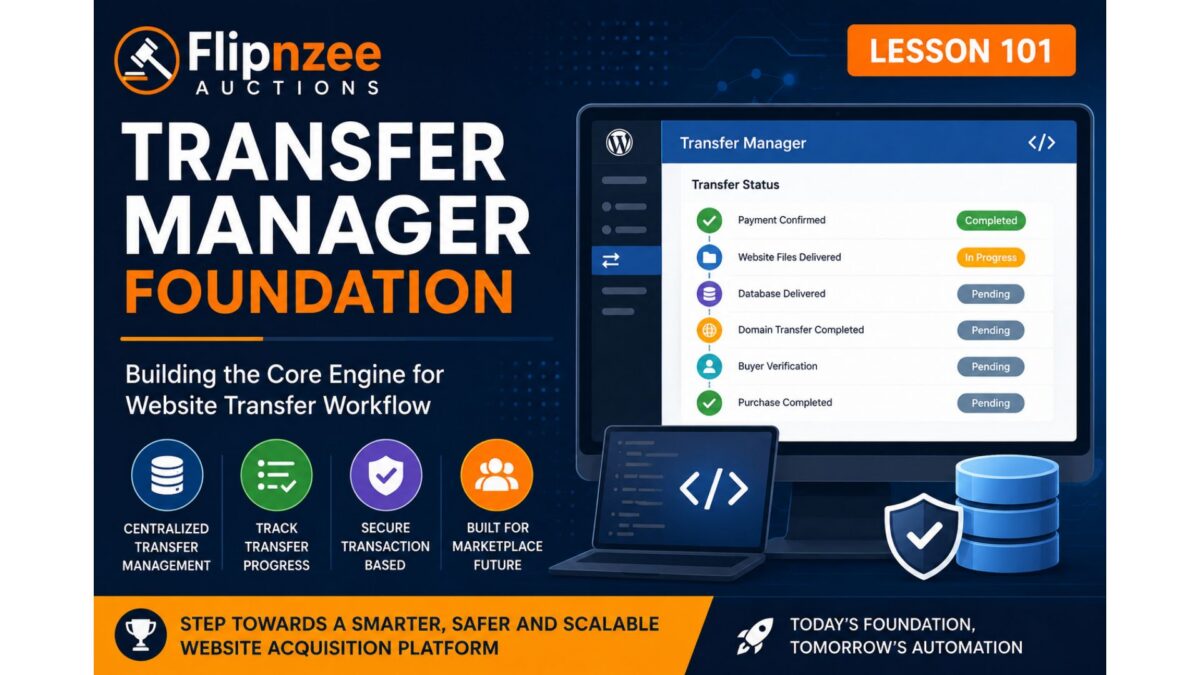
Default Transfer Workflow

The transfer manager now defines a standard website transfer process consisting of:

  • Payment Confirmed
  • Website Files Delivered
  • Database Delivered
  • Domain Transfer Completed
  • Buyer Verification
  • Purchase Completed

By centralizing these steps, the Purchase Details page no longer needs to manually construct workflow arrays.


Purchase Details Refactoring

The Purchase Details page was substantially cleaned up.

Instead of containing hardcoded arrays, it now simply requests data from the Transfer Manager.

For example, instead of:

$transfer_steps = array(
    ...
);

the page now uses:

$transfer_steps =
    Flipnzee_Transfer_Manager::get_default_steps();

The same approach is used for transfer statuses and status badges.


Cleaner Separation of Responsibilities

After the refactoring:

Transfer Manager

Responsible for:

  • transfer workflow
  • transfer status
  • badge mappings

Purchase Details

Responsible only for:

  • loading transaction data
  • displaying purchase information
  • rendering the user interface

This greatly improves readability.


Improvements to the Purchase Details Page

Several improvements were made:

  • Purchase Summary Card
  • Purchase Timeline
  • Transaction Details Table
  • Purchase Information
  • Transfer Status
  • Next Steps
  • Purchase Notes
  • Dashboard Action Buttons

Each section is now more clearly organized.


Reduced Code Duplication

Earlier versions contained repeated transfer arrays and duplicated HTML sections.

These duplicates were removed.

The resulting code is significantly cleaner and easier to maintain.


Improved Maintainability

One major advantage of this architecture is that future changes only need to be made in one place.

For example, adding another transfer step later requires modifying only the Transfer Manager rather than every page displaying transfer information.


Foundation for Future Lessons

Although the Transfer Manager currently returns default values, this is only the first stage.

Future lessons will replace these defaults with real database records.

This means the Purchase Details page will automatically display live transfer progress without requiring significant changes to its rendering logic.


Current Flipnzee Workflow

At Flipnzee.com, the auction platform currently sells only in-house websites and digital assets.

The transfer workflow therefore reflects the internal process used by the Flipnzee team after an auction is won.

However, because the plugin is fully open source, developers may extend it into a complete marketplace supporting multiple independent sellers.

The Transfer Manager has been designed with that future flexibility in mind.


Benefits Achieved

By the end of Lesson 101 we have:

  • Introduced a dedicated Transfer Manager class.
  • Improved separation of concerns.
  • Reduced duplicated code.
  • Centralized transfer workflow logic.
  • Simplified the Purchase Details page.
  • Improved WordPress Coding Standards compliance.
  • Established a solid architectural foundation for future transfer features.

Download Source Code

Download the starting version of the plugin before the lesson:

Download the completed version after this lesson:


Looking Ahead

In Lesson 102, we will transform the Transfer Manager from a provider of default values into a fully dynamic transfer tracking system.

Instead of hardcoded statuses, transfer progress will be stored and retrieved from the database, allowing administrators to update website transfers while buyers see real-time progress directly within their Purchase Details page.

This marks the beginning of a much more powerful post-auction management system and moves Flipnzee Auctions closer to becoming a complete website transfer platform.

Lesson 101 — Implementing the Transfer Manager Foundation

Introduction

As the Flipnzee Auctions plugin continues to evolve into a professional platform for buying and selling websites, it is time to separate transfer management from the purchase details page.

Until Lesson 100, transfer progress was represented using hardcoded arrays inside the buyer purchase details page. While this allowed us to design and test the user interface, it is not suitable for a production-ready application.

Beginning with Lesson 101, we introduce a dedicated Transfer Manager class. This new class will become the central location for managing the website ownership transfer process after an auction has been won.

This architectural improvement keeps business logic separate from presentation, follows object-oriented design principles, and prepares the plugin for future marketplace support.


Objectives

In this lesson we will:

  • Create a dedicated Transfer Manager class.
  • Register the new class using the plugin loader.
  • Centralize transfer-related logic.
  • Prepare helper methods for transfer status retrieval.
  • Prepare helper methods for transfer progress updates.
  • Keep the purchase page fully functional.
  • Lay the groundwork for future admin and seller transfer workflows.

Why Create a Transfer Manager?

Currently, the purchase details page performs several responsibilities:

  • Displays purchase summary
  • Displays transfer timeline
  • Displays transfer status
  • Displays purchase notes
  • Displays buyer guidance

In addition, it currently stores transfer information directly inside the page itself.

That violates one of the most important software engineering principles:

A class should have one primary responsibility.

The purchase page should display information.

The Transfer Manager should manage transfer information.


New Architecture

Instead of this:

Purchase Details Page

├── Purchase Summary
├── Transfer Timeline
├── Transfer Status
├── Hardcoded Transfer Arrays
├── Notes
└── Buttons

We will move toward:

Purchase Details Page
        │
        │
        ▼
Flipnzee_Transfer_Manager
        │
        ├── Get Transfer Status
        ├── Update Transfer Status
        ├── Generate Timeline
        ├── Verify Completion
        └── Future Notifications

This dramatically improves maintainability.


Why Not Use Listing Meta?

During Lesson 100 we considered storing transfer progress using WordPress post meta attached to the listing.

However, that approach has an important limitation.

A website listing may eventually be sold more than once, particularly if someone uses the open-source Flipnzee Auctions plugin to build a marketplace where multiple sellers list digital assets.

Transfer progress belongs to an individual transaction, not the listing itself.

Therefore, future lessons will associate transfer data with transactions rather than listings.

This design also works perfectly for Flipnzee.com’s current business model, where only in-house websites are sold.


New File

A new class will be introduced:

includes/
    class-transfer-manager.php

Initially, the class will be lightweight.

Future lessons will gradually expand its capabilities.


Responsibilities of the Transfer Manager

Eventually this class will handle:

  • Website files delivered
  • Database delivered
  • Domain transfer completed
  • Buyer verification
  • Seller confirmation
  • Transfer completion
  • Admin verification
  • Transfer history
  • Transfer notes
  • Automatic progress calculations
  • Future email notifications

Planned Public Methods

The class will gradually expose methods similar to:

get_transfer_status()

update_transfer_status()

get_transfer_steps()

is_transfer_complete()

get_transfer_percentage()

add_transfer_note()

get_transfer_history()

These methods keep transfer logic centralized and reusable throughout the plugin.


Benefits

Creating a dedicated Transfer Manager provides several advantages:

  • Cleaner object-oriented architecture
  • Easier maintenance
  • Smaller purchase details page
  • Better code reuse
  • Easier testing
  • Future marketplace compatibility
  • Simpler notification integration
  • Cleaner admin interface development

Development Roadmap

Lesson 101

  • Create Transfer Manager class
  • Register with loader
  • Prepare architecture

Lesson 102

  • Implement transaction-based transfer status retrieval

Lesson 103

  • Allow admin to update transfer progress

Lesson 104

  • Buyer dashboard displays live transfer progress

Lesson 105

  • Seller transfer workflow

Lesson 106

  • Transfer completion verification

Lesson 107

  • Transfer history

Lesson 108

  • Email notifications

Expected Outcome

After completing Lesson 101, the Flipnzee Auctions plugin will have a dedicated Transfer Manager integrated into the plugin architecture.

Although the buyer interface will continue using placeholder transfer data temporarily, the plugin will now have a solid foundation for implementing a fully dynamic, transaction-driven website transfer workflow in subsequent lessons.

This marks an important architectural milestone, transitioning the project from frontend presentation enhancements toward a scalable backend transfer management system.

Lesson 100 Implementation — Building the Website Transfer Workflow Foundation

After completing the buyer purchase dashboard in the previous lessons, the Flipnzee Auctions plugin now enters an important new development phase. While the buyer can already view purchase details, timelines, reference numbers, payment information, and transfer guidance, the transfer process itself is still based on placeholder values.

Lesson 100 focuses on preparing the architecture that will eventually power real website transfers.

Rather than immediately introducing complex database logic, this lesson establishes a clean foundation that future lessons can build upon. The objective is to separate presentation from business logic while keeping the current implementation simple, stable, and easy to understand.

Objectives

During this lesson we improved the purchase details page and prepared it for future dynamic transfer management.

Major goals included:

  • Display a professional purchase summary card
  • Improve the transfer timeline
  • Add transfer status information
  • Display purchase reference number
  • Show purchase date and purchase time separately
  • Display payment method
  • Introduce purchase notes
  • Add buyer guidance cards
  • Create next-step checklist
  • Keep transfer data temporarily hardcoded while backend architecture is being designed

Purchase Summary

The purchase page now begins with a clean summary card displaying important information at a glance.

The buyer can immediately see:

  • Purchased website
  • Current purchase status
  • Winning bid
  • Purchase date
  • Direct link to the listing

This significantly improves usability compared to viewing raw table data first.


Transfer Timeline

A visual timeline was introduced showing the expected stages of a website acquisition.

Current stages include:

  • Payment Confirmed
  • Website Files Delivered
  • Database Delivered
  • Domain Transfer Completed
  • Buyer Verification
  • Purchase Completed

Although currently driven by placeholder values, the interface is now ready for dynamic updates.


Purchase Information Cards

Additional informational panels were added beneath the transaction details.

These explain:

Buyer Protection

How Flipnzee verifies transfers before marking a purchase complete.

Ownership Transfer

Explains that website files, database and domain transfer instructions will be supplied.

Need Help?

Provides guidance if buyers experience issues during the transfer process.

These cards improve transparency while reducing repetitive support questions.


Transfer Status Section

A dedicated Transfer Status card has been introduced.

It currently displays:

  • Payment
  • Website Files
  • Database
  • Domain
  • Buyer Verification

Each value is presently hardcoded using placeholder data such as:

  • Completed
  • Pending

This section will later become fully dynamic.


Purchase Notes

A Purchase Notes section was introduced to provide important reminders to buyers after completing an auction.

Examples include:

  • Verify all transferred assets.
  • Change passwords immediately after receiving the website.
  • Review hosting and registrar access.
  • Contact support if any issue occurs.

This creates a much more professional post-purchase experience.


Next Steps Checklist

The buyer dashboard now includes a clear checklist describing the expected transfer workflow.

Typical items include:

  • ✓ Payment confirmed
  • Receive website files
  • Receive database
  • Receive domain transfer
  • Verify website
  • Change passwords
  • Confirm successful transfer

This checklist prepares buyers for the remaining transfer process instead of leaving them uncertain about what happens after payment.


Purchase Reference Number

A unique purchase reference was added to every transaction.

Example:

FLP-2026-00003

This makes customer support significantly easier since buyers can reference a human-friendly transaction ID instead of an internal database ID.


Purchase Date and Time

Instead of displaying a raw timestamp, the purchase details now separate:

  • Purchase Date
  • Purchase Time

This provides a cleaner and more readable interface while respecting the site’s configured WordPress date and time formats.


Payment Method

The purchase page now displays the payment method used for the transaction.

For current testing this defaults to:

Manual

As additional gateways such as Escrow.com, Stripe, PayPal, Wise and cryptocurrency are implemented, this field will automatically display the correct payment method.


Architecture Decision

One important architectural discussion took place during this lesson.

Initially, transfer progress was considered for storage using WordPress post meta attached to the listing.

However, after reviewing the long-term design, a better approach emerged.

Website transfer progress belongs to an individual transaction—not the listing itself.

A single website may eventually be sold multiple times over its lifetime, especially when the plugin is used as a marketplace by third-party developers.

For that reason, transfer management will be implemented using a dedicated Flipnzee_Transfer_Manager class and transaction-based data in upcoming lessons.

This decision avoids future refactoring while keeping the plugin scalable.


Why Placeholder Data Was Retained

Instead of prematurely introducing backend logic, Lesson 100 intentionally keeps transfer information hardcoded.

For example:

$transfer_status = array(
    'payment' => 'Completed',
    'files' => 'Pending',
    'database' => 'Pending',
    'domain' => 'Pending',
    'buyer' => 'Pending',
);

This allows the frontend interface to be fully designed and tested before connecting it to live transfer data.

Separating interface development from backend implementation results in cleaner, more maintainable code.


Current Status

By the end of Lesson 100, the Flipnzee Auctions buyer purchase page now provides:

  • Professional purchase summary
  • Purchase reference number
  • Purchase date and time
  • Payment method
  • Purchase information cards
  • Transfer timeline
  • Transfer status panel
  • Purchase notes
  • Buyer next-step checklist
  • Improved user experience
  • Clean foundation for future transfer automation

Download Source Code

Download the starting version of the plugin before the lesson:

Download the completed version after this lesson:


What Comes Next?

Lesson 101 will begin implementing the backend transfer architecture by introducing a dedicated Flipnzee_Transfer_Manager class.

This class will eventually become responsible for:

  • Managing website transfer progress
  • Updating transfer stages
  • Storing transaction-specific transfer data
  • Powering dynamic buyer dashboards
  • Supporting future marketplace implementations while remaining fully compatible with Flipnzee.com’s current in-house website sales model.

Lesson 100 therefore marks the transition from building the buyer interface to implementing the business logic that powers a complete website acquisition workflow.

Lesson 100 – Admin Transfer Manager (Transaction Workflow Management)

Objective

In Lesson 99, we created a professional Buyer Purchase Details page. However, the transfer timeline and checklist are still driven by static arrays. In this lesson, we will make the transfer process administrator-controlled, allowing the Flipnzee admin to update website transfer progress directly from the Transaction Details page.

Although Flipnzee.com currently sells only its own in-house websites, this architecture is intentionally designed so that developers using the open-source Flipnzee Auctions plugin can later extend it into a full multi-vendor marketplace.


Why This Lesson?

A completed payment does not mean the transaction is finished.

Website sales typically involve multiple stages:

  • Payment received
  • Website files shared
  • Database delivered
  • Domain transfer initiated
  • Buyer verification
  • Transaction completed

These stages should be manageable from the admin panel rather than being hard-coded.


Objectives

By the end of this lesson we will:

  • Add a Transfer Manager section to Transaction Details.
  • Allow administrators to update transfer progress.
  • Save transfer progress securely.
  • Automatically update the Buyer Purchase Details page.
  • Prepare the plugin for future notifications and email updates.

Current Workflow

Auction Ends
        │
        ▼
Transaction Created
        │
        ▼
Buyer Purchase Page
        │
        ▼
Static Timeline

New Workflow

Auction Ends
        │
        ▼
Transaction Created
        │
        ▼
Admin Transfer Manager
        │
        ▼
Transfer Progress Saved
        │
        ▼
Buyer Purchase Details
        │
        ▼
Dynamic Timeline

Database Strategy

Rather than adding numerous columns to the transactions table, we will use WordPress transaction meta (or a dedicated metadata layer in future lessons).

Each transaction will eventually store values such as:

payment_confirmed

website_files_delivered

database_delivered

domain_transfer_completed

buyer_verified

purchase_completed

This keeps the system extensible without modifying the main transaction table whenever new workflow steps are introduced.


Admin Interface

Inside:

Flipnzee Auctions → Transactions → Transaction Details

we will introduce a new card:

Transfer Manager

☑ Payment Confirmed

☐ Website Files Delivered

☐ Database Delivered

☐ Domain Transfer Completed

☐ Buyer Verified

☐ Purchase Completed

[ Save Progress ]

Only administrators will have permission to modify these values.


Buyer Experience

The buyer page will automatically reflect the saved progress.

Instead of displaying a static checklist, buyers will see:

✓ Payment Confirmed

✓ Website Files Delivered

✓ Database Delivered

○ Domain Transfer Pending

○ Buyer Verification

○ Completed

No manual edits to frontend templates will be required.


Security

This lesson introduces several important security practices:

  • Administrator capability checks
  • Nonce verification
  • Sanitization
  • Validation of transaction IDs
  • Secure saving of transfer data

Only authorized administrators will be able to update transfer progress.


Why This Fits Flipnzee

Because Flipnzee currently sells only its own websites, the transfer workflow is managed entirely by the site administrator.

Typical workflow:

Auction Won
      │
Payment Received
      │
Website ZIP Sent
      │
Database Sent
      │
Domain Transfer
      │
Buyer Confirms
      │
Completed

This closely matches how professional website acquisitions are handled.


Benefits for Marketplace Developers

Developers using the open-source Flipnzee Auctions plugin can later replace the administrator with individual sellers.

The exact same workflow can become:

Seller uploads files

↓

Buyer downloads files

↓

Seller starts domain transfer

↓

Buyer verifies

↓

Transaction completed

No redesign of the buyer interface will be necessary.


Files Planned for Modification

This lesson will primarily work with:

includes/class-transaction-manager.php

includes/class-my-purchase-details.php

includes/class-loader.php

assets/css/admin.css

Additional helper methods may be introduced if required.


Skills Covered

  • WordPress admin forms
  • Secure POST handling
  • Nonce verification
  • Capability checks
  • Updating transaction metadata
  • Dynamic frontend rendering
  • Admin workflow design
  • Separation of presentation and business logic

Expected Outcome

By the end of Lesson 100, administrators will have a dedicated Transfer Manager that controls the progress of every website sale. Buyers will immediately see real-time updates to their purchase page, replacing the static checklist introduced in Lesson 99.

This lesson marks an important transition in the Flipnzee Auctions plugin—from presenting purchase information to actively managing the post-sale website transfer process. It establishes the foundation for future enhancements such as automated notifications, secure file delivery, domain transfer tracking, and Escrow.com integration while remaining fully compatible with Flipnzee’s current in-house sales model and future marketplace implementations.

Lesson 99 Implementation – Buyer Purchase Details Page & Purchase Journey

After completing the Buyer Dashboard in Lesson 98, the next logical step was to provide buyers with a dedicated page where they could review every aspect of a completed purchase. Simply listing purchased websites is not sufficient for a professional auction platform. Buyers need a central place to verify transaction information, monitor transfer progress, understand the next steps, and quickly access important resources.

Lesson 99 focused on designing and implementing a comprehensive Buyer Purchase Details page within the Flipnzee Auctions plugin. The implementation lays the foundation for a transparent website transfer workflow while remaining flexible enough for both Flipnzee’s own business model and future marketplace implementations by other developers.


Objectives

The primary goals of this lesson were:

  • Create a dedicated Purchase Details shortcode.
  • Securely display transaction information only to the purchasing user.
  • Build a professional purchase summary card.
  • Display transaction metadata in an organized table.
  • Introduce a visual purchase timeline.
  • Add buyer guidance and protection information.
  • Present transfer instructions and recommended next steps.
  • Improve overall user experience through frontend styling.

1. Secure Transaction Validation

The Purchase Details page begins by ensuring that only authenticated buyers can access purchase information.

The implementation validates:

  • Logged-in user
  • Transaction ID from the URL
  • Ownership of the transaction
  • Existence of the transaction record

Example:

$transaction_id = isset( $_GET['transaction_id'] )
	? absint( $_GET['transaction_id'] )
	: 0;

if ( ! $transaction_id ) {

	return '<p>No purchase selected.</p>';
}

The database query also confirms that the transaction belongs to the current user before displaying any information.


2. Purchase Summary Card

Instead of immediately showing raw transaction data, the page now opens with a visually appealing purchase summary card containing:

  • Website title
  • Featured image
  • Purchase status badge
  • Winning bid
  • Purchase date
  • Quick “View Listing” button

This provides buyers with an immediate overview of their purchase.


3. Transaction Reference

A unique purchase reference is generated for every completed transaction.

Example:

FLIP-2026-000003

The reference helps buyers and administrators identify transactions during support conversations without relying solely on numeric IDs.


4. Transaction Metadata

Additional metadata was added to make the page feel more professional.

Displayed information includes:

  • Transaction ID
  • Purchase Reference
  • Purchase Date
  • Purchase Time
  • Payment Method
  • Auction Title
  • Winning Bid
  • Purchase Status
  • Original Purchase Timestamp

Dates and times are displayed using WordPress localization functions.


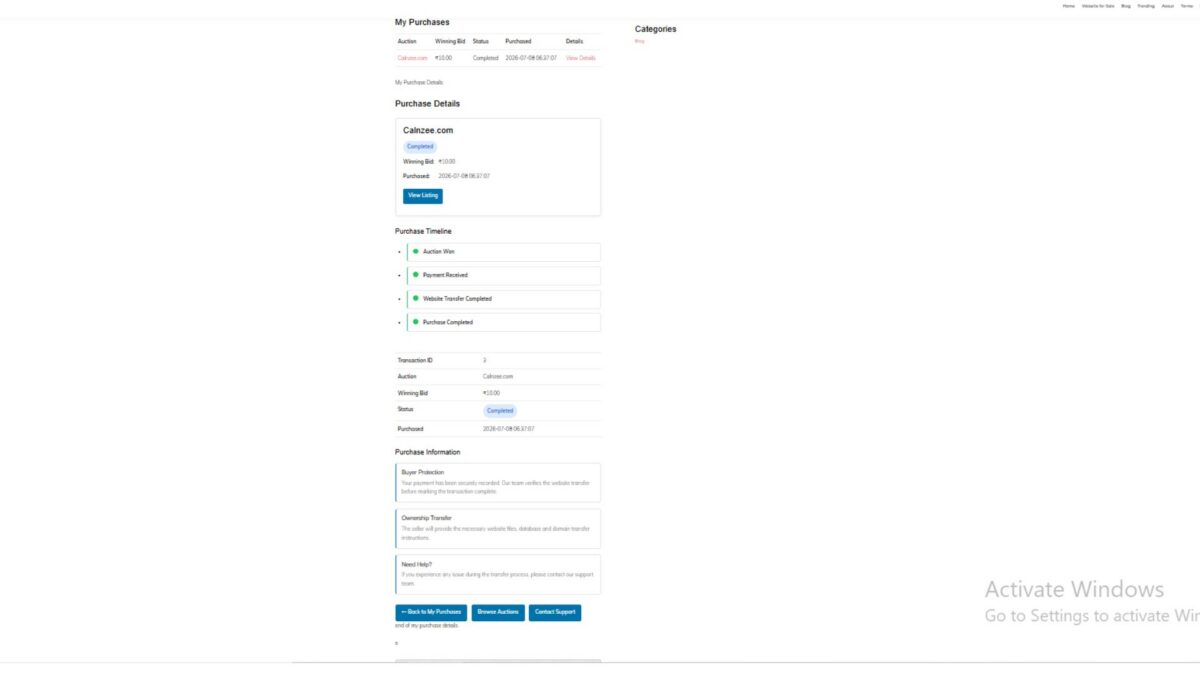
5. Purchase Timeline

A simple timeline visually communicates the major milestones of the purchase process.

Current implementation includes:

  • Auction Won
  • Payment Received
  • Website Transfer Completed
  • Purchase Completed

The timeline prepares the plugin for future workflow automation.


6. Purchase Information Cards

To improve buyer confidence, several informational cards were introduced.

These explain topics such as:

Buyer Protection

Explains that payment has been securely recorded and that the transfer process is monitored.

Ownership Transfer

Provides an overview of the expected transfer of website files, database, and domain ownership.

Need Help?

Directs buyers toward support if they encounter problems during the transfer process.


7. Transfer Checklist

A dedicated “Next Steps” section guides buyers through the website acquisition process.

The current checklist includes items such as:

  • Payment confirmed
  • Receive website files
  • Receive database
  • Domain transfer
  • Verify website
  • Change passwords
  • Confirm successful transfer

Although currently driven by a static array, the structure is intentionally designed so future lessons can connect it to dynamic transaction data managed by administrators.


8. Purchase Action Buttons

Quick navigation buttons were added to improve usability.

Buyers can easily:

  • Return to My Purchases
  • Browse additional auctions
  • Contact Support

This reduces unnecessary navigation and provides convenient access to common actions.


9. Status Badges

Purchase status is displayed using colored badges instead of plain text.

Examples include:

  • Completed
  • Pending
  • Processing

The CSS implementation allows additional statuses to be introduced later without modifying the page layout.


10. Frontend Styling

Several reusable frontend components were added, including:

  • Purchase summary card
  • Timeline styling
  • Information cards
  • Success badges
  • Action buttons
  • Transfer checklist
  • Responsive spacing and typography

The page now matches the overall design language of the Buyer Dashboard introduced in Lesson 98.


Testing Performed

The implementation was tested using completed auction transactions.

The following functionality was verified:

  • Buyer authentication
  • Transaction ownership validation
  • Transaction lookup
  • Purchase summary display
  • Reference generation
  • Timeline rendering
  • Purchase information cards
  • Action buttons
  • Responsive frontend layout
  • URL-based transaction loading

Challenges Encountered

Several development issues were resolved during implementation:

  • Missing shortcode registration
  • Transaction ID validation
  • URL parameter handling
  • Purchase ownership verification
  • PHP syntax errors caused by mixed PHP and HTML
  • Duplicate HTML table elements
  • Status badge styling
  • Responsive layout adjustments
  • Frontend CSS refinements

These debugging sessions significantly improved the overall code quality and reinforced the importance of validating PHP syntax throughout development.


Lessons Learned

Lesson 99 demonstrated that a successful website auction platform requires much more than simply recording completed transactions.

A dedicated Purchase Details page:

  • improves buyer confidence,
  • provides transparency during ownership transfer,
  • reduces support requests,
  • prepares the system for future automation,
  • and creates a professional post-purchase experience comparable to commercial digital asset marketplaces.

The lesson also highlighted the value of separating presentation from future business logic by designing components that can later be connected to dynamic transaction metadata.

Download Source Code

Download the starting version of the plugin before the lesson:

Download the completed version after this lesson:


Looking Ahead

While the Purchase Details page is now functionally complete, several opportunities remain for future enhancements.

Planned improvements include:

  • Dynamic transfer progress managed by administrators
  • Buyer notifications
  • Secure file delivery
  • Domain transfer tracking
  • Private buyer-admin messaging
  • Escrow workflow integration
  • Downloadable purchase documents

These features will gradually transform the Purchase Details page into a complete digital asset transfer portal.


Conclusion

Lesson 99 represents a major milestone in the Flipnzee Auctions plugin. Buyers now have a centralized location where they can review completed purchases, understand the transfer process, and access important transaction information.

Although Flipnzee.com currently sells only in-house websites, the implementation has been designed with extensibility in mind. Developers who adopt the open-source Flipnzee Auctions plugin for marketplace scenarios will be able to build upon this foundation, replacing static workflow elements with dynamic seller-managed processes while retaining the same user experience.

The result is a significantly more polished, trustworthy, and scalable post-purchase system that strengthens both the current Flipnzee platform and the plugin’s long-term roadmap.

Lesson 99: Building the Purchase Details Page

In the previous lesson, we introduced the My Purchases page, allowing buyers to view all the websites they have successfully won through Flipnzee Auctions. While that page provides a useful overview, buyers also need access to detailed information about each individual purchase.

In this lesson, we will build the Purchase Details Page, which will serve as the central location for managing a purchased website throughout its lifecycle—from winning the auction to completing payment and eventually transferring ownership.


Why a Purchase Details Page?

Purchasing a website involves multiple stages beyond simply winning an auction. Buyers often need to review:

  • Winning bid amount
  • Auction information
  • Payment status
  • Transaction details
  • Domain transfer progress
  • Administrative updates

Rather than displaying all this information on the Purchases page, it is better organized within a dedicated details page.

This modular approach keeps the user interface clean while allowing each purchase to have its own management page.


Objectives

At the end of this lesson, buyers should be able to:

  • View detailed information about a purchased website
  • Verify purchase ownership
  • Review transaction information
  • Monitor payment status
  • Access support resources
  • Prepare for future transfer management

Creating a Dedicated Purchase Details Class

A new class will be introduced:

includes/class-my-purchase-details.php

Separating purchase details into its own class keeps the plugin organized and follows the object-oriented architecture established throughout previous lessons.


Registering a New Shortcode

The page will be rendered using a dedicated shortcode.

[flipnzee_purchase_details]

This allows administrators to place the purchase details page anywhere within WordPress while maintaining complete separation between presentation and business logic.


Secure Purchase Validation

Security remains one of the most important aspects of the marketplace.

Before displaying any purchase information, the plugin should verify:

  • The visitor is logged in.
  • A valid purchase ID has been provided.
  • The purchase actually exists.
  • The logged-in user owns that purchase.

If any validation fails, an appropriate message should be displayed instead of exposing sensitive information.

Example:

Purchase not found.

or

You do not have permission to view this purchase.

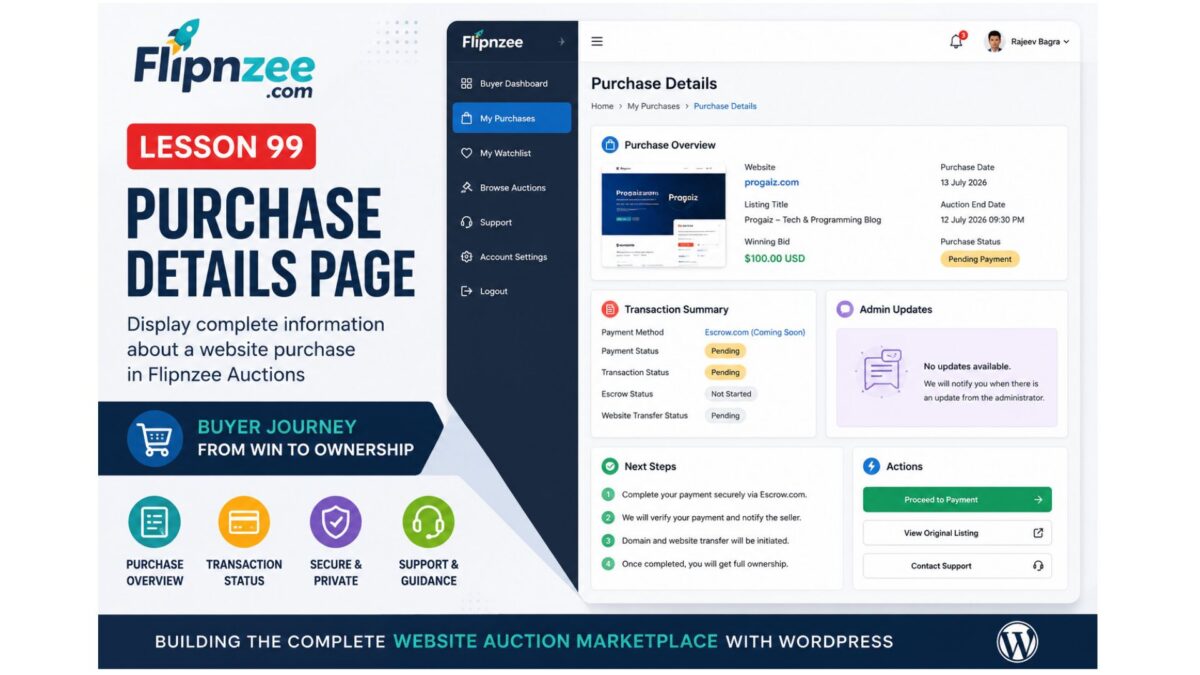
Purchase Overview

The top section of the page will summarize the purchase.

Example fields include:

  • Website Name
  • Listing Title
  • Winning Bid
  • Purchase Date
  • Auction End Date
  • Purchase Status

This provides buyers with an immediate overview without requiring them to search through multiple pages.


Transaction Summary

The page will also display transaction-related information.

Initially, this section will include placeholders for:

  • Payment Method
  • Payment Status
  • Transaction Status
  • Escrow Status
  • Website Transfer Status

As future lessons introduce payment gateways and Escrow.com integration, these fields will automatically become more informative.


Administrative Updates

Marketplace administrators may occasionally need to communicate with buyers regarding:

  • Payment verification
  • Required documents
  • Domain transfer
  • Hosting migration
  • Additional instructions

A dedicated section will be reserved for these updates.

Initially it may simply display:

No updates available.

Later this area will become a communication hub between administrators and buyers.


Buyer Guidance

Many first-time buyers may be unfamiliar with the website acquisition process.

The Purchase Details page will therefore include a brief explanation of the next steps after winning an auction, including:

  • Payment instructions
  • Escrow workflow
  • Domain transfer
  • Website migration
  • Completion of ownership transfer

This reduces buyer confusion while improving the overall marketplace experience.


Action Buttons

To simplify navigation, the page will provide several action buttons.

Examples include:

  • View Original Listing
  • Proceed to Payment
  • Contact Support

These shortcuts eliminate unnecessary navigation and allow buyers to continue their purchase workflow with minimal effort.


Responsive User Interface

The Purchase Details page will continue using the design language introduced in previous lessons.

Features include:

  • Responsive layout
  • Clean information cards
  • Consistent typography
  • Professional spacing
  • Mobile-friendly design

Maintaining a consistent interface improves usability throughout the marketplace.


Preparing for Future Lessons

Although this lesson primarily focuses on displaying purchase information, it also lays the foundation for several important upcoming features.

Future lessons will build upon this page by adding:

  • Escrow.com transaction tracking
  • Online payment processing
  • Transfer progress indicators
  • Buyer notifications
  • Downloadable invoices
  • Ownership confirmation
  • Website migration status
  • Administrative messaging
  • Transaction history

Because all purchase-related functionality will originate from this page, designing it carefully now makes future development significantly easier.


Final Thoughts

Lesson 99 represents another important step toward transforming Flipnzee Auctions into a complete marketplace for buying and selling websites.

With the introduction of a dedicated Purchase Details page, buyers gain a centralized location for reviewing every aspect of a completed auction. Rather than treating a successful bid as the end of the buying journey, Flipnzee now begins supporting the entire post-auction process—from payment and verification to domain transfer and final ownership.

This lesson continues the philosophy of building the marketplace incrementally, ensuring that each new feature integrates naturally with the existing architecture while providing a scalable foundation for future enhancements.

Lesson 98 Implementation: Building the Buyer Dashboard

In this lesson, we introduced the Buyer Dashboard, an important milestone in the Flipnzee Auctions plugin. While the earlier lessons focused on auctions, bidding, payments, and watchlists, this lesson begins building the buyer’s personal workspace after logging into the marketplace.

The Buyer Dashboard serves as the central navigation hub for buyers, allowing them to quickly access their purchases, watchlist, active auctions, and support resources.


Why a Buyer Dashboard?

As Flipnzee grows into a specialized marketplace for buying and selling websites, buyers need a dedicated area where they can manage their activity without navigating through multiple pages.

The dashboard is designed to provide:

  • Quick access to purchased websites
  • Easy navigation to the watchlist
  • Direct access to current auctions
  • Support resources
  • A foundation for future buyer features

This dashboard will continue to evolve in upcoming lessons as more buyer functionality is introduced.


Registering a Dedicated Shortcode

A new shortcode was created for the dashboard:

[flipnzee_buyer_dashboard]

This shortcode allows the dashboard to be embedded on any WordPress page while keeping the implementation modular and reusable.

The dashboard class registers the shortcode during construction using WordPress’ Shortcode API.


Login Protection

Since the dashboard contains user-specific information, it is only available to authenticated users.

If a visitor is not logged in, the shortcode displays a friendly message requesting authentication before accessing buyer features.

This keeps buyer information private while following WordPress best practices.


Personalized Welcome Section

The dashboard greets the logged-in buyer using their WordPress display name.

Example:

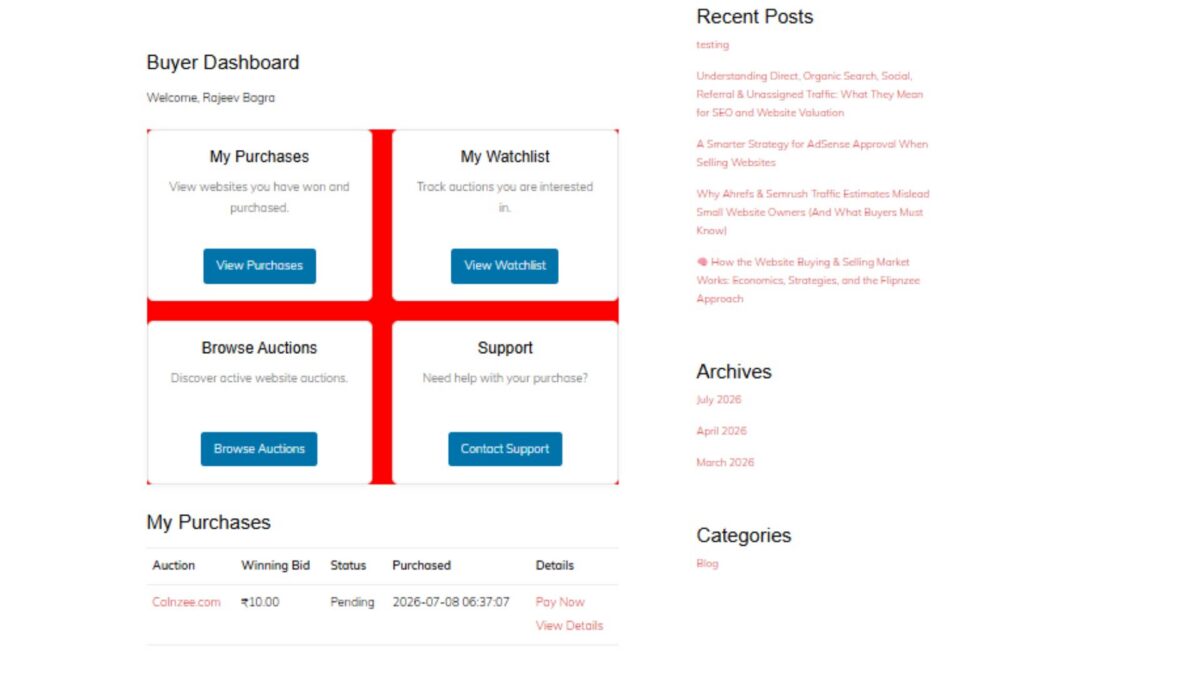
Buyer Dashboard

Welcome, Rajeev Bagra

Personalization creates a much more user-friendly experience and prepares the dashboard for future account-specific information.


Dashboard Cards

Instead of displaying long navigation menus, the dashboard uses clean responsive cards.

Four primary navigation cards were introduced:

My Purchases

Provides access to websites that the buyer has successfully won and purchased.

Future lessons will display:

  • Purchase history
  • Pending transfers
  • Completed transfers
  • Payment status

My Watchlist

Allows buyers to quickly revisit auctions they are monitoring.

This integrates directly with the Watchlist system developed in previous lessons.


Browse Auctions

Provides a shortcut back to the marketplace so buyers can continue exploring active website auctions.


Support

Offers direct access to marketplace support resources whenever assistance is required during the buying process.


Responsive CSS Grid

A responsive CSS Grid layout was implemented to display the dashboard cards.

Benefits include:

  • Responsive across desktop, tablet, and mobile devices
  • Equal spacing between cards
  • Professional appearance
  • Easy future expansion

Each card includes:

  • Title
  • Description
  • Action button
  • Hover animation
  • Subtle shadows
  • Rounded corners

Modern User Interface

Several interface improvements were added:

  • Soft shadows
  • Rounded card design
  • Smooth hover animations
  • Consistent Flipnzee button styling
  • Responsive spacing
  • Clean typography

The result is a dashboard that feels modern while remaining lightweight.


Reusing Existing Marketplace Pages

Each dashboard card links to an existing or upcoming marketplace page.

Current destinations include:

  • /my-purchases/
  • /watchlist/
  • /listings/
  • /support/

This keeps navigation centralized and reduces unnecessary menu complexity.


Debugging Journey

An interesting challenge during this lesson involved the dashboard layout initially rendering as a vertical list instead of the intended responsive grid.

The issue was systematically investigated by verifying:

  • Shortcode registration
  • HTML structure
  • CSS loading
  • Browser Developer Tools
  • Network requests
  • Stylesheet versions
  • CSS Grid rules

A temporary diagnostic background color confirmed that the correct stylesheet was being loaded, allowing the issue to be isolated and resolved successfully.

This debugging process reinforced the importance of methodical troubleshooting rather than assuming the problem originates in PHP or HTML.


Foundation for Future Lessons

Although the dashboard currently serves as a navigation hub, it lays the groundwork for significantly richer buyer functionality.

Upcoming enhancements will include:

  • Live purchase summaries
  • Recent bidding activity
  • Pending payments
  • Escrow transaction status
  • Website transfer progress
  • Buyer notifications
  • Personalized marketplace insights

The dashboard is intentionally designed to grow alongside the Flipnzee marketplace.

Download Source Code

Download the starting version of the plugin before the lesson:

Download the completed version after this lesson:


Final Thoughts

Lesson 97 marks the beginning of the buyer experience within Flipnzee Auctions. By introducing a dedicated Buyer Dashboard, the plugin now offers a centralized, user-friendly starting point for every buyer after login.

Rather than overwhelming users with scattered pages and menus, the dashboard provides a clean, responsive interface that will gradually evolve into a comprehensive buyer control panel as future lessons expand payment workflows, purchase management, and ownership transfers.

The Buyer Dashboard represents another important step toward transforming Flipnzee Auctions into a professional marketplace specifically built for buying and selling websites and digital assets.