Lesson 91 Implementation: Versioned Database Migration System & Watchlist Table

Introduction

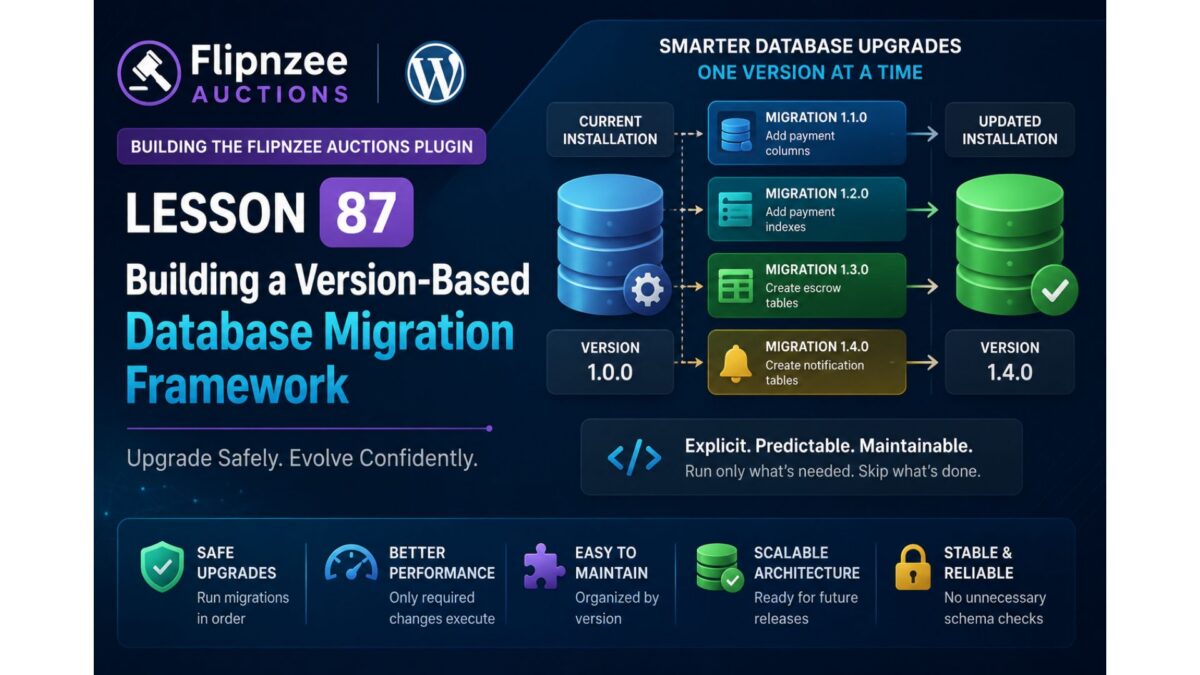
In this lesson, I implemented a proper database migration system for the Flipnzee Auctions plugin. Instead of recreating tables or manually modifying the database whenever a new release introduces schema changes, the plugin now supports version-based migrations. This makes future updates much safer and easier to maintain.

The major objective of this lesson was to introduce the Watchlist table while ensuring that existing installations can upgrade without affecting current auction, bid, or transaction data.


Objectives

  • Implement a version-based database migration manager.
  • Support automatic schema upgrades during plugin activation.
  • Add database version tracking.
  • Create a dedicated Watchlist table.
  • Keep existing auction data intact during upgrades.
  • Prepare the plugin for future schema changes.

Files Modified

flipnzee-auctions.php
includes/class-database.php
includes/class-database-migration.php

Step 1: Added Database Version Constant

A dedicated database schema version constant was introduced.

define( 'FLIPNZEE_DB_VERSION', '1.3.0' );

This version is independent from the plugin version and is used exclusively for database migrations.


Step 2: Added Database Version Tracking

A helper method was implemented for updating the stored schema version.

public static function update_db_version() {

    update_option(
        'flipnzee_db_version',
        FLIPNZEE_DB_VERSION
    );

}

This ensures the plugin always knows which schema version is currently installed.


Step 3: Implemented Version-Based Migration Manager

A migration manager was created to execute pending migrations only when required.

$current_version = get_option(
    'flipnzee_db_version',
    '1.0.0'
);

The migration manager compares the stored version with the latest schema version and runs only the necessary migrations.


Step 4: Added Migration Methods

Separate migration methods were implemented for each schema version.

Example:

private static function migrate_to_1_3_0() {

    Flipnzee_Auction_Database::create_watchlist_table();

    Flipnzee_Auction_Database::update_db_version();

}

This structure keeps every database upgrade isolated and easy to maintain.


Step 5: Created Dedicated Watchlist Table

A separate Watchlist table was added.

CREATE TABLE wp_flipnzee_watchlist

The table stores:

  • Watchlist ID
  • Auction ID
  • User ID
  • Created timestamp

Watchlist Table Structure

id
auction_id
user_id
created_at

To prevent duplicate watchlist entries, a composite unique key was added.

UNIQUE KEY auction_user
(
    auction_id,
    user_id
)

Step 6: Database Indexes

Indexes were added for efficient lookups.

KEY auction_id
KEY user_id

These indexes improve performance when retrieving user watchlists or auction followers.


Step 7: Updated Table Creation

The database creation routine now creates four plugin tables.

flipnzee_auctions
flipnzee_bids
flipnzee_transactions
flipnzee_watchlist

Each table is created independently using dbDelta().


Step 8: Activation Flow

The activation sequence now performs the following operations:

Plugin Activation
        │
        ▼
Create Core Tables
        │
        ▼
Check Stored DB Version
        │
        ▼
Run Pending Migrations
        │
        ▼
Update Database Version

This ensures new installations receive the latest schema while existing installations are upgraded safely.


Testing Performed

The implementation was tested by:

  • Activating the plugin on a clean WordPress installation.
  • Verifying automatic database version updates.
  • Confirming the creation of the Watchlist table.
  • Checking successful execution of migration methods.
  • Ensuring existing auction, bid, and transaction tables remained intact.
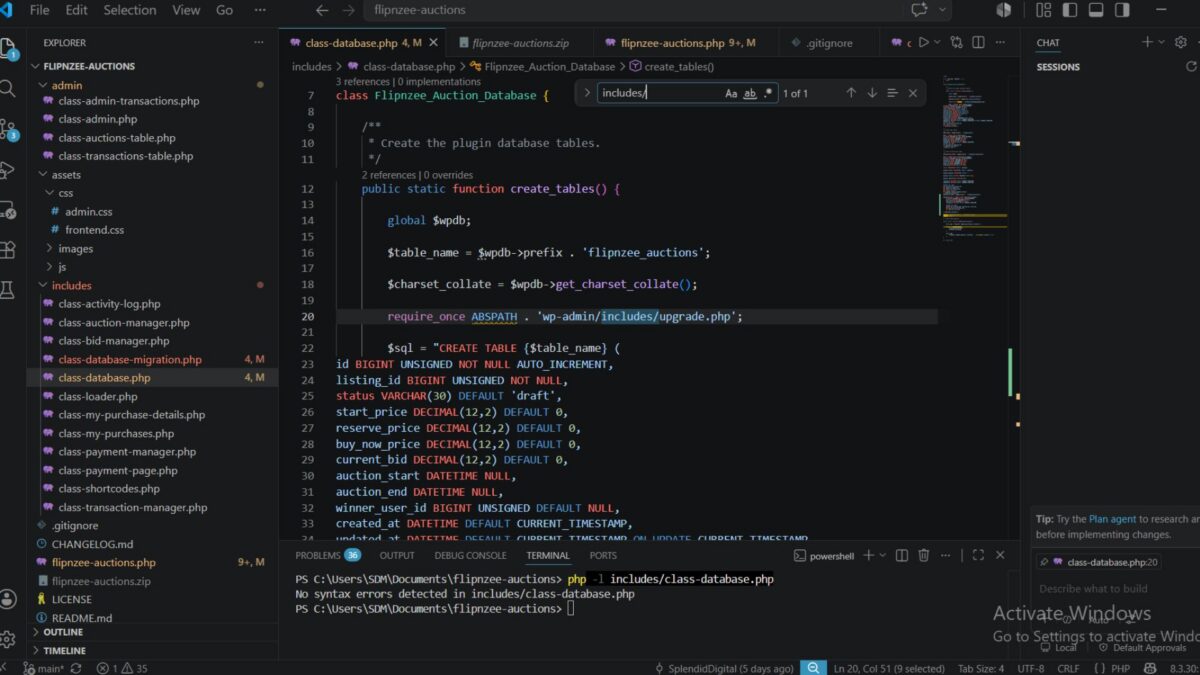
  • Running PHP syntax validation on modified files.
  • Testing activation on multiple environments.

Challenges Encountered

During implementation, several issues were identified and resolved:

  • Missing migration method caused activation errors.
  • Incorrect dbDelta() variable usage during table creation.
  • Separate table creation logic required refinement.
  • Database version synchronization needed adjustment.
  • Environment-specific activation behaviour differed between hosting providers.

Interestingly, the plugin activated successfully on a clean WP Engine installation, while one development environment produced activation warnings. Since the same code functioned correctly on another WordPress installation, the issue was determined to be environment-specific rather than a problem with the migration implementation.


Lessons Learned

This lesson reinforced several important WordPress development concepts:

  • Database schema versions should be managed separately from plugin versions.
  • Incremental migrations are safer than rebuilding database tables.
  • Each migration should have a dedicated method to improve maintainability.
  • dbDelta() should be executed independently for each table definition.
  • Proper indexing and unique constraints improve performance and data integrity.
  • Testing across multiple hosting environments is valuable, as environment-specific behaviour can expose issues that are not caused by the plugin itself.

Download Source Code

Download the starting version of the plugin before the lesson:

Download the completed version after this lesson:


Outcome

At the end of this lesson, Flipnzee Auctions now includes a robust versioned database migration system capable of upgrading existing installations without data loss. The new Watchlist table has been integrated successfully, providing the foundation for upcoming Watchlist functionality while establishing a scalable migration framework for future plugin releases.
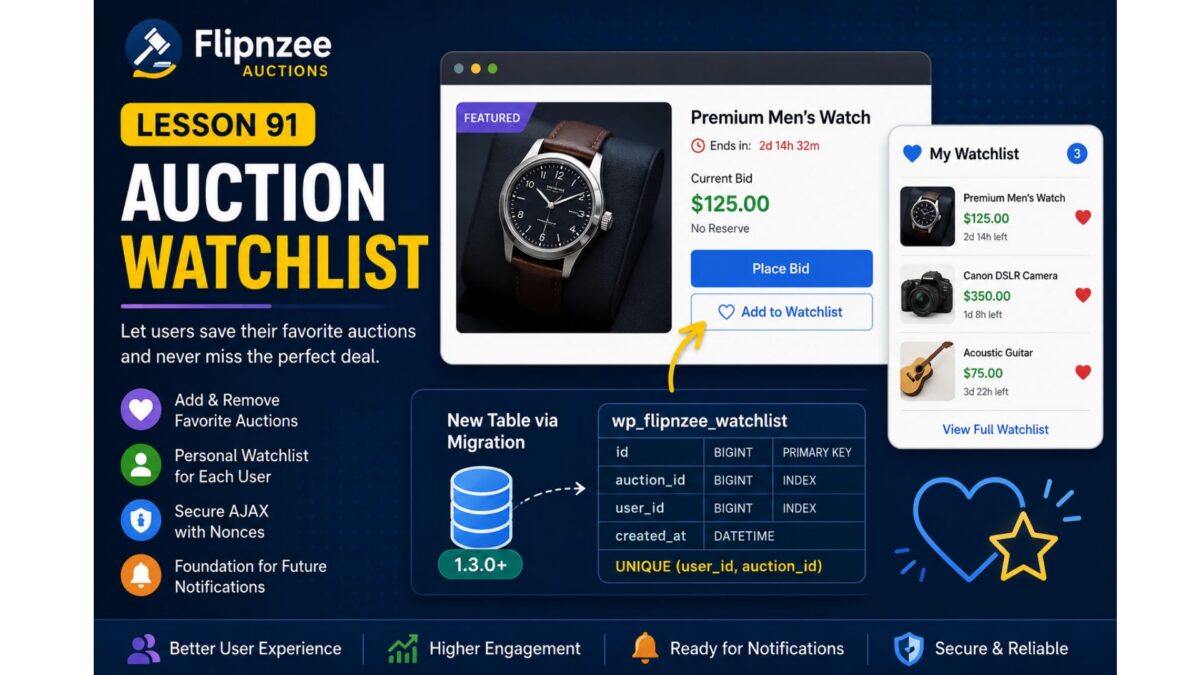
Lesson 91: Auction Watchlist (Favorite Auctions)


Project: Flipnzee Auctions Plugin

Lesson: 91

Topic: Building a User Watchlist (Favorite Auctions) System


Introduction

As the number of auctions grows, users need an easy way to keep track of listings they are interested in without placing a bid immediately. A watchlist (or favorites) feature allows registered users to bookmark auctions and quickly revisit them later.

In this lesson, we will implement a complete auction watchlist system, enabling users to add and remove auctions from their personal watchlist. This feature improves user engagement and lays the foundation for future enhancements such as watchlist email notifications, price drop alerts, and ending-soon reminders.


Learning Objectives

By the end of this lesson, we will:

  • Design a user watchlist system.
  • Create a dedicated database table for watchlists.
  • Register the watchlist through the migration framework.
  • Add “Add to Watchlist” and “Remove from Watchlist” functionality.
  • Prevent duplicate watchlist entries.
  • Secure AJAX requests using WordPress nonces.
  • Display watchlist status on auction pages.
  • Prepare for future notification features.

Why This Feature?

Many successful auction platforms provide a watchlist because users often discover auctions long before they are ready to bid.

Benefits include:

  • Better user engagement.
  • Higher return visitor rate.
  • Easier auction discovery.
  • Foundation for automated notifications.
  • Personalized user experience.

Database Design

A new table will be introduced:

wp_flipnzee_watchlist

Suggested structure:

ColumnTypeDescription
idBIGINTPrimary key
auction_idBIGINTAuction/Post ID
user_idBIGINTWordPress User ID
created_atDATETIMEDate added

Unique constraint:

(user_id, auction_id)

to prevent duplicate entries.


Files Planned

flipnzee-auctions.php

includes/class-database.php

includes/class-database-migration.php

includes/class-watchlist.php

includes/class-ajax.php

templates/

assets/js/frontend.js

assets/css/frontend.css

Features to Build

Part 1

Database migration for watchlist table.


Part 2

Watchlist manager class.


Part 3

Add to Watchlist button.


Part 4

Remove from Watchlist button.


Part 5

AJAX handlers.


Part 6

Nonce verification.


Part 7

Display watchlist status.


Part 8

User watchlist page shortcode.


Testing Plan

We will verify:

  • Logged-out users cannot use watchlists.
  • Logged-in users can add auctions.
  • Duplicate entries are prevented.
  • Removing items works.
  • AJAX responses are secure.
  • Database records are correctly created and deleted.
  • Migration executes successfully on upgrades.

Expected Outcome

By the end of Lesson 91, Flipnzee Auctions will include a complete watchlist system that enables users to save favorite auctions for later viewing. The feature will integrate cleanly with the database migration framework introduced in Lesson 90 and provide a strong foundation for future engagement features such as notifications, reminders, and personalized dashboards.


Git Commit (planned)

Lesson 91: Implement auction watchlist system with database migration

I think this is a natural progression from Lesson 90 because it immediately puts your new migration framework to practical use by introducing a new database table and a user-facing feature that will enhance the overall auction experience.

Lesson 90 Implementation: Building and Validating the Flipnzee Database Migration Framework

Project: Flipnzee Auctions Plugin
Lesson: 90
Topic: Database Migration Framework and Schema Version Management
Plugin Version: 1.2.0


Introduction

As the Flipnzee Auctions plugin continues to evolve, simply creating database tables during plugin activation is no longer sufficient. Existing users must be able to upgrade to newer plugin versions without losing their auction data.

In this lesson, we implemented a production-ready database migration framework that allows the plugin to safely upgrade existing database schemas whenever new plugin versions introduce structural changes. We also created and thoroughly tested our first real migration by adding a new payment_reference column to the transactions table.

This lesson involved extensive real-world debugging and validation, ensuring the migration framework behaves correctly across fresh installations and upgrades.


Objectives

During this implementation we aimed to:

  • Build a reusable database migration framework.
  • Execute migrations only when required.
  • Track database versions independently of plugin versions.
  • Add new database columns safely.
  • Prevent duplicate schema modifications.
  • Verify migrations through real upgrade testing.
  • Prepare the plugin for future database upgrades.

Files Modified

flipnzee-auctions.php

includes/class-database.php

includes/class-database-migration.php

Step 1 — Integrating Database Migrations

The activation hook was enhanced to distinguish between fresh installations and upgrades.

For new installations, database tables are created normally.

For existing installations, the migration manager is executed.

function flipnzee_auction_activate() {

	if ( false === get_option( 'flipnzee_db_version', false ) ) {

		Flipnzee_Auction_Database::create_tables();

	} else {

		Flipnzee_Database_Migration::run();

	}

}

This prevents unnecessary table recreation while ensuring existing installations receive required schema updates.


Step 2 — Creating the Migration Manager

A dedicated migration manager was introduced.

It determines the currently installed database version and executes only the pending migrations.

Example:

public static function run() {

	$current_version = get_option(
		'flipnzee_db_version',
		'1.0.0'
	);

	if ( version_compare( $current_version, '1.1.0', '<' ) ) {

		self::migrate_to_1_1_0();

	}

	if ( version_compare( $current_version, '1.2.0', '<' ) ) {

		self::migrate_to_1_2_0();

	}

}

Step 3 — Implementing the First Production Migration

The first production migration upgrades the database from version 1.1.0 to 1.2.0.

Its primary responsibility is adding the new payment reference column.

self::add_column(
	'flipnzee_transactions',
	'payment_reference',
	'`payment_reference` VARCHAR(100) NULL'
);

Once complete, the migration updates the stored database version.


Step 4 — Safe Schema Updates

The helper function first checks:

  • whether the table exists
  • whether the column already exists

before executing:

ALTER TABLE
ADD COLUMN

This prevents duplicate-column errors during repeated activations.


Step 5 — Debugging and Validation

During testing we investigated every stage of the migration process.

Temporary debugging was added to inspect:

  • activation hook execution
  • database version detection
  • SQL queries
  • migration execution
  • WordPress option values
  • LiteSpeed object cache
  • database updates
  • activation sequence

This systematic debugging helped identify and eliminate every suspected issue.


Step 6 — Real Upgrade Simulation

To simulate a real plugin upgrade:

  1. The database version was manually changed to:
1.1.0
  1. The plugin was deactivated.
  2. The plugin was activated again.

The migration manager correctly detected the older version:

FLIPNZEE RUN: Current version = 1.1.0

It then executed:

FLIPNZEE RUN: Calling migrate_to_1_2_0()

The schema update completed successfully:

FLIPNZEE MIGRATION: Added payment_reference column.

Finally, the stored database version became:

flipnzee_db_version = 1.2.0

This confirmed that the migration framework correctly performs production upgrades.


Step 7 — Cleaning the Framework

Once the migration was verified:

  • temporary debugging statements were removed
  • cache investigation code was removed
  • SQL diagnostic code was removed
  • activation logic was simplified
  • the migration runner was restored to a clean production-ready implementation

Testing Performed

The migration framework was tested using:

  • Fresh installation
  • Existing installation
  • Manual version downgrade
  • Plugin deactivate/reactivate
  • phpMyAdmin verification
  • Debug log inspection
  • SQL verification
  • Column existence validation

Every test completed successfully.

Download Source Code

Download the starting version of the plugin before the lesson:

Download the completed version after this lesson:


Lessons Learned

This lesson reinforced several important development practices:

  • Database migrations are essential for production plugins.
  • Schema updates should always be incremental.
  • Migration code must be idempotent.
  • Version numbers should drive upgrade logic.
  • Thorough debugging is invaluable when validating activation workflows.
  • Real upgrade simulations provide greater confidence than relying solely on fresh installs.

Final Outcome

By the end of this lesson, Flipnzee Auctions now includes a fully functional database migration framework capable of upgrading existing installations without requiring users to reinstall the plugin or lose data.

The first production migration (v1.2.0) was successfully implemented, tested, and validated through a complete upgrade simulation. This framework provides a scalable foundation for future database enhancements, ensuring that new tables, columns, indexes, and data transformations can be introduced safely as the plugin evolves.


Git Commit

Lesson 90: Implement and validate database migration framework with schema versioning

This lesson marks a major architectural milestone for the Flipnzee Auctions plugin, bringing its database management in line with best practices used in mature WordPress plugins and laying the groundwork for future feature development.

Lesson 89 Implementation: Implementing the First Production Database Migration

Series: Building the Flipnzee Auctions Plugin
Lesson: 89
Project: Flipnzee Auctions
Topic: Implementing the First Production Database Migration Framework


Introduction

After several lessons dedicated to improving the database architecture of the Flipnzee Auctions plugin, Lesson 89 marks an important milestone: the migration framework is now capable of performing version-controlled database upgrades.

Rather than continuing to rely on repeated dbDelta() executions during plugin activation, the plugin now follows a structured migration process that executes upgrades only when necessary based on the stored database version.

Although the first migration introduced in this lesson does not yet modify the database schema, it establishes the complete migration lifecycle that future releases will use.


Objectives

The goals of this lesson were to:

  • implement the first production migration runner,
  • introduce version-based migration execution,
  • create the first version-specific migration method,
  • update database versions after successful migrations,
  • validate the migration architecture,
  • prepare the framework for future schema upgrades.

Previous Architecture

Before this lesson, plugin activation primarily focused on creating database tables.

Plugin Activation
        │
        ▼
Create Tables
        │
        ▼
Update Database Version

Although the migration framework had been introduced in earlier lessons, it was not yet actively performing migrations.


New Architecture

Lesson 89 transforms the migration framework into an active upgrade system.

Plugin Activation
        │
        ▼
Database Version Exists?
        │
 ┌──────┴──────┐
 │             │
 ▼             ▼
Fresh      Existing
Install     Install
 │             │
 ▼             ▼
Create       Run
Tables     Migrations
 │             │
 ▼             ▼
Update      Version-
Version     Specific
             Migration
                 │
                 ▼
        Update Database Version

This separation allows fresh installations and upgrades to follow different execution paths while sharing the same version management strategy.


Files Modified

Main Plugin File

flipnzee-auctions.php

Updated the activation workflow to support version-aware migrations.


Migration Framework

includes/class-database-migration.php

Extended the migration framework with:

  • migration runner
  • version comparison
  • first migration method
  • database version updates
  • migration logging

Migration Runner

The run() method now performs proper version comparison before executing migrations.

Responsibilities include:

  • reading the installed database version,
  • comparing versions,
  • executing only required migrations,
  • preparing for future version upgrades.

This ensures that migrations are executed only when necessary.


Version Comparison

The migration framework now compares:

$current_version

against:

FLIPNZEE_DB_VERSION

using PHP’s built-in:

version_compare()

Only installations running an older database version execute the migration.


First Production Migration

This lesson introduced the project’s first version-specific migration method.

Example:

migrate_to_1_1_0()

Responsibilities include:

  • preparing the migration workflow,
  • providing a dedicated location for schema upgrades,
  • updating the stored database version after successful execution.

Although the method currently contains placeholder logic, it establishes the pattern that every future migration will follow.


Activation Flow

The activation process now behaves differently depending on the installation state.

Fresh Installation

No Database Version
        │
        ▼
Create Tables
        │
        ▼
Store Current Database Version

Existing Installation

Existing Version
        │
        ▼
Compare Versions
        │
        ▼
Execute Required Migration
        │
        ▼
Update Database Version

This eliminates unnecessary upgrade operations on new installations while enabling controlled schema evolution for existing sites.


Logging and Debugging

Temporary logging was introduced during development to verify the migration workflow.

The debugging process confirmed:

  • activation hook execution,
  • migration runner execution,
  • version comparison,
  • database version storage,
  • plugin activation stability.

These logs were used solely for development and validation.


Testing Performed

The implementation was tested on multiple environments.

Local Development

Verified:

  • PHP syntax
  • plugin activation
  • migration framework loading
  • activation stability

Hostinger

Verified:

  • successful plugin activation,
  • database version stored correctly,
  • migration framework integration.

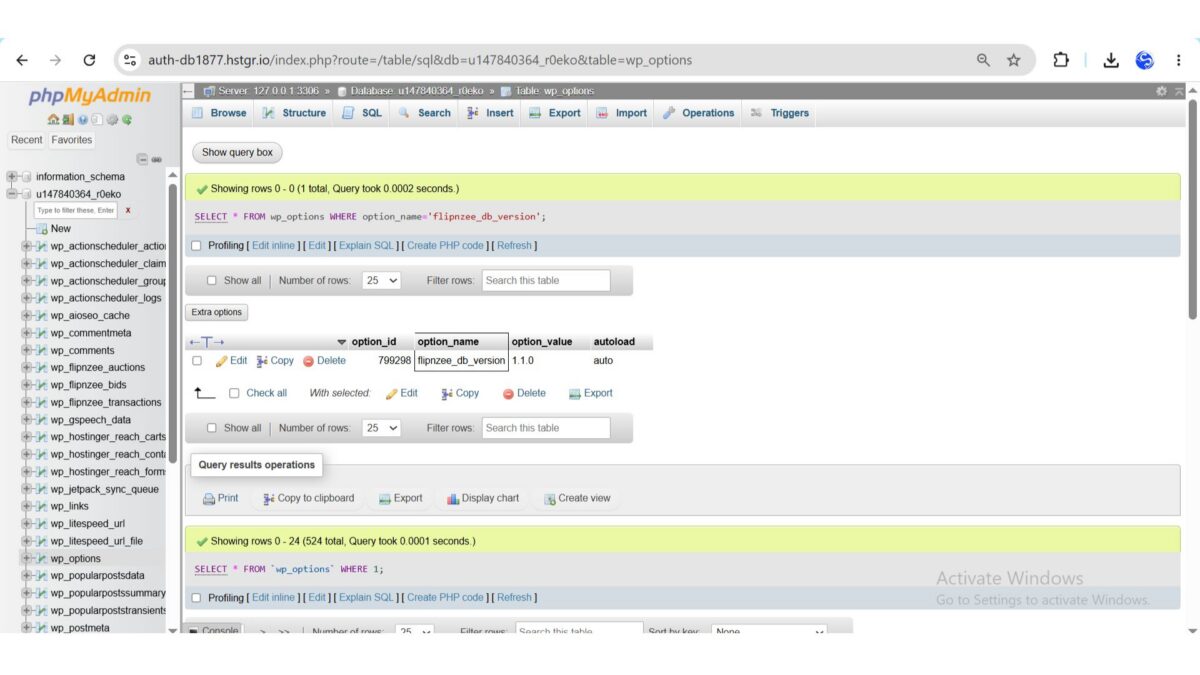
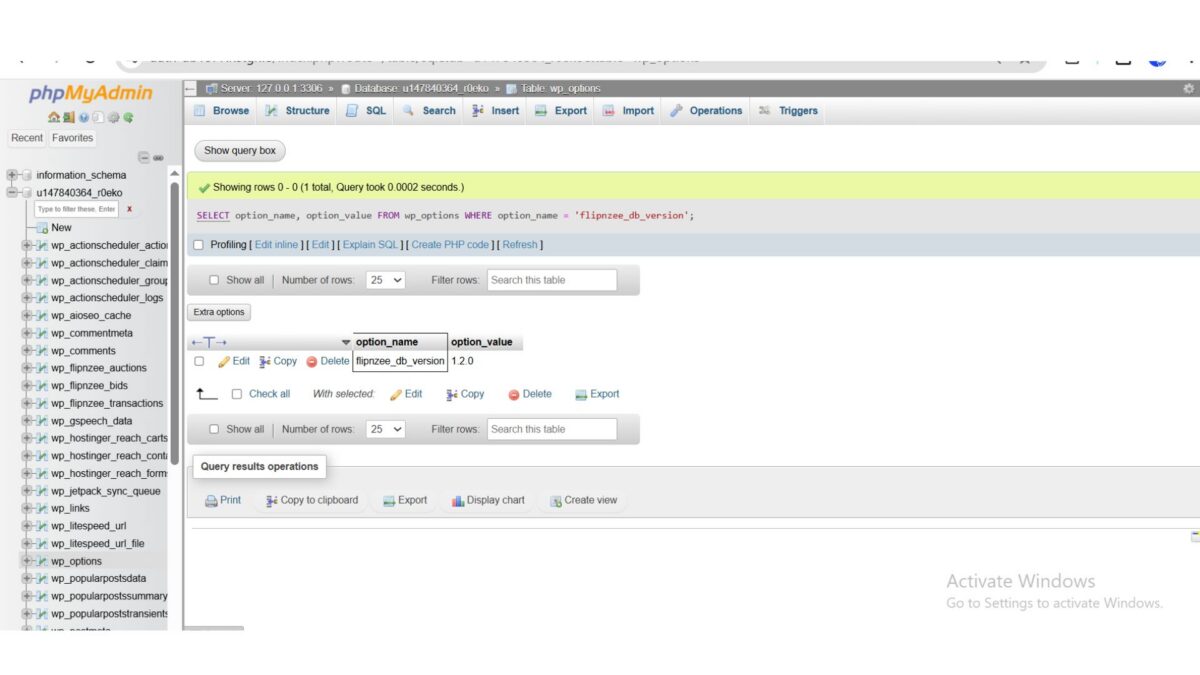
During testing, we confirmed via SQL that:

flipnzee_db_version = 1.1.0

was successfully stored in the WordPress wp_options table.

This confirmed that the migration framework was functioning correctly.


WP Engine

Additional testing confirmed:

  • successful activation,
  • compatibility across hosting environments,
  • stable database version handling.

Challenges Encountered

This lesson included several valuable debugging sessions.

Initially, it appeared that the database version was not being stored because the option was not visible while browsing the wp_options table.

Further investigation revealed that:

  • the activation hook was executing correctly,
  • the version constant was defined correctly,
  • the database version was being updated successfully,
  • the option simply did not appear on the first page of phpMyAdmin results.

Using direct SQL queries confirmed that the version had been stored correctly.

This reinforced the importance of verifying assumptions with database queries rather than relying solely on paginated table views.


Lessons Learned

Several important software engineering principles emerged during this lesson.

Version-Controlled Migrations

Database upgrades should be driven by version comparisons rather than repeated schema parsing.


Separate Installation from Upgrades

Fresh installations and upgrades represent different workflows and should be handled independently.


Verify with SQL

Database debugging should rely on direct SQL queries whenever possible rather than assumptions based on user interface views.


Incremental Development

Implementing and testing one migration component at a time significantly reduced debugging complexity.


Git Milestone

A stable checkpoint should be created after completing the migration framework.

Recommended Commit

Lesson 89: Implement first production database migration

Recommended Git Tag

lesson-89-stable

This tag will represent the first production-ready version-controlled migration system within the Flipnzee Auctions plugin.

Download Source Code

Download the starting version of the plugin before the lesson:

Download the completed version after this lesson:


Roadmap

The migration architecture is now fully operational.

Upcoming lessons will begin using the framework for real database schema changes.

Lesson 90

Planned objectives include:

  • implementing the first schema-changing migration,
  • using add_column() in a production migration,
  • using add_index() where appropriate,
  • validating idempotent schema updates,
  • further reducing dependence on dbDelta() for upgrades.

Conclusion

Lesson 89 marks a major architectural milestone in the Flipnzee Auctions project. The plugin now supports a complete version-aware migration workflow that distinguishes fresh installations from upgrades and executes migrations only when required.

While the first migration intentionally focuses on establishing the migration lifecycle rather than modifying the schema, it provides a robust and scalable foundation for all future database evolution. This work positions Flipnzee Auctions to support safe, maintainable, and production-quality upgrades as the plugin continues to grow into a full-featured WordPress auction marketplace.

Lesson 88 Implementation: Building Reusable Database Migration Helper Methods

Series: Building the Flipnzee Auctions Plugin
Lesson: 88
Project: Flipnzee Auctions
Topic: Implementing Reusable Database Migration Helpers


Introduction

In Lesson 87, we introduced a dedicated database migration framework and integrated it into the plugin activation process. Although the migration runner was functional, it did not yet have the tools required to safely modify the database schema.

In this lesson, we implemented the first collection of reusable migration helper methods. These methods form the core toolkit that future database migrations will rely upon. Rather than repeatedly writing SQL existence checks and ALTER TABLE statements throughout the project, these common operations are now centralized inside the migration framework.

This represents another important architectural improvement for the Flipnzee Auctions plugin.


Objectives

The primary objectives for Lesson 88 were:

  • Build reusable database helper methods.
  • Reduce duplicate SQL logic.
  • Improve migration safety.
  • Prepare the framework for production database upgrades.
  • Keep plugin activation stable throughout development.

Implementation Overview

During this lesson we extended the new migration framework by introducing reusable helper methods responsible for inspecting and modifying the database schema.

The migration framework now contains dedicated methods for:

  • checking tables
  • checking columns
  • checking indexes
  • safely adding columns
  • safely adding indexes

These methods will become the building blocks for all future database migrations.


Files Modified

Migration Framework

includes/class-database-migration.php

This file received the majority of the implementation work during this lesson.

No significant changes were required elsewhere because the migration framework had already been integrated during Lesson 87.


Helper Methods Implemented

table_exists()

Determines whether a database table exists before any migration attempts to modify it.

Responsibilities:

  • verify table existence
  • prevent unnecessary SQL errors
  • support future migrations

column_exists()

Checks whether a column already exists inside a table.

This prevents duplicate column creation and allows migrations to be safely executed multiple times.


index_exists()

Determines whether a database index is already present.

This allows migrations to create indexes only when required.


add_column()

Introduced the first schema modification helper.

The method performs several checks automatically:

  • verifies the table exists
  • verifies the column does not already exist
  • executes the ALTER TABLE statement only when appropriate

This significantly reduces repetitive migration code.


add_index()

Introduced a reusable helper for safely creating indexes.

Responsibilities include:

  • checking table existence
  • verifying the index does not already exist
  • creating the index only when necessary

Future migrations can now add indexes using a single reusable method instead of duplicating SQL logic.


Current Migration Framework

The migration framework now provides the following structure:

Flipnzee_Database_Migration
│
├── run()
├── table_exists()
├── column_exists()
├── index_exists()
├── add_column()
└── add_index()

This toolkit establishes a consistent API for future database upgrades.


Architecture Benefits

The new helper methods provide several important advantages.

Reduced Code Duplication

Common SQL checks are now centralized.

Future migrations no longer need to repeatedly write:

  • SHOW TABLES
  • SHOW COLUMNS
  • SHOW INDEX
  • conditional ALTER TABLE statements

Improved Readability

Migration methods become significantly easier to understand.

Instead of embedding raw SQL throughout the codebase, migrations can simply call helper methods that clearly describe their intent.


Safer Database Upgrades

Each helper performs validation before executing SQL.

This reduces the likelihood of duplicate columns, duplicate indexes, or failed schema updates.


Easier Maintenance

Future enhancements to database handling can now be implemented in one location rather than throughout the plugin.


Testing

Each helper method was implemented incrementally and tested immediately after development.

The following checks were performed:

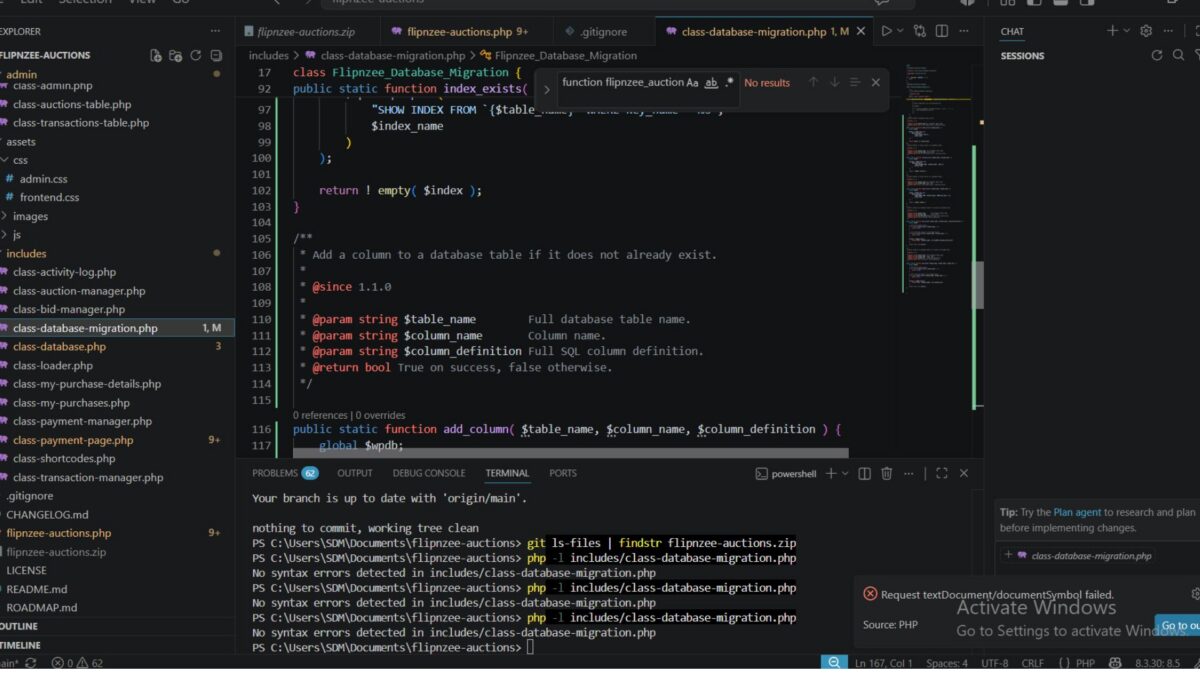
  • PHP syntax validation
  • plugin activation
  • migration framework loading
  • compatibility with existing installations
  • activation stability
  • no database regressions

The plugin activated successfully after each implementation step.

No activation warnings or database errors were encountered during testing.


Lessons Learned

Several software engineering principles continued to guide development during this lesson.

Build Infrastructure Before Features

Rather than immediately implementing production migrations, we first created a reliable toolkit that future migrations can depend upon.


Small Incremental Changes

Every helper method was implemented and tested individually.

This reduced debugging time and ensured plugin stability throughout development.


Reusability Improves Maintainability

Centralizing database operations inside reusable methods simplifies future development while reducing duplicated logic.


Separation of Responsibilities

The plugin architecture now clearly separates responsibilities.

Database Class

Responsible for:

  • table creation
  • installation
  • database version management

Migration Class

Responsible for:

  • migration runner
  • schema inspection
  • reusable migration helpers
  • future database upgrades

This separation makes the project easier to maintain as it continues to grow.


Roadmap

With the helper library now in place, the migration framework is ready for real production use.

Lesson 89

The next lesson will introduce the first version-controlled database migration.

Planned objectives include:

  • implementing the first production migration
  • replacing manual schema upgrade logic
  • using the new helper methods
  • validating database version comparisons
  • preparing the payment workflow for future enhancements

Git Milestone

A stable checkpoint was created after completing the migration helper library.

Commit

Lesson 88: Add reusable database migration helpers

Git Tag

lesson-88-stable

This tag marks another stable milestone in the evolution of the Flipnzee Auctions plugin.

Download the starting version of the plugin before the lesson:

Download the completed version after this lesson:


Conclusion

Lesson 88 focused on strengthening the internal architecture of the Flipnzee Auctions plugin by introducing a reusable migration helper library. Although these changes are largely invisible to end users, they significantly improve the quality and maintainability of the codebase.

With reusable helper methods now available, future database upgrades can be implemented using concise, consistent, and reliable migration code. This foundation prepares the project for production-grade version-controlled database migrations in the upcoming lessons and represents another important step toward building a robust WordPress auction marketplace plugin.

Lesson 87 Implementation: Introducing a Database Migration Framework

Series: Building the Flipnzee Auctions Plugin
Lesson: 87
Topic: Creating a Dedicated Database Migration Framework


Introduction

In the previous lessons, we significantly improved the stability of the Flipnzee Auctions plugin by introducing database versioning and resolving the activation issues caused by dbDelta(). Those improvements laid the foundation for a more reliable database upgrade process.

In this lesson, we take the next architectural step by introducing a dedicated database migration framework. Instead of placing all upgrade logic inside the activation routine, we create a separate migration class that will eventually manage all database schema upgrades in a structured and maintainable way.

Although the framework currently contains only the basic migration runner, it establishes the architecture that future migrations will build upon.


Objectives

By the end of this lesson we achieved the following:

  • Created a dedicated database migration class.
  • Introduced a migration runner.
  • Connected the migration framework to plugin activation.
  • Separated fresh installations from upgrade logic.
  • Successfully tested plugin activation on multiple WordPress environments.
  • Prepared the plugin for version-based database migrations.

Why We Needed a Migration Framework

During Lessons 85 and 86 we discovered that repeatedly calling dbDelta() on existing installations could produce unpredictable behaviour on some hosting environments.

Rather than relying solely on dbDelta() for future upgrades, we decided to move toward a proper migration architecture.

The long-term goals are:

  • predictable upgrades
  • easier maintenance
  • version-controlled database changes
  • safer production deployments

Architecture Before Lesson 87

Previously, plugin activation simply created the database tables.

Plugin Activation
        │
        ▼
create_tables()
        │
        ▼
Update Database Version

While this worked for new installations, it wasn’t designed for long-term schema evolution.


New Architecture

After Lesson 87 the activation process is smarter.

Plugin Activation
        │
        ▼
Database Version Exists?
        │
   ┌────┴─────┐
   │          │
   ▼          ▼
Fresh      Existing
Install     Install
   │          │
   ▼          ▼
create_     Migration
tables()     Runner
   │          │
   └────┬─────┘
        ▼
Update Database Version

This separation allows future upgrades to be handled independently from initial installations.


Files Modified

Main Plugin File

flipnzee-auctions.php

Updated the activation routine to distinguish between fresh installations and existing installations.


New File

includes/class-database-migration.php

Added the new migration framework that will host all future database migrations.


Implementation Highlights

The migration framework now contains a dedicated class responsible for future schema upgrades.

Responsibilities include:

  • central migration runner
  • version-based upgrade handling
  • future migration methods
  • database upgrade coordination

Although the class is intentionally lightweight at this stage, it provides a clean foundation for incremental development.


Activation Flow

The activation process now follows this logic:

  1. Check whether the plugin has been installed before.
  2. If this is a new installation:
    • Create all required database tables.
  3. If this is an existing installation:
    • Execute the migration runner.
  4. Update the stored database version.

This approach reduces unnecessary database operations on existing sites.


Testing Performed

The migration framework was tested extensively.

Local Development

  • Plugin activated successfully.
  • No PHP syntax errors.
  • Activation logic executed correctly.
  • Database version updated successfully.

Hostinger Test Site

The plugin was activated successfully after correcting a syntax issue discovered during testing.

Verified:

  • plugin activation
  • database version update
  • migration runner execution

WP Engine Test Site

The plugin was also activated successfully on WP Engine.

This confirmed that the new activation flow behaves consistently across different hosting environments.


Debugging Process

This lesson involved careful debugging before reaching the final implementation.

Challenges included:

  • PHP parse errors caused by unmatched braces.
  • Syntax errors while introducing the migration class.
  • Activation failures during early integration.
  • Ensuring the migration framework loaded before activation.

Each issue was isolated and resolved systematically, resulting in a stable implementation.


Git Milestone

A stable checkpoint was created after successful testing.

Commit

Lesson 87: Add database migration framework

Git Tag

lesson-87-stable

This tag represents the new stable baseline for future database migration work.


Lessons Learned

Several important software engineering principles became evident during this lesson:

  • Separate installation logic from upgrade logic.
  • Build the migration architecture before implementing migrations.
  • Test across multiple hosting environments.
  • Resolve one issue at a time rather than making multiple unrelated changes.
  • Small architectural improvements reduce future complexity.

Roadmap

The migration framework introduced in this lesson serves as the foundation for the next phase of development.

Upcoming work includes:

  • reusable migration helper methods
  • version-specific migration functions
  • production database migrations
  • removal of remaining upgrade dependencies on dbDelta()
  • safer long-term database evolution

Download Source Code

Download the starting version of the plugin before the lesson:

Download the completed version after this lesson:


Conclusion

Lesson 87 marks an important architectural milestone in the Flipnzee Auctions project. Rather than simply adding new features, we invested in strengthening the plugin’s internal design.

By introducing a dedicated migration framework, we have separated installation and upgrade responsibilities, making the plugin easier to maintain, safer to upgrade, and better prepared for future releases.

This foundation will support all upcoming database enhancements as Flipnzee Auctions continues evolving into a professional WordPress auction marketplace plugin.

Lesson 86 Implementation: Stabilizing Plugin Activation and Preparing the Migration Framework

Series: Building the Flipnzee Auctions WordPress Plugin
Lesson: 86
Project: Flipnzee Auctions
Difficulty: Intermediate–Advanced


Introduction

In the previous lesson, we laid the foundation for database versioning by introducing a database version constant and storing the plugin’s schema version inside WordPress. The long-term objective is to transition from relying solely on dbDelta() for database upgrades to a dedicated migration framework.

As work began on Lesson 86, the initial goal was to implement reusable migration helper methods such as table_exists(), column_exists(), index_exists(), and add_column(). However, during development we encountered a significant activation issue that required immediate investigation before continuing with the migration framework.

Rather than ignoring the problem and moving forward, we paused development to systematically isolate the root cause. This debugging effort ultimately resulted in a cleaner activation process and a more robust long-term architecture.


Objectives

The objectives for Lesson 86 were:

  • Continue preparing the database migration system.
  • Investigate unexpected plugin activation warnings.
  • Restore stable plugin activation.
  • Prevent unnecessary database schema comparisons during activation.
  • Preserve the Lesson 85 database foundation.
  • Prepare the project for the upcoming migration framework.

The Unexpected Activation Problem

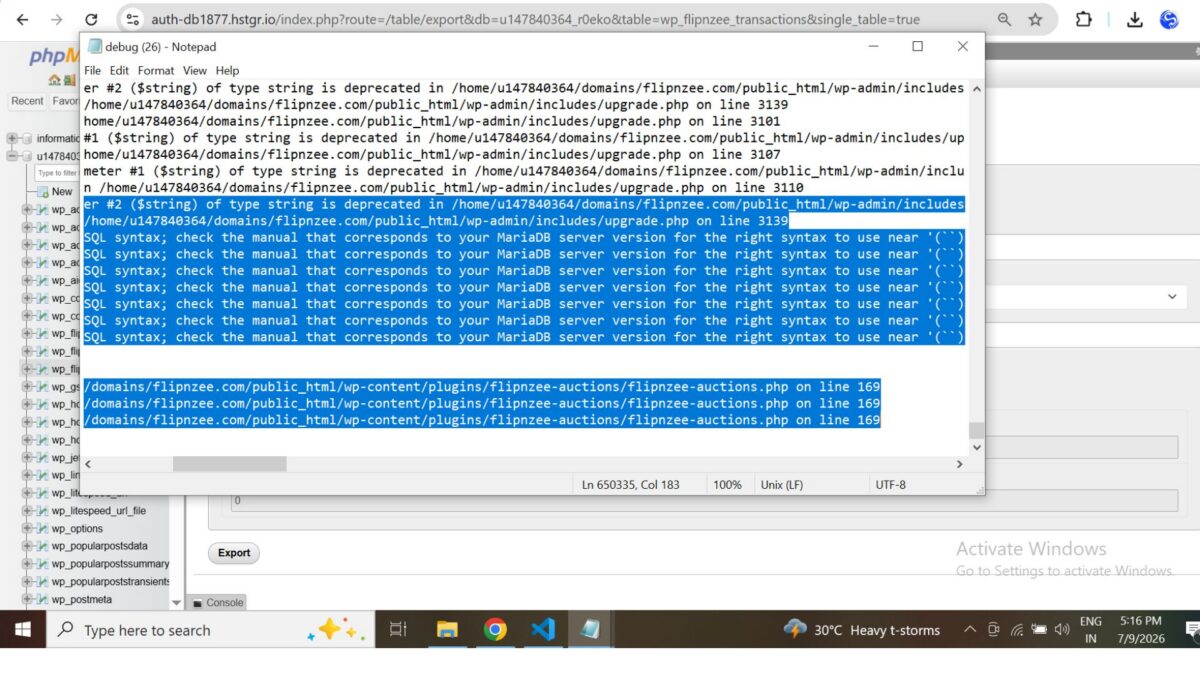
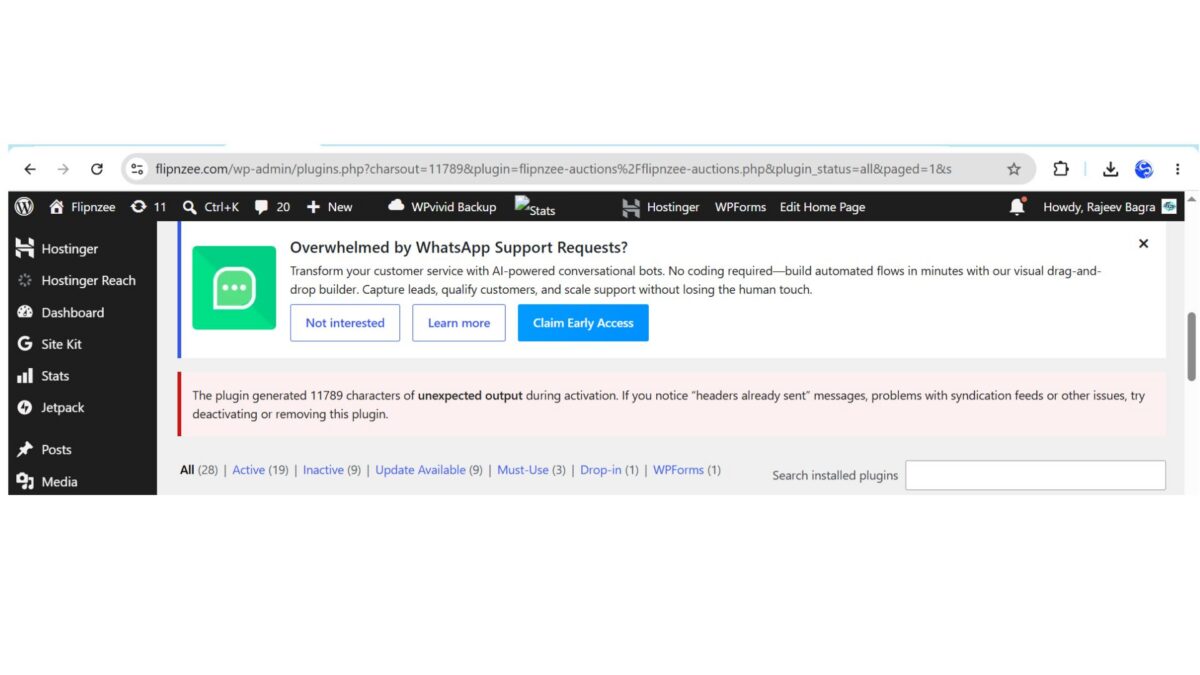
During activation, WordPress displayed the following warning:

The plugin generated 11788 characters of unexpected output during activation.

The debug log consistently pointed to WordPress core’s dbDelta() function, producing warnings similar to:

Undefined array key "index_name"
Undefined array key "index_columns"
Undefined array key "column_name"

followed by SQL such as:

ALTER TABLE wp_flipnzee_transactions ADD `` (``)

This SQL was not generated by the plugin itself. Instead, it originated from WordPress while attempting to compare the existing database schema with the SQL definition provided to dbDelta().


Debugging Strategy

Instead of making multiple unrelated changes, we followed a structured debugging process.

The investigation included:

  • Verifying PHP syntax.
  • Reviewing the transaction table schema.
  • Inspecting the activation hook.
  • Examining database exports.
  • Comparing the SQL generated by the plugin.
  • Reviewing WordPress debug logs.
  • Comparing plugin behavior across different hosting environments.
  • Restoring the project to the Lesson 85 Git checkpoint to confirm whether the issue originated in Lesson 86.

Each step narrowed the possibilities without introducing additional variables.


Cross-Environment Testing

One of the most valuable discoveries came from testing the exact same plugin on two different hosting environments.

WP Engine

  • Plugin activated successfully.
  • Database creation completed normally.
  • No activation warnings appeared.

Hostinger

The same plugin triggered repeated dbDelta() parser warnings when reactivated on an existing installation.

This comparison demonstrated that:

  • the plugin code itself was functional,
  • the activation issue occurred during repeated schema comparisons on an existing database.

Architectural Improvement

Previously, the activation routine always executed:

Flipnzee_Auction_Database::create_tables();

This meant that every activation caused WordPress to run dbDelta() and compare the existing schema with the SQL definitions.

To avoid unnecessary schema comparisons, the activation logic was updated.

Previous implementation

function flipnzee_auction_activate() {

    Flipnzee_Auction_Database::create_tables();
    Flipnzee_Auction_Database::update_db_version();
}

Updated implementation

function flipnzee_auction_activate() {

    if ( false === get_option( 'flipnzee_db_version', false ) ) {
        Flipnzee_Auction_Database::create_tables();
    }

    Flipnzee_Auction_Database::update_db_version();
}

The revised activation process now creates database tables only during the initial installation. Existing installations simply update the stored database version and avoid unnecessary schema comparisons.


Why This Improvement Matters

This seemingly small change significantly improves the plugin architecture.

Instead of repeatedly asking dbDelta() to compare an already existing database schema, future upgrades will be handled by explicit migration routines.

Benefits include:

  • faster activation,
  • reduced risk of parser-related issues,
  • cleaner upgrade path,
  • easier maintenance,
  • improved compatibility across different hosting environments.

Testing

The updated activation workflow was tested after correcting an unrelated PHP syntax issue introduced during debugging.

The final activation tests confirmed:

  • ✅ Plugin activates successfully.
  • ✅ Existing auction functionality remains operational.
  • ✅ Payment infrastructure remains intact.
  • ✅ Database version continues to update correctly.
  • ✅ No activation warnings appear using the revised activation flow.

Git Checkpoint

After verifying successful activation, the project was committed and tagged as a stable checkpoint.

This provides a reliable rollback point before implementing the dedicated migration framework in future lessons.


Lessons Learned

Several important engineering lessons emerged from this debugging session.

1. Debug systematically

Avoid making multiple changes simultaneously. Isolating one variable at a time makes root causes much easier to identify.


2. Cross-environment testing is essential

Testing on multiple hosting providers revealed that the issue was environment-specific rather than a general plugin defect.


3. Stable checkpoints save time

Creating Git tags before major architectural changes allowed the project to be restored quickly during debugging.


4. Installation and upgrades are different concerns

Creating database tables and upgrading existing schemas should be treated as separate responsibilities.


Roadmap

The activation system is now stable again.

The next lessons will continue the original roadmap.

Lesson 87

Introduce a dedicated migration framework responsible for:

  • version-based database upgrades,
  • reusable migration helpers,
  • controlled schema evolution,
  • eliminating the need for repeated dbDelta() schema comparisons on existing installations.

Download Source Code

Download the starting version of the plugin before the lesson:

Download the completed version after this lesson:


Conclusion

Although Lesson 86 began as an implementation of reusable migration helper methods, it evolved into an important architectural milestone.

By resolving the activation issues and refining the activation workflow, the Flipnzee Auctions plugin now has a more stable foundation for future database migrations. This work reinforces an important principle of long-term plugin development: installation and schema upgrades should be managed independently.

With a clean activation process restored and the database versioning system already in place, the project is well positioned to continue building a dedicated migration framework in the upcoming lessons.

Lesson 85 Implementation: Building the Payment Infrastructure and Database Versioning System

As Flipnzee Auctions continues to evolve into a complete auction marketplace, maintaining the database safely across plugin updates becomes increasingly important. While WordPress provides the dbDelta() function for creating and updating database tables, real-world testing during development revealed that relying entirely on dbDelta() for schema upgrades can sometimes lead to unexpected behaviour across different environments.

In this lesson, the focus shifted from simply adding new payment-related database fields to designing a more reliable foundation for future database upgrades. Along the way, a challenging activation issue became an opportunity to investigate WordPress database migrations in greater depth.


Objectives

The primary objectives of this lesson were to:

  • Extend the transactions table for payment processing.
  • Introduce database schema versioning.
  • Build the foundation for future database migrations.
  • Improve the payment infrastructure.
  • Resolve plugin activation issues.
  • Prepare the plugin for safe future upgrades.

Features Implemented

During this lesson, several important improvements were completed.

1. Payment Database Foundation

The transactions table was extended to support the upcoming payment workflow.

New database fields include:

  • payment_status
  • payment_gateway
  • payment_proof_id
  • payment_submitted_at

These fields provide the information required for buyers to submit payments and for sellers or administrators to verify them.


2. Database Schema Versioning

A dedicated database version constant was introduced:

define( 'FLIPNZEE_DB_VERSION', '1.1.0' );

Separating the plugin version from the database schema version lays the groundwork for future database migrations without affecting plugin functionality.


3. Database Version Tracking

A new helper method was added to store the installed schema version:

public static function update_db_version() {
    update_option( 'flipnzee_db_version', FLIPNZEE_DB_VERSION );
}

The activation routine now records the installed database version after creating or updating the database tables.


4. Payment Infrastructure

The lesson also introduced the initial payment management components, including:

  • Payment Manager class
  • Payment administration page
  • Payment styling
  • Supporting transaction updates

These components will be expanded in upcoming lessons as the complete payment workflow is implemented.


Debugging the Activation Issue

One of the most educational parts of this lesson involved diagnosing a difficult plugin activation problem.

Initially, activating the plugin generated thousands of characters of unexpected output.

Rather than immediately rewriting the implementation, the issue was investigated systematically.

The debugging process included:

  • validating SQL syntax
  • checking PHP syntax
  • comparing generated SQL with the database
  • examining table structures
  • isolating dbDelta() calls
  • reviewing activation hooks
  • inspecting plugin output
  • checking for whitespace before PHP opening tags
  • analysing activation behaviour across multiple iterations

This systematic approach made it possible to eliminate several possible causes before identifying and correcting the underlying issues.


Lessons Learned

Several valuable engineering lessons emerged from this implementation.

Database migrations deserve careful planning

Although dbDelta() is extremely useful for initial table creation, upgrading existing database schemas requires additional care. Introducing database version tracking provides a much safer path for future enhancements.


Debugging should be systematic

Rather than changing multiple components simultaneously, isolating one potential cause at a time greatly reduced the complexity of diagnosing the activation issue.


Build infrastructure before features

Instead of rushing into the payment workflow itself, creating the supporting database and versioning infrastructure first will make future development significantly easier.


Testing Performed

The following tests were successfully completed:

  • Plugin activation
  • Database table verification
  • Payment column creation
  • Existing data preservation
  • Database version storage
  • Payment infrastructure integration
  • Administrative page verification
  • Transaction table verification

The plugin returned to a stable working state after the activation issue was resolved.


Complete Source Code

The implementation involved updates across several files, including:

flipnzee-auctions.php

includes/class-database.php

includes/class-payment-manager.php

includes/class-payment-page.php

includes/class-transaction-manager.php

includes/class-auction-manager.php

includes/class-shortcodes.php

admin/class-admin.php

admin/class-admin-payments.php

admin/class-admin-transaction-details.php

assets/css/admin.css

These changes collectively establish the foundation for payment processing and future database migrations.


What Comes Next?

With the payment infrastructure and database versioning now in place, the next lesson will focus on implementing the first stage of the buyer payment workflow.

Upcoming work will include:

  • Payment submission interface
  • Payment proof upload
  • Transaction status updates
  • Seller verification workflow
  • Administrative payment approval

These features will build upon the infrastructure completed during Lesson 85.

Download Source Code

Download the starting version of the plugin before the lesson:

Download the completed version after this lesson:


Final Thoughts

This lesson demonstrates an important aspect of professional software development: sometimes the most valuable progress comes not from adding visible features, but from strengthening the architecture beneath them.

By introducing database versioning, expanding the payment schema, and carefully investigating a complex activation issue, Flipnzee Auctions is now built on a much stronger technical foundation. These improvements will make future enhancements easier to implement, safer to deploy, and more reliable for users as the project continues to grow.

Lesson 84 Implementation: Extending the Payment Database and Investigating WordPress Database Upgrades

In this lesson, work continued on preparing Flipnzee Auctions for a complete payment workflow.

The initial objective was to extend the transaction database so that future lessons could support payment proof uploads, manual verification, and payment tracking.

Database Enhancements

The transactions table was extended to include:

  • payment_status
  • payment_gateway
  • payment_proof_id
  • payment_submitted_at

These additions provide the foundation required for recording buyer payments after an auction has ended.

Unexpected Challenge

After implementing the schema changes, plugin activation began producing thousands of characters of unexpected output.

Instead of immediately changing the implementation, the issue was investigated systematically.

The debugging process included:

  • validating SQL syntax
  • checking PHP syntax
  • isolating individual dbDelta() calls
  • inspecting plugin activation logs
  • comparing generated SQL with the existing database
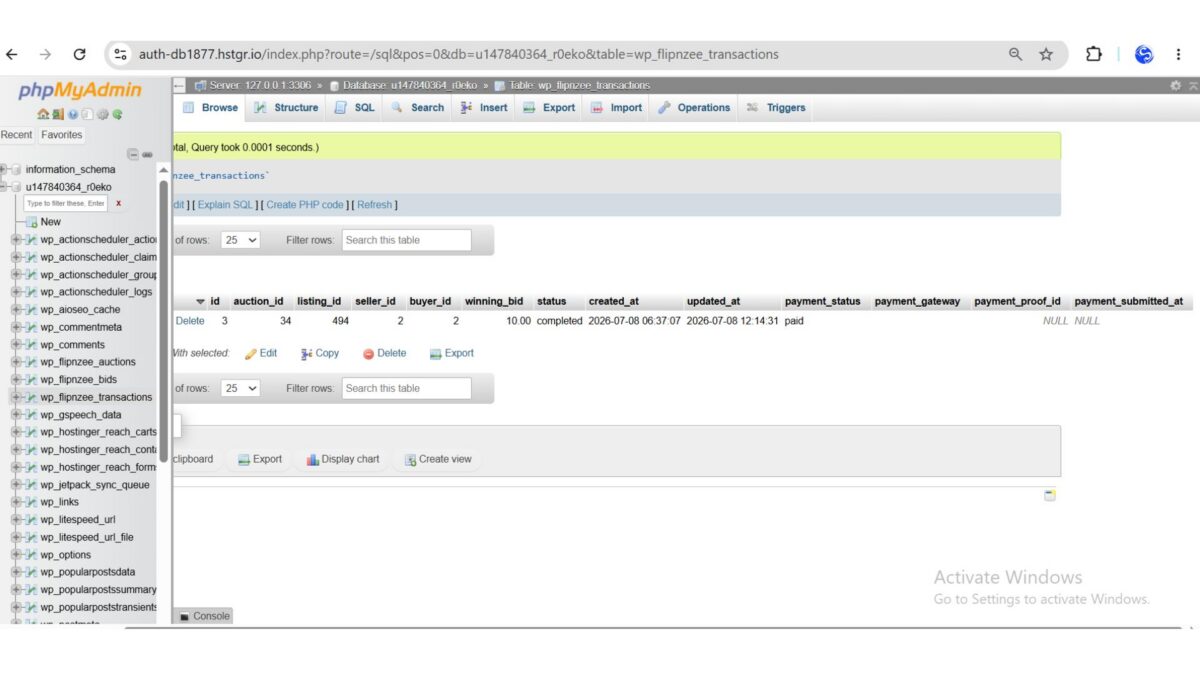
  • examining the database structure using SHOW CREATE TABLE
  • logging the SQL sent to dbDelta()
  • analysing the return values from dbDelta()

Findings

The investigation revealed several important observations:

  • The SQL statements themselves were valid.
  • The existing database tables were structurally correct.
  • WordPress repeatedly generated malformed index upgrade statements while processing database upgrades.
  • The issue originated from dbDelta() attempting to parse existing indexes rather than from invalid SQL definitions.

Although the payment schema itself was correct, relying on dbDelta() for complex schema upgrades proved unreliable in this development environment.

Engineering Decision

Rather than continuing to force dbDelta() to modify existing tables, the project will adopt a dedicated migration system in the next lesson.

Future database upgrades will:

  • check whether tables exist
  • verify individual columns
  • verify indexes
  • execute explicit ALTER TABLE statements only when required
  • maintain a plugin database version for safe upgrades

This approach is widely used in mature WordPress plugins because it provides greater control over database evolution and reduces compatibility issues across different hosting environments.

What Was Learned

One of the biggest lessons from this implementation is that software development often involves validating assumptions.

The payment database design itself was correct. The challenge lay in how WordPress attempted to upgrade an existing schema.

Carefully isolating each database operation, examining generated SQL, and validating the existing database structure made it possible to identify the true source of the problem rather than assuming the SQL definitions were incorrect.

Source Code Highlights

During this lesson, the transaction table was extended with new payment-related fields, including:

payment_status VARCHAR(30) DEFAULT 'pending',
payment_gateway VARCHAR(50) DEFAULT '',
payment_proof_id BIGINT UNSIGNED DEFAULT NULL,
payment_submitted_at DATETIME NULL,

Extensive logging was also added temporarily to inspect the SQL generated during activation and analyse the output returned by dbDelta() before deciding on a more robust migration strategy.

Download Source Code

Download the starting version of the plugin before the lesson:

Download the completed version after this lesson:

Next Lesson

Lesson 85 will focus on building Flipnzee’s database migration engine.

Instead of depending on dbDelta() for every schema change, the plugin will introduce version-based database migrations that safely upgrade existing installations while remaining compatible with future releases.


Lesson 80 Implementation: Supporting Unlimited Historical Auctions While Allowing Only One Active Auction per Listing

After planning the architecture in Lesson 80, it was time to implement one of the most important structural improvements in the Flipnzee Auctions plugin.

Earlier versions of the plugin prevented duplicate auctions by updating the existing auction whenever the same listing was selected. While this solved duplicate auction creation, it also prevented maintaining a complete auction history.

This lesson redesigns the logic so that a listing can have unlimited historical auctions while ensuring that only one auction can remain active at any given time.


The Problem

Originally, the plugin searched for any auction belonging to the listing.

$existing_auction = $wpdb->get_var(
    $wpdb->prepare(
        "SELECT id
        FROM {$table}
        WHERE listing_id = %d
        LIMIT 1",
        $listing_id
    )
);

If one existed, it was updated instead of creating a new auction.

Although simple, this approach caused a major limitation:

  • historical auctions could never be preserved
  • every new auction overwrote the previous one
  • reporting and analytics became inaccurate

New Design

Instead of checking whether the listing has ever been auctioned, the plugin now checks only for active auctions.

Conceptually the lookup becomes:

SELECT id
FROM wp_flipnzee_auctions
WHERE listing_id = ?
AND status = 'active'
LIMIT 1;

This small change completely changes the behaviour of the system.


Behaviour Before

Listing 494

Auction IDStatus
15Closed

Creating another auction resulted in:

Auction #15 being updated.

No historical record remained.


Behaviour After

Listing 494

Auction IDStatus
15Closed
21Closed
27Closed
35Active

Each completed auction remains permanently stored.

Only one auction is active.


Code Changes

The auction lookup logic was modified so only active auctions are considered duplicates.

If an active auction exists:

  • update that active auction
  • return its ID

Otherwise:

  • insert a completely new auction record

This preserves auction history while still preventing multiple active auctions for the same listing.


Testing Performed

Several scenarios were tested.

Test 1

Create first auction

Result:

  • New auction created

✔ Passed


Test 2

Create another auction while first auction is active

Result:

  • Existing active auction updated

✔ Passed


Test 3

Close auction

Result:

Auction status became Closed.

✔ Passed


Test 4

Create a new auction for the same listing

Result:

A brand-new auction record was inserted.

Previous closed auction remained untouched.

✔ Passed


Test 5

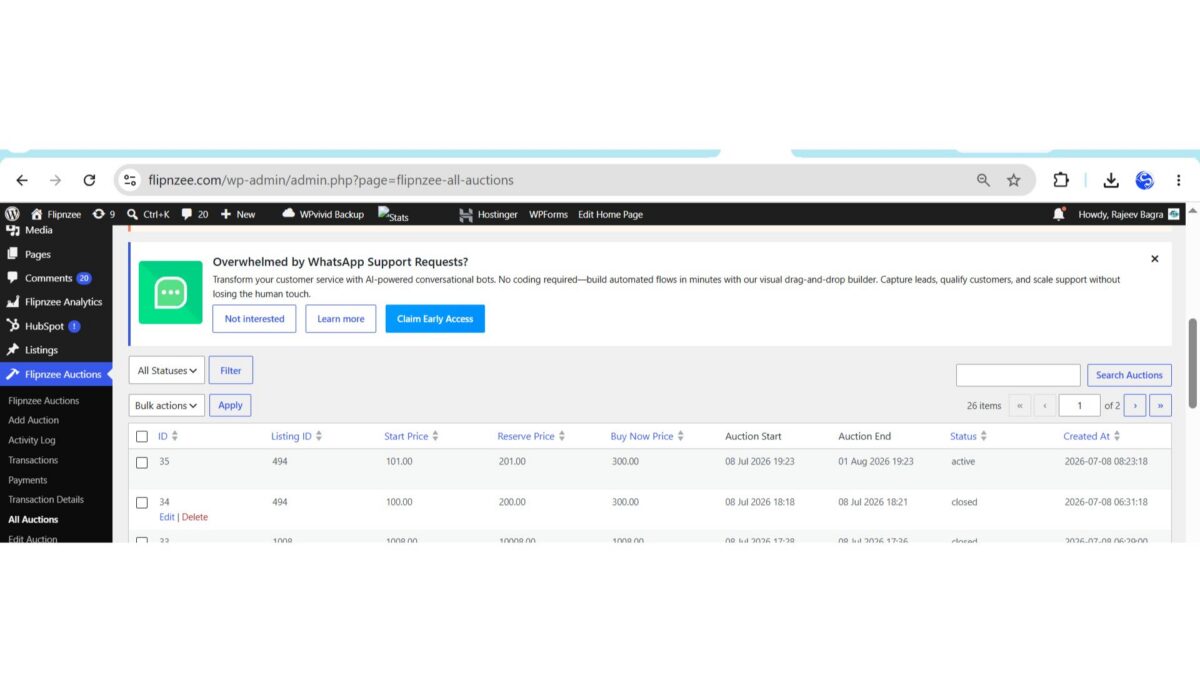
Verify All Auctions page

The administration screen correctly displayed:

Auction #35   Active
Auction #34   Closed

Both auctions belong to the same listing.

History is preserved.

✔ Passed


Benefits

The redesigned architecture provides several advantages:

  • Unlimited auction history
  • One active auction per listing
  • Cleaner reporting
  • Better analytics
  • Easier auditing
  • Marketplace-style auction lifecycle
  • Future support for auction history pages

What Was Learned

A small SQL condition can dramatically change application behaviour.

Instead of asking:

“Has this listing ever had an auction?”

the system now asks:

“Does this listing currently have an active auction?”

This subtle change aligns the plugin with how professional marketplace platforms typically manage auction lifecycles.


Source Code

The implementation focused primarily on:

  • includes/class-auction-manager.php

Key improvements included:

  • checking only for active auctions
  • preserving closed auctions
  • creating new records only when no active auction exists
  • maintaining a single active auction per listing

Download Source Code

Download the starting version of the plugin before the lesson:

Download the completed version after this lesson:


Final Result

Lesson 80 successfully redesigned the auction creation workflow.

The Flipnzee Auctions plugin now supports unlimited historical auctions while enforcing a single active auction per listing, providing a scalable foundation for future features such as auction archives, historical analytics, relisting workflows, and seller performance tracking.